

You priced Bunny Stream and the number looked almost too low. Then you priced Vimeo or Wistia for the same video library and the gap made you suspicious of the cheap number. This post runs the real Bunny Stream bill through a calculator, then shows exactly what FluentPlayer adds on top, and what it doesn’t.
TL;DR
- Bunny Stream’s own bill usually runs a few dollars a month; storage and delivery are the two lines that matter.
- FluentPlayer Pro is a one-time license, not a subscription, so it never repeats in the monthly total.
- Bunny Stream’s own player already handles adaptive streaming, chapters, captions, and a watch-time heatmap.
- Switching playback to FluentPlayer trades that heatmap for FluentPlayer’s own analytics, plus lead capture and CTAs Bunny doesn’t have.
- Run the calculator below with your own library and traffic to see your number, not an average.
The Real Monthly Cost of Bunny Stream on WordPress
A typical WordPress video library on Bunny Stream costs $4 to $20 a month in storage and delivery. FluentPlayer Pro is a separate one-time license starting at $199, not a recurring cost.
Video source → Bunny Stream encodes it once, stores every resolution, and delivers it through its CDN. FluentPlayer connects to that library, signs playback with a security token, and adds what Bunny’s player doesn’t: email capture, CTAs, and FluentCRM tags.
This sits inside the bigger question of where to host WordPress video at all. See the full WordPress video hosting comparison for how Bunny stacks up against self-hosting, Mux, and the rest.
Calculate your own Bunny Stream and FluentPlayer cost
Every number above is a placeholder for your own. Bunny Stream bills two things every month: how much video you have stored, and how much gets delivered to viewers. FluentPlayer Pro is a license you buy once.
The calculator below keeps those separate instead of blending them into one misleading monthly figure. Enter your library size and monthly traffic to see your real recurring bill, and how long the license takes to pay for itself against Wistia or Vimeo.
Bunny Stream cost calculator
Enter your library and monthly delivery. Both pricing tiers update as you type.
Monthly video delivered, by where your viewers are:
Try: · ·
Standard tier
$0.00 /mo
119 points of presence
Volume tier
$0.00 /mo
10 points of presence, flat $0.005/GB
Compare to what you pay now
Prices checked September 21, 2026. Sources: Bunny Stream pricing, FluentPlayer pricing. Estimate, not a quote.
If you want to see the player before you commit to a host, start with FluentPlayer Free. It plays self-hosted video, YouTube, and Vimeo with no license required. Bunny Stream, as a dedicated source with its own library picker, is part of Pro.
What Bunny Stream's Own Player Already Does
Bunny Stream is not a bare file host. Its own documentation lists a real feature set: adaptive HLS across multiple qualities, automatic caption import, video chapters, thumbnails, resumable playback, and a watch-time heatmap that shows where inside one video people drop off.
What ships with a Bunny Stream library, according to Bunny's own docs:
- Adaptive HLS with multiple quality levels, encoded automatically at no extra cost for standard resolutions
- Captions imported directly from the source video, with language metadata
- Video chapters and thumbnails, generated or set per video
- Resumable playback and playback speed control
- A watch-time heatmap and a 0 to 100 engagement score, calculated per video from viewing duration and patterns
The encoding, adaptive streaming, and caption import travel with the library no matter which player renders the frame. The heatmap and engagement score don't: they're a feature of Bunny's own embed player specifically, not the underlying library. Play that same video through FluentPlayer instead, and the heatmap stays behind with Bunny's dashboard.
What Bunny's Player Leaves for FluentPlayer to Do
Bunny's heatmap can't tell you who was watching, and once you switch playback to FluentPlayer, you don't get the heatmap at all. That's a real tradeoff, not a footnote: you're giving up Bunny's per-video engagement score to gain the layer that turns a view into a contact.
What you gain in its place: FluentPlayer's own analytics track views, watch time, completion rate, and audience retention per video, inside your WordPress dashboard, tied to what a viewer actually did on your site rather than inside Bunny's. On a membership site, that's enough to spot which members are engaged and which are about to churn from watch data alone.
What stays missing either way, based on Bunny's documented feature set:
- No in-video lead capture or email form
- No CTA banner, hotspot, or clickable overlay inside the frame
- No connection to a CRM, so a view never becomes a tagged contact
- No way to trigger a FluentCRM automation from a watch milestone
FluentPlayer adds that layer on top of the Bunny library you already pay for. You can capture an email address inside the video itself once a viewer passes a set point, or add an interactive layer like a CTA banner or hotspot without touching Bunny's dashboard.
Bunny Stream vs Bunny Storage
Bunny sells two separate products under one dashboard, and mixing them up is the most common setup mistake we see. Stream encodes and delivers; Storage just delivers what you already encoded.
Here's how the two compare on the points that actually change your setup:
| Bunny Stream | Bunny Storage | |
| Purpose | Full video platform: encoding plus CDN | File storage plus CDN delivery |
| Encoding | Automatic, multiple qualities | None; you upload ready-to-play files |
| Billed by | GB stored plus GB delivered | GB stored plus GB transferred |
| Captions and chapters | Bunny imports them | Manual, set in FluentPlayer |
| Token protection | Bunny Player Token Authentication | Pull Zone signed URL or WordPress proxy |
| Best for | Most video use cases | Pre-encoded files, simple hosting |
Most WordPress video use cases want Stream. Reach for Storage only if you already have finished MP4 files at the right quality and just need cheap, fast delivery. Full field reference for both integrations is in FluentPlayer's docs.
Connect Bunny Stream to FluentPlayer
Connecting Bunny Stream to FluentPlayer takes about five minutes once the account pieces are in place. This walks through Stream specifically, since it's the setup most WordPress sites want.
What you need first
Before you start, make sure you have:
- A Bunny.net account with a Stream Library already created
- Your Bunny account API key, from Bunny's Account Settings, under API Key
- FluentPlayer Pro active on the site
Step-by-step setup
Follow these steps in order:
1. In Bunny, go to Account Settings, then API Key, and copy it.
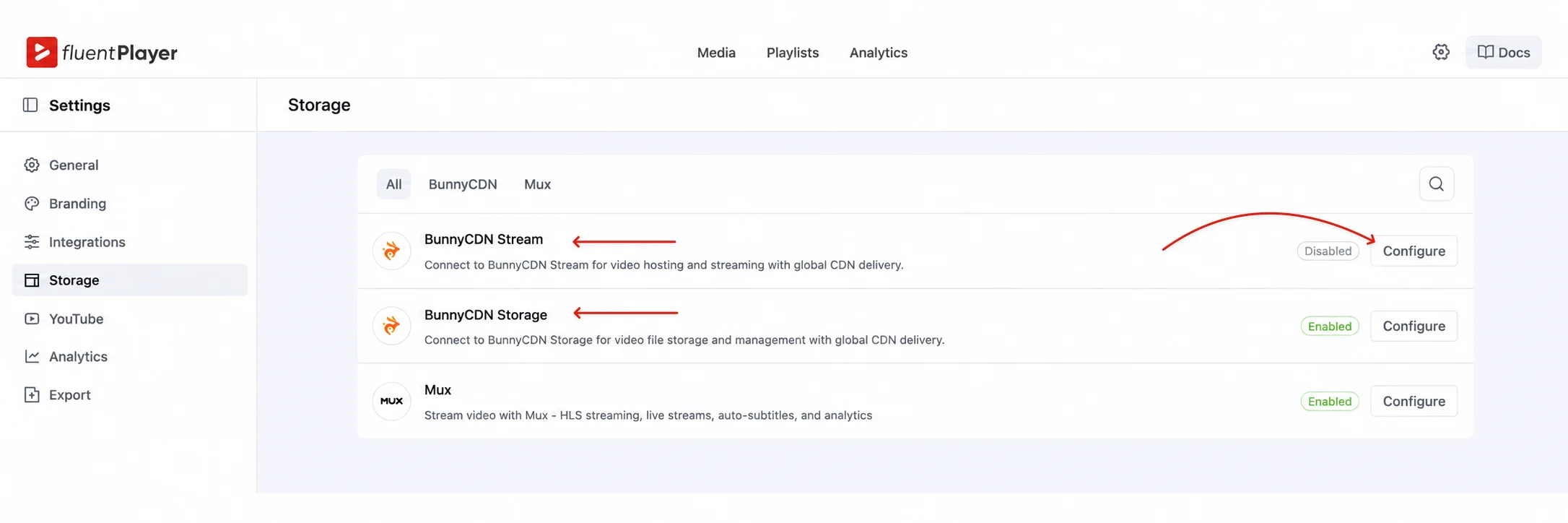
2. In WordPress, go to FluentPlayer Pro, then Settings, then Storage.
3. Find the BunnyCDN Stream card and click Configure.
4. Toggle Enable Integration on.
5. Paste your API Key.
6. Click Test Connection.
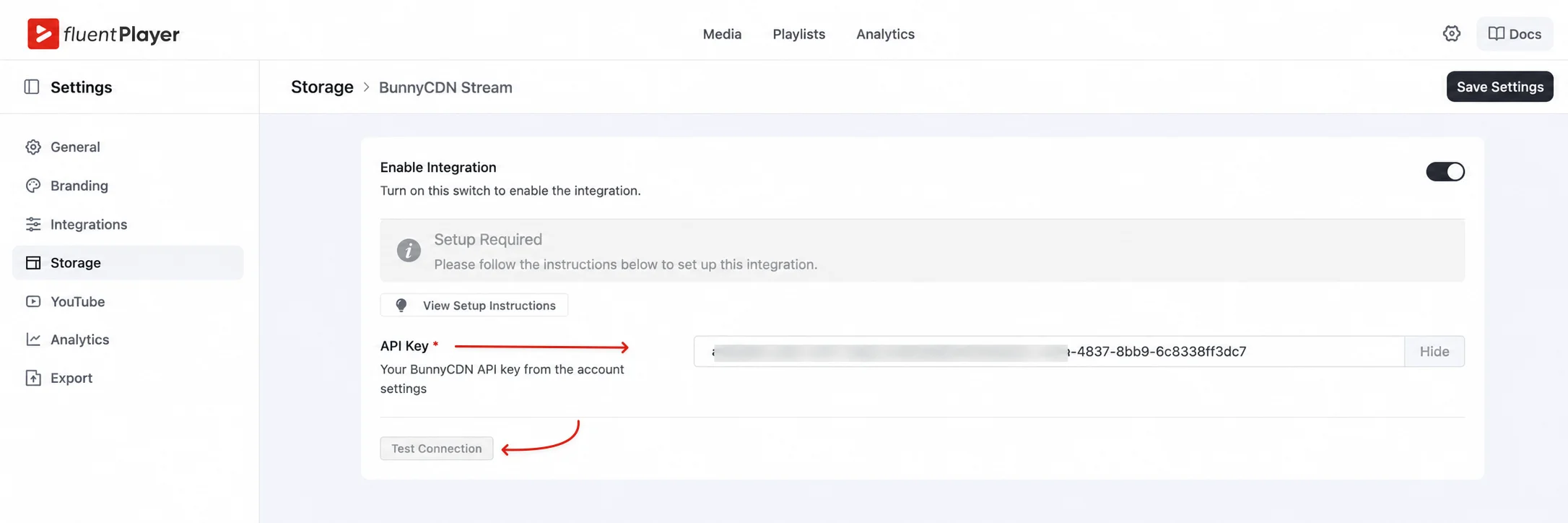
7. Click Save Settings.
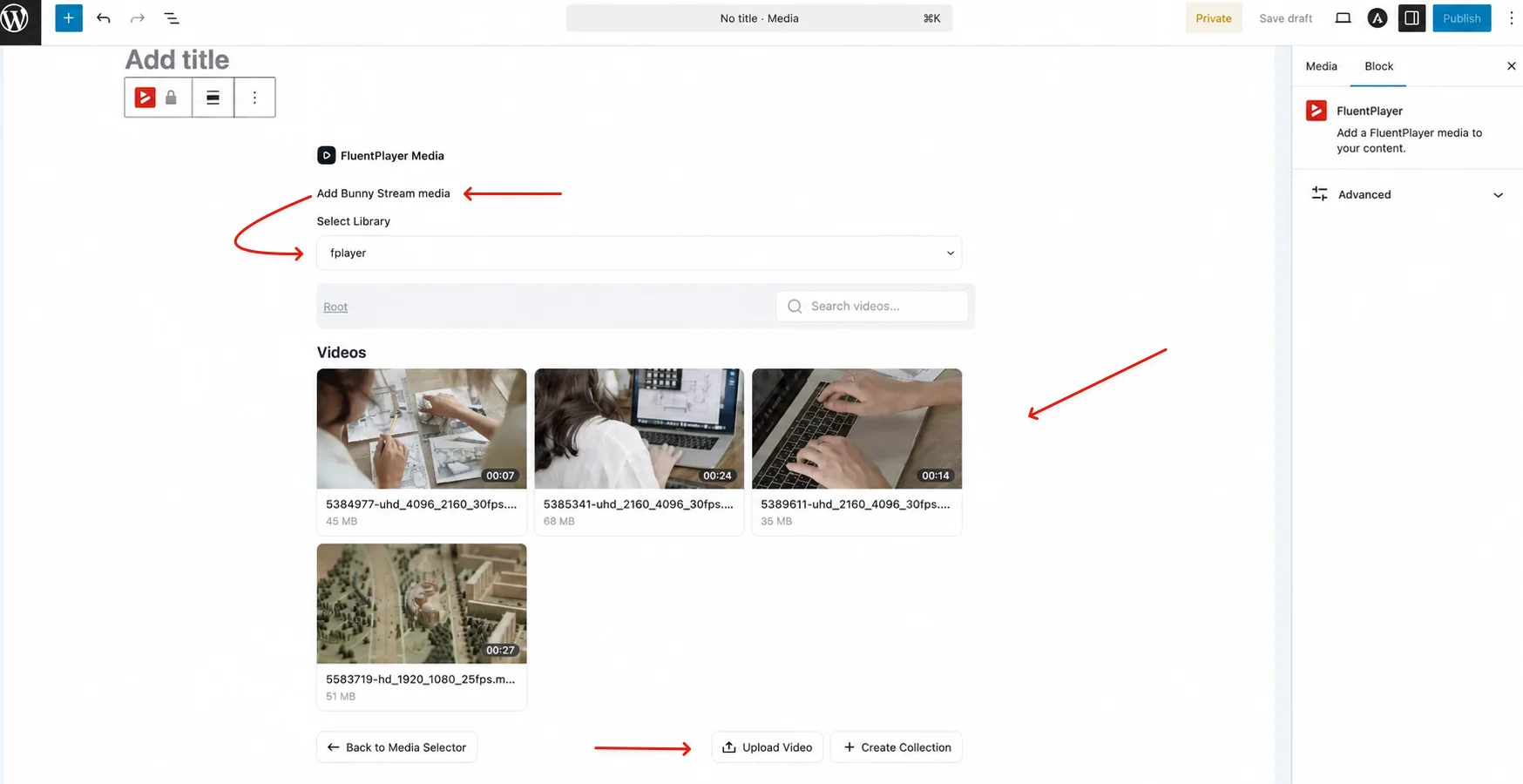
8. Go to FluentPlayer, then Media, create or edit a media item, choose Bunny Stream as the source, select the library, optionally select a collection, select or upload the video, wait for Bunny to finish processing if it's a fresh upload, then save and publish. Embed with the block, or the shortcode FluentPlayer generates for that media item.
Protect Paid and Member-Only Videos
How FluentPlayer protects Bunny playback
At render time, FluentPlayer signs every URL a viewer's browser touches, not just the main one. A signature on the manifest alone would still let protected segment requests fail.
What gets signed:
- The main HLS manifest
- Every child playlist and segment inside it
- The poster image
- The storyboard or thumbnail resource
- Any MP4 fallback URL
Token life defaults to two hours. For longer videos, FluentPlayer calculates max(2 hours, video duration + 1 hour), so a token never expires mid-watch.
Don't enable MediaCage on a Bunny library you're playing through FluentPlayer. FluentPlayer completes Mux's DRM license flow; it doesn't complete Bunny's. A MediaCage-protected video will fail to play. Use Token Authentication instead, since that flow is wired end to end.
Turn on Bunny Token Authentication
Signed URLs don't happen by default. Turn them on in Bunny first:
1. In Bunny, open Stream.
2. Select your Video Library.
3. Open Security.
4. Enable Token Authentication.
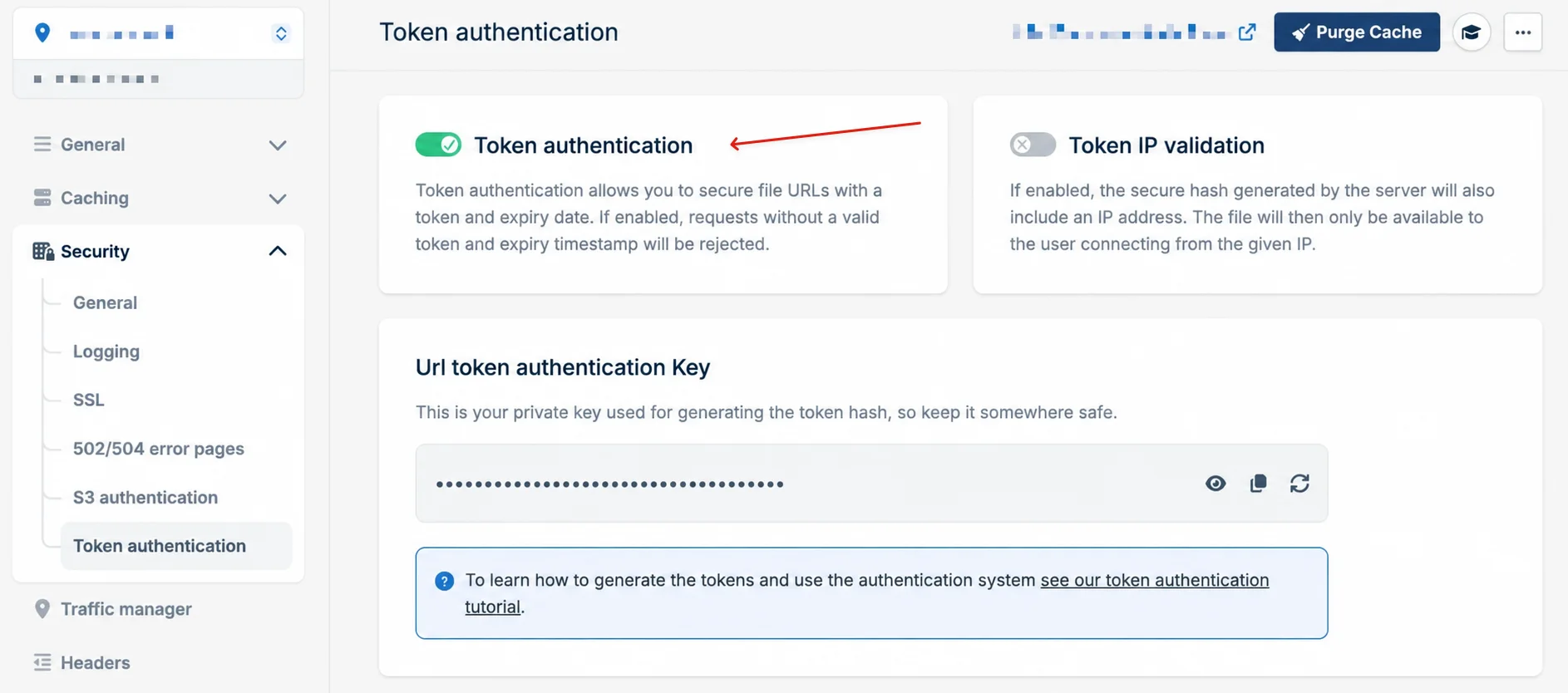
5. Save the library settings.
Configure Allowed Referrers
Token Authentication alone doesn't stop every kind of hotlinking. Pair it with a domain allowlist:
1. In the library's Security settings, add your domains, both with and without www.
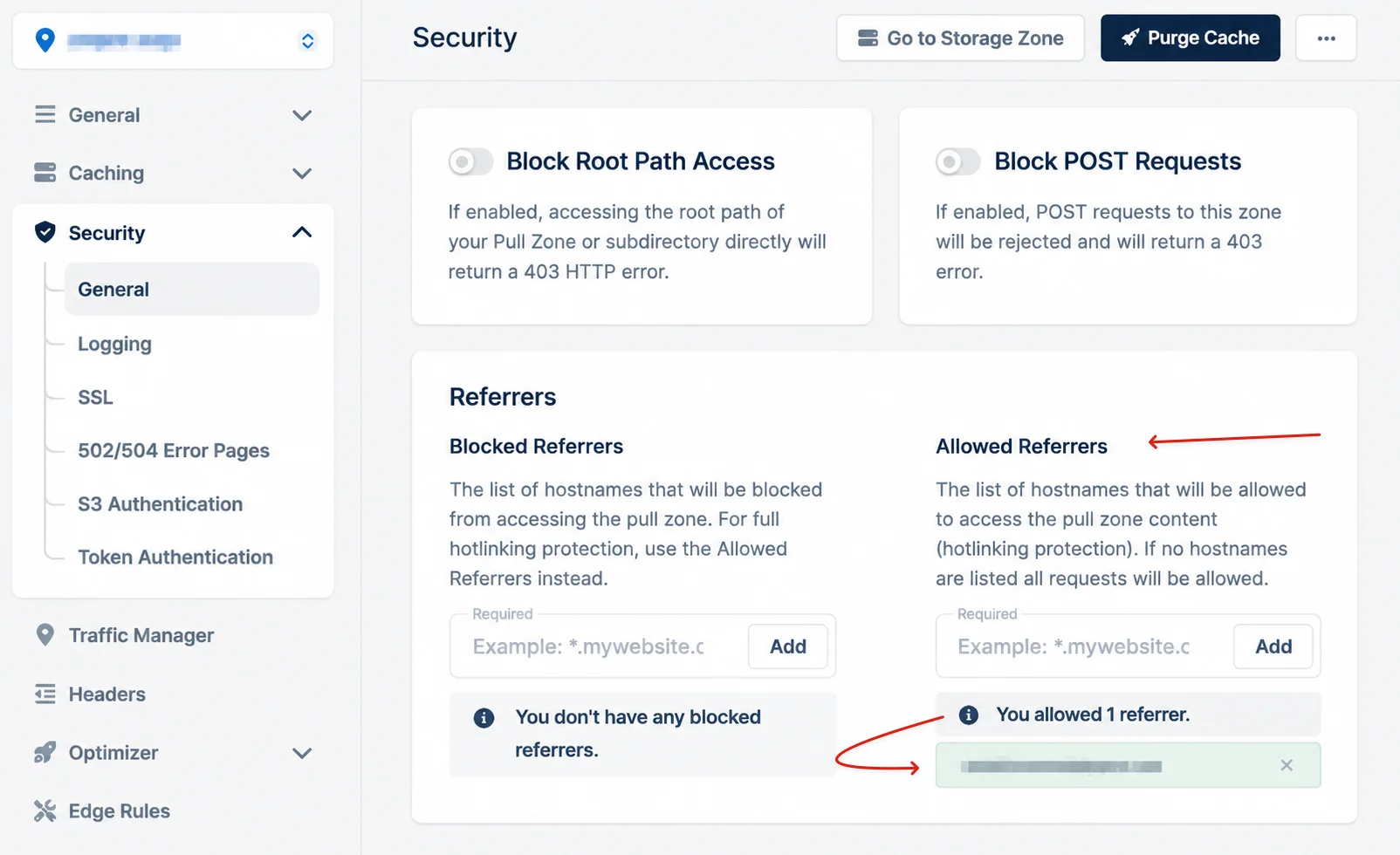
2. Enable referrer blocking if you want it.
3. Include staging and any alternate domain that needs to play video.
Don't enable Block None Referrer before every legitimate domain is on the list. Turning it on with an incomplete allowlist blocks requests from your own site, not just outside ones.
Protect password-locked playlists
For a playlist item behind a password, FluentPlayer strips the Bunny source, the token, the poster, and the subtitle data from the page before it ever serializes, so there's nothing to extract from view-source before a visitor unlocks the item. Keep FluentPlayer Free and Pro both updated to the latest version; this stripping is a plugin behavior, not a Bunny setting, so an old build won't have it.
None of this stops screen recording, and a signed URL is still playable by anyone holding a valid, unexpired link. For a membership course, pair it with a private page so only logged-in members ever see the link at all. If keeping a paid course from being shared outright is the real goal, not just the URL, see the fuller build for a course that can't be shared.
Test Your Bunny Security Setup
Configuring Token Authentication doesn't confirm it works. Test it before you trust it.
Run through this checklist
Use an incognito browser and work through these in order:
- Confirm an unauthorized visitor can't open the protected page at all.
- Log in as an authorized student or member.
- Confirm playback starts and quality switching works.
- Open DevTools, go to Network, and confirm token and expires are present on the request.
- Copy a playback URL and confirm it stops working after it expires.
- Try playback from a domain that isn't on your Allowed Referrers list.
- Confirm the poster, captions, seeking, and MP4 fallback all still work with the token in place.
If Bunny returns a 403
A 403 almost always traces to one of these:
- The wrong Bunny account API key
- The wrong Stream Library selected
- Token Authentication not actually enabled
- Your site's domain missing from Allowed Referrers
- The www or non-www variant missing
- A staging domain missing
- A page or CDN cache still serving an old signed URL
- Duplicate token and expires parameters stacked in one URL
Who Should Choose Bunny Stream Plus FluentPlayer
Bunny Stream plus FluentPlayer fits a specific reader, not everyone pricing video hosting this week. Match your setup to the reader you actually are:
Public marketing videos, no lead capture needed
Skip FluentPlayer's Bunny integration. Bunny's own WordPress plugin embeds a video in one paste, and you're not paying for a conversion layer you won't use.
Membership sites and courses that want FluentCRM tagging
This stack fits. You already pay Bunny for delivery; the license adds the layer that turns a watch into a contact. If you're deciding whether that's worth it, see whether FluentPlayer is worth it for course creators specifically.
Teams that want one invoice and native HubSpot or Marketo automation
Wistia Business is built for that, and it costs more per month for it.
Anyone who needs DRM, not just signed URLs
Say so plainly: Bunny's MediaCage DRM doesn't currently work through FluentPlayer's Bunny source. See how it stacks up against the other WordPress players.
Run the Numbers on Your Own Library
The real question isn't whether Bunny Stream is cheap. It is. The question is whether the layer it leaves out, the emails you don't capture and the views that never become a tagged contact, costs you more than a one-time license would.
Run your own numbers in the calculator above, then see the other ways FluentPlayer pays for itself. Get FluentPlayer Pro once you know your number.
Frequently Asked Questions
Does Bunny Stream have a video player?
Yes. Bunny ships its own embed player with chapters, captions, resumable playback, and a watch-time heatmap. FluentPlayer doesn't use that embed; it connects to your Bunny library directly and renders the video in its own player instead, which trades Bunny's heatmap for FluentPlayer's own analytics.
Is Bunny Stream free?
Bunny Stream bills by usage, with a $1 monthly minimum, so there's no free tier there. FluentPlayer's connection to it is Pro-only. Free FluentPlayer can still play an HLS stream from any URL, including an unprotected one on Bunny, through its generic HLS source; you lose Bunny's library picker, direct uploads, and automatic token signing.
Bunny Stream vs. Vimeo: which is cheaper for WordPress?
For most libraries, Bunny Stream's usage-based storage and delivery cost less than a flat Vimeo plan, especially once a library grows past what a fixed storage cap covers. Vimeo is restructuring its plans as of 2026, so check your own renewal notice rather than a published number. If you're leaving Vimeo because Vimeo On Demand is shutting down specifically, that's a different product and a different fix: see the WordPress replacement for Vimeo On Demand before you touch your video host.
Can I protect course videos with Bunny Stream?
Yes, with Bunny Token Authentication and Allowed Referrers, which FluentPlayer applies automatically to the manifest, poster, and fallback files. See Protect Paid and Member-Only Videos above for the exact setup, and the checklist above to confirm it's actually working.
Does FluentPlayer support Bunny Stream DRM?
Not yet. FluentPlayer configures a DRM license flow for Mux, but not for Bunny's MediaCage. Enabling MediaCage on a library played through FluentPlayer will break playback until that support ships. Use Token Authentication instead.