










"There's plenty of different things you can do inside here, including short codes, hotspots, and so on. So from a marketing point of view, this is super useful."
Paul CharltonOwner at WPTuts

Explore the features designed to provide your users an unforgettable content-watching experience.

Make long videos and multi-video content easier to follow and complete.
Group videos into ordered playlists with autoplay and resume controls.
Split long videos into chapters so viewers can jump to the moment they need.
Attach multiple caption tracks and let viewers switch languages from the player.
Go beyond basic embeds with interactive elements, custom branding, and detailed analytics.
Forms, CTA banners, hotspots, email capture, and shortcodes on top of the video, plus an ad layer with clickable media, skip timing, and a disclosure badge.
Apply your logo and brand colors to every player, consistently across your site.
See exactly how your videos perform, views, drop-offs, and engagement over time.
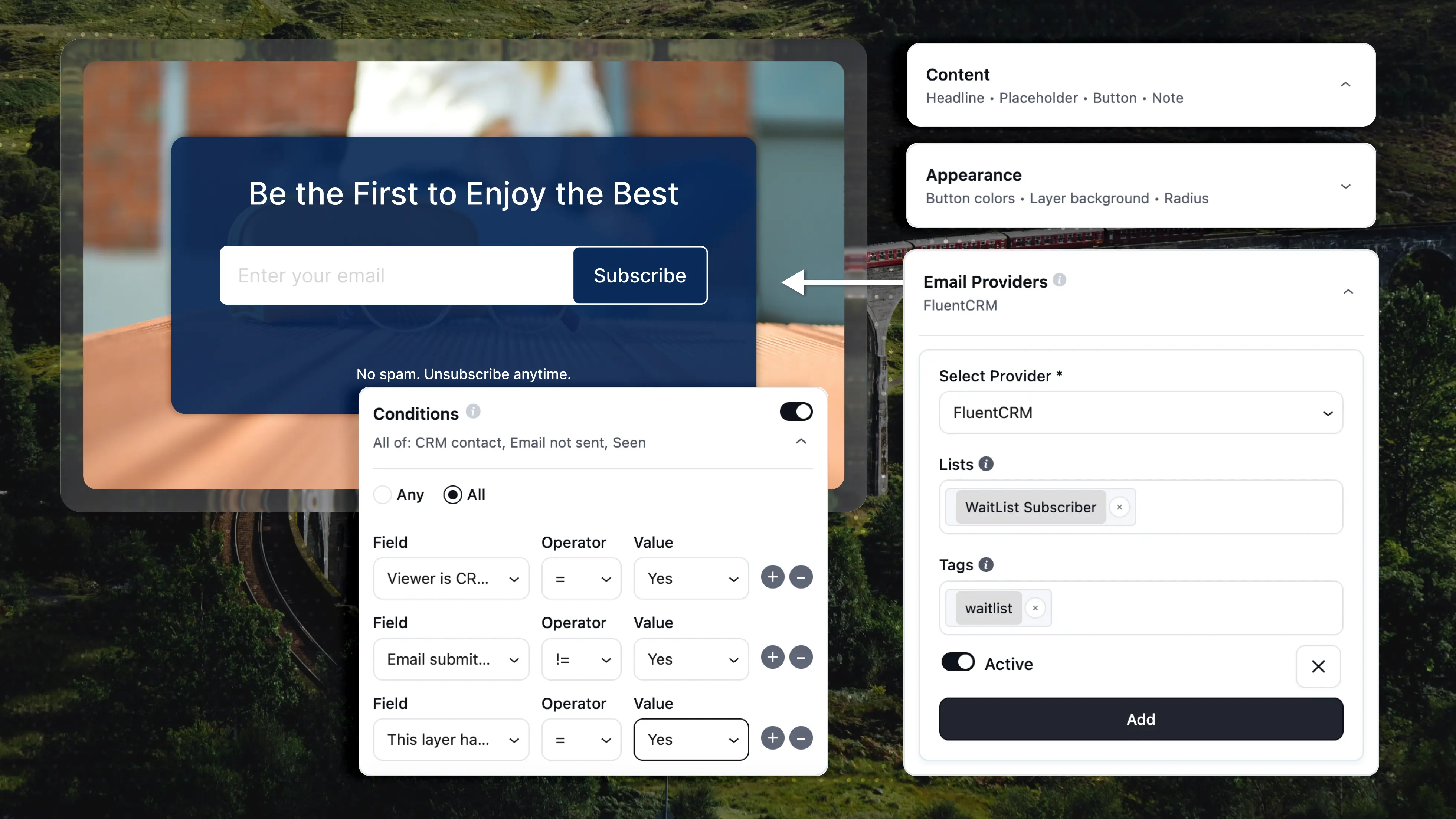
Show the right layer to the right viewer. Conditional rules let you decide who sees a layer instead of showing the same form or offer to everyone, with each layer getting its own Conditions panel built on a simple Field, Operator, and Value setup.
Define how videos behave on the page, across devices, and during playback.
Use FluentPlayer with self-hosted videos, YouTube, Vimeo, audio files, and more while keeping playback behavior consistent across all sources.
Create and save your own player presets to reuse across pages and videos. This helps maintain consistent behavior while reducing repetitive setup work.
Videos remember where viewers stopped and allow them to continue from the same point when they return. Useful for long videos and tutorials.
Start videos automatically, either muted or with sound.
Let viewers adjust playback speed to match their preferred pace.
Let viewers continue watching while browsing, for HTML5 videos.
Keep videos playing right on the page without triggering full-screen mode.
Display clear playback progress so viewers can track their position.
Display text or CTA buttons inside the video at the right moment.
Paste a link from any supported provider. FluentPlayer detects the source, and links to your own uploads; resolve to the library file.
Editors can add media, layers, presets, and playlists without an administrator account. Adjustable through a filter if you want tighter control.
The media shortcode now takes playback-override attributes and an optional dynamic source, so one shortcode serves many videos.
Vimeo videos play with Privacy-Enhanced Mode on by default, plus quality and playback-speed menus. Import captions, and chapters straight from Vimeo instead of retyping them.
A new autoplay mode that loops your video silently as its own thumbnail, then plays with sound the moment a viewer clicks. Tracking and analytics wait until they choose to watch.
Starting one video pauses every other FluentPlayer video on the page, so two soundtracks never play at once. On by default. Turn it off only when videos should run together.
Basic YouTube and Vimeo embeds are great for hosting. But they weren't built for control, engagement, or conversion on your site.
Want a deeper comparison? See how FluentPlayer stacks up against other WordPress video plugins on the Comparisons page.
See full comparisonsTurn video engagement into real actions – capture leads, trigger workflows, and connect everything with Fluent tools.
 FluentCRM
Capture your viewers' email addresses during a video and automatically add them to your FluentCRM contact lists with proper tags.
 Fluent Forms
Collect lead information and accept payment for premium content directly from a video with Fluent Forms integration.
 FluentBooking
Allow viewers to easily book a one-on-one appointment or group session with you directly from a video using shortcode.
 FluentCommunity
Embed videos or playlists directly in your FluentCommunity courses and track exactly how members engage with your content.
Explore all the features of FluentPlayer that give you full control over playback, branding, performance, and user experience.
FluentPlayer is designed to fit into your existing WordPress setup instead of forcing you to change how you work.
Listen from the real users who are already seeing the difference – better playback, deeper engagement, and more control.

"There's plenty of different things you can do inside here, including short codes, hotspots, and so on. So from a marketing point of view, this is super useful."
"It will for sure be a game-changer for me and I can't wait for the official release so I can start setting it up on my live site!"

"C'est un outil qui va booster l'interaction avec des messages incrustés et surtout c'est une plateforme de data pour analyser les actions de vos utilisateurs et devenir un véritable outil décisionnel."

"These interactive layer features are pretty cool. You can have a link in the middle of the video to take someone to a resource or something like that."

"It looks like it's going to be a really nice plugin and it has a cool set of features that I wanted to show you."

Choose the plan that fits how you embed, structure, and track video inside WordPress.
For your own site or a side project.
lifetime license
What's included:
Covers today's clients, and next year's.
lifetime license
What's included:
For growing studios & multi-brand sites.
lifetime license
What's included:
One license for every client, forever.
Answers to the questions we hear most about FluentPlayer.
Yes. FluentPlayer plays self-hosted videos, YouTube, Vimeo, external URLs, and HLS streams. Pro adds Bunny Stream, Bunny Storage, Mux, Gumlet, Cloudflare Stream and Cloudflare R2. Paste any media URL and FluentPlayer detects the provider for you.
Go beyond basic playback. Add interactivity, capture leads, and understand your audience.
Buy Now