

I found the Vimeo On Demand shutdown notice a few weeks back, and the reaction since has been consistent. Sellers who built steady revenue on it are scrambling, and the platform Vimeo keeps pointing people toward isn’t built for them.
Vimeo OTT, the replacement they’re pushed toward, is built for companies running their own subscription channel. Most VOD sellers just want to sell a title here and there, not manage a channel.
This isn’t the only fix, but it’s the one that doesn’t require moving to a new platform if you’re already on WordPress. Three free plugins: one for the gate, one for checkout, one for the video.
A filmmaker selling a single $19 documentary and a course creator running a $15 monthly library face different problems. Neither gets their money back once a storefront disappears.
What follows is the full build for both paths: the screens, the settings, and the order to do them in this week.
TL;DR
- Vimeo On Demand shuts down completely on November 20, 2026.
- New purchases and subscriptions already stopped on September 21.
- There is no purchase migration path for buyers.
- Buyers lose access to what they bought unless the seller exports and notifies them before the cutoff.
- This is a WordPress-based replacement, built for sellers willing to self-host rather than move to another subscription platform.
- Single-title sellers and recurring or subscription operators need different replacement setups.
- FluentCommunity’s Paywall, powered by FluentCart, is the actual access gate, free on both plugins.
- FluentPlayer is the video layer inside that gate, not a standalone storefront.
- FluentCRM tags every buyer automatically the moment they pay, free, including the ones Vimeo’s own export tools won’t hand over.
What the Vimeo On Demand Shutdown Actually Changes
The replacement is a free WordPress stack: FluentCommunity for the paywall, FluentCart for checkout, FluentPlayer for video. It runs on your own WordPress hosting instead of a subscription platform.
Three dates explain why that decision can’t wait.
August 22, 2026: new uploads to Vimeo On Demand stopped. If you were mid-launch, that window is closed.
September 21, 2026: new purchases and subscriptions stopped. Existing buyers keep access until the full shutdown, but new customers can’t hand you money through this channel again.
November 20, 2026: Vimeo On Demand shuts down completely. Storefronts go offline. Every buyer who purchased through VOD loses streaming access, whether they bought last week or three years ago.
Vimeo’s own reason, stated in the shutdown notice: adoption had slowed, and the company wanted to put resources into its core hosting and Vimeo Streaming instead. That’s a business call on their end. It becomes your operational problem the moment your storefront depends on the product they’re retiring.
This is Vimeo On Demand specifically, the transactional buy-and-rent storefront, not Vimeo overall. Vimeo’s core hosting and Vimeo Streaming aren’t part of this shutdown.
If your videos live in a standard Vimeo hosting plan, those files stay put. What’s disappearing is the store built around them, not the video host itself.
Two Migrations, Not One
Every roundup treats “moving off Vimeo On Demand” as one task. It isn’t. A one-time sale and a recurring subscription need different gates, different products, and different follow-up with buyers.
Say you’re a documentary filmmaker who sold a $19 rental through VOD. You need one gated purchase, playback that looks intentional, and a way to reach the people who already bought before the page disappears.
Say instead you run a $15-a-month cooking-technique library. You need recurring billing that renews on schedule, a structure for drip-releasing new lessons, and a way to see who’s actually watching before they cancel.
Neither path is harder than the other. They’re just different builds, and treating them as one migration is how this drags into November with half the work still undone.
Some replacements split this into two vendors, a CDN for hosting and a separate service to handle checkout and access. This stack doesn’t. FluentCommunity, FluentCart, and FluentPlayer are one connected system.
Don’t build the paywall on FluentCart alone without FluentCommunity’s Space or Course structure.
You’ll get checkout, but you’ll lose Drip Content, lesson organization, and the Section Completed trigger. Those are the parts that make Path 2 work as an actual subscription library.
Before you pick a path, here’s what actually matters in a replacement, regardless of which one you choose:
| What to look for | Why it matters |
| You own the buyer list | Vimeo’s own export tools only hand over opted-in contacts, not the full list. A replacement should give you all of it. |
| Both one-time and recurring sales, on the same system | Don’t let a platform push a buy-and-rent business into subscriptions just to fit its pricing model. |
| Protection you can turn on only when you need it | DRM and signed URLs add cost and setup. Most titles don’t need them; some do. |
| No fee that scales with every subscriber or transaction | A flat plugin cost beats a percentage of every sale once volume grows. |
| Checkout and playback in one system, not two vendors stitched together | Fewer moving parts means fewer things that break when a platform changes its policies. |
| Setup measured in days, not a migration project | If replacing VOD takes weeks of vendor onboarding, you’ve traded one dependency for another. |
One thing to state plainly: the paywall stack itself costs nothing beyond hosting you already pay for. FluentCommunity, FluentCart, and FluentPlayer’s core setup are all free, and so is the automation that ties them together in FluentCRM.
Sellers comparing options report the same pattern: most hosted alternatives cost more per year than VOD ever did, whether priced by subscriber count or a flat enterprise plan.
If you need Smart TV apps or a fully hosted platform with no WordPress, this stack isn’t for you.
This is for sellers willing to run their own WordPress site, not migrate to another hosted vendor.
Path 1: Replacing a One-Time Purchase Storefront
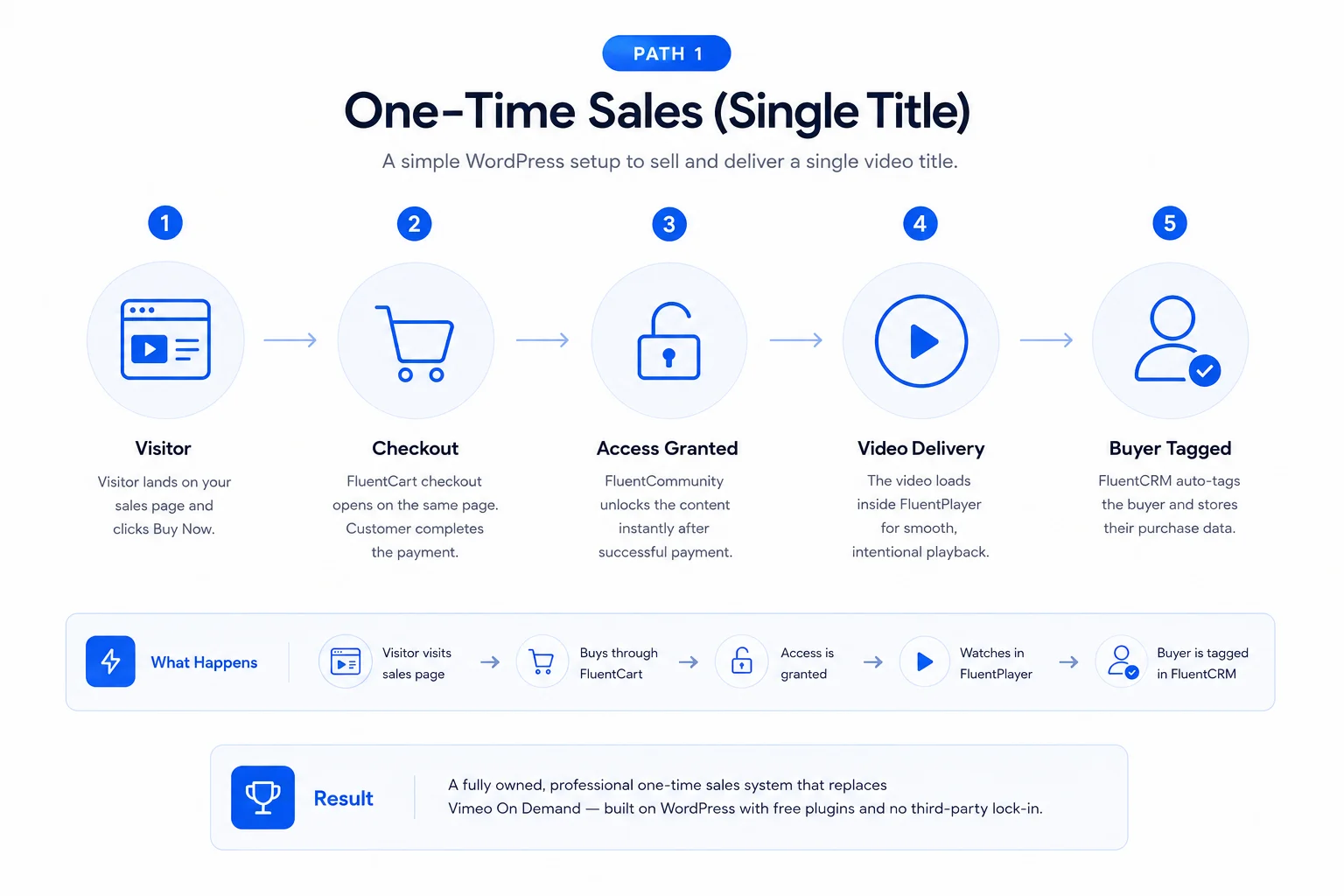
Set up the gated purchase
Start in FluentCommunity. A Course gives you more control over player settings and content blocks, so it’s the better default even for a single film. A Space works too, and it’s the simpler option if you don’t need that extra control.
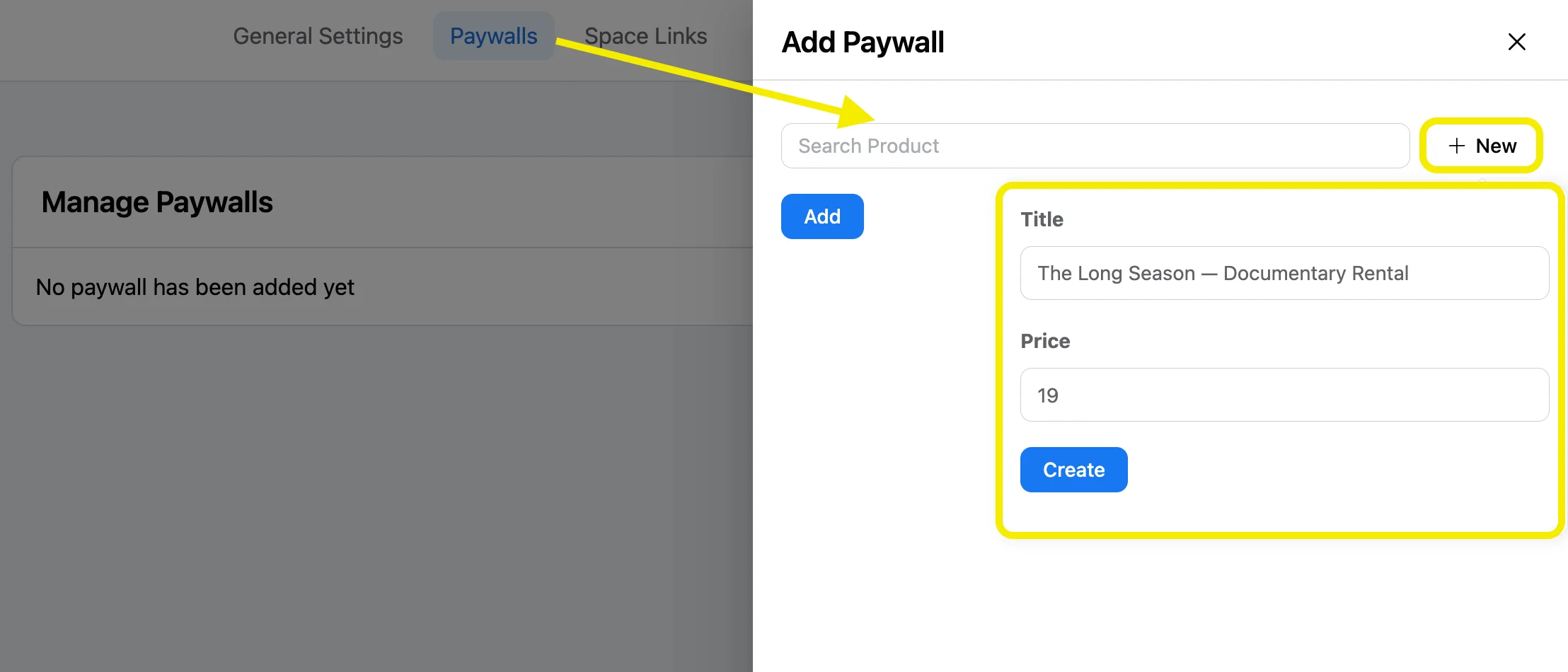
From the Paywall tab, add a new FluentCart product on the spot: a title, a $19 price, done. FluentCart’s checkout engine sits behind that button automatically. You never leave FluentCommunity to build the store separately.
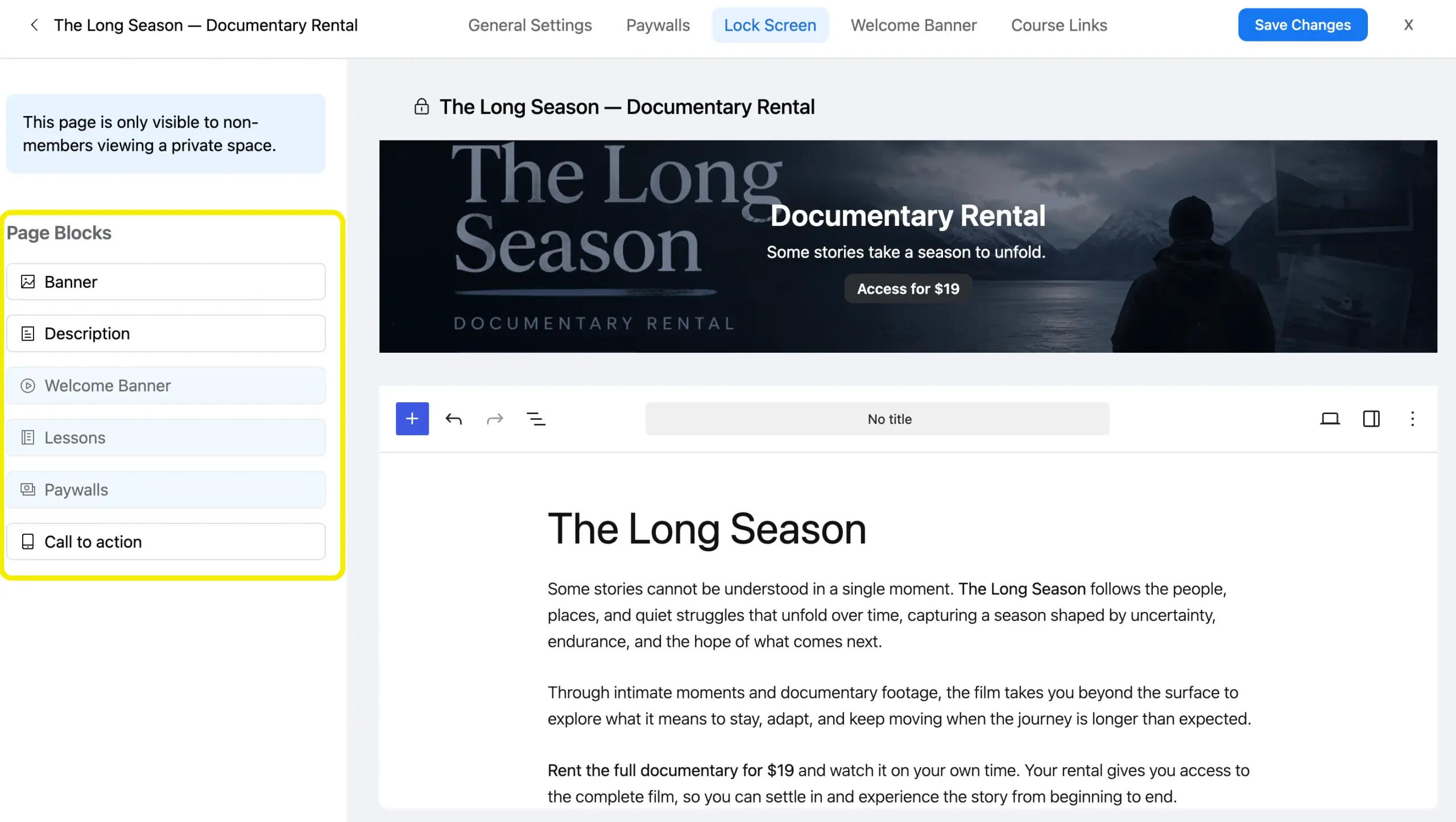
Set the Lock Screen last. The default version adds a Buy Now section to the private page in one click. If you want a real sales page, the custom builder handles colors, button copy, and a description block, all without leaving the settings panel.
If you’re bundling a director’s commentary or behind-the-scenes footage with the main film, add those as additional lessons inside the same Course instead of a second product. One purchase, one gate, less to manage.
One thing worth knowing either way: a single Paywall covers everything inside that Space or Course. You can’t price the main film and a bonus feature separately if they share a container.
Play the film
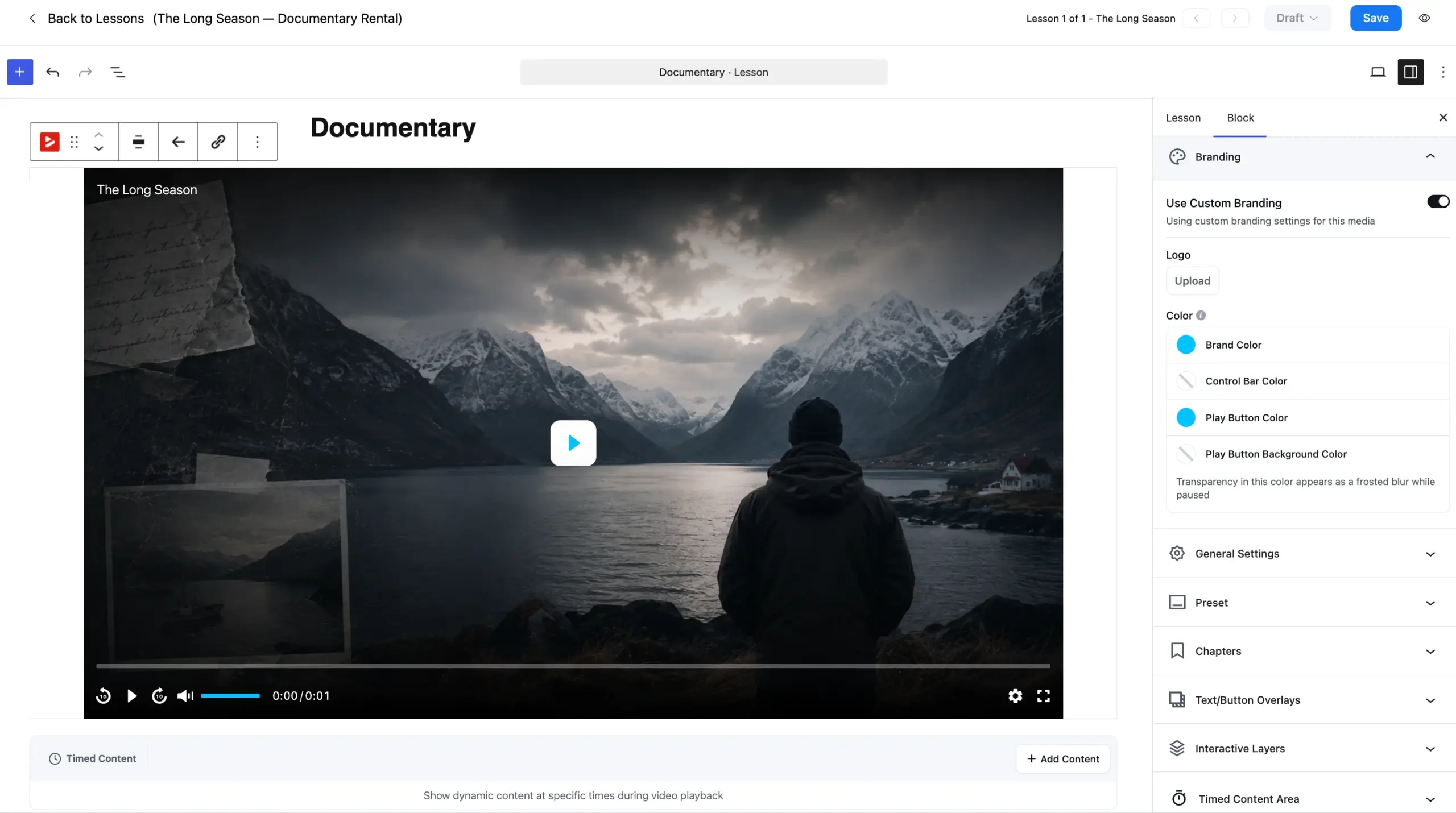
FluentPlayer handles playback inside that gated container, not a generic embed. Branding controls let you set the skin, brand color, control bar color, and play button color, so the player matches your site instead of looking like a stock embed.
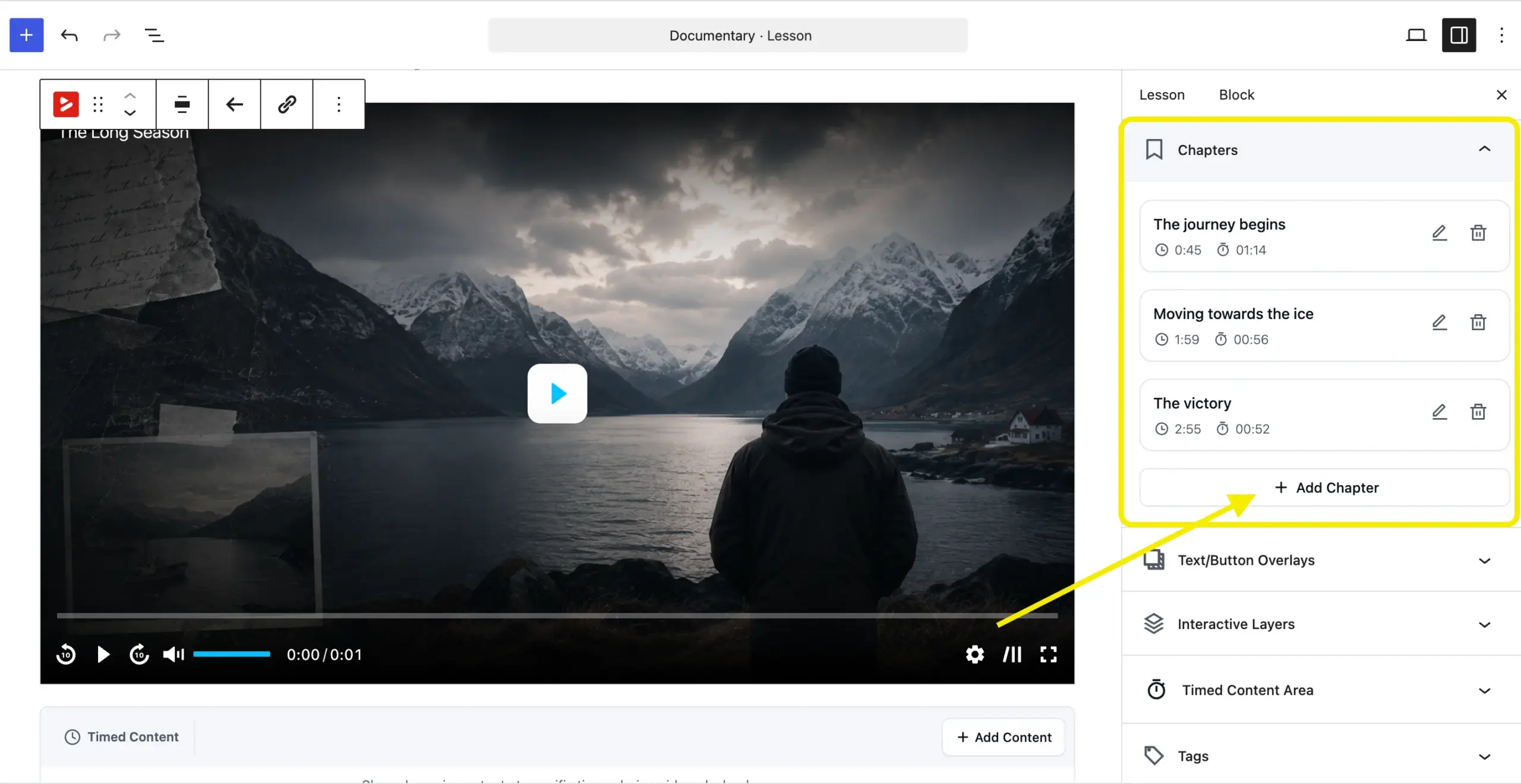
Chapters give viewers a way to jump to a specific scene instead of scrubbing blind. Picture-in-picture keeps the film playing if someone switches tabs mid-viewing.
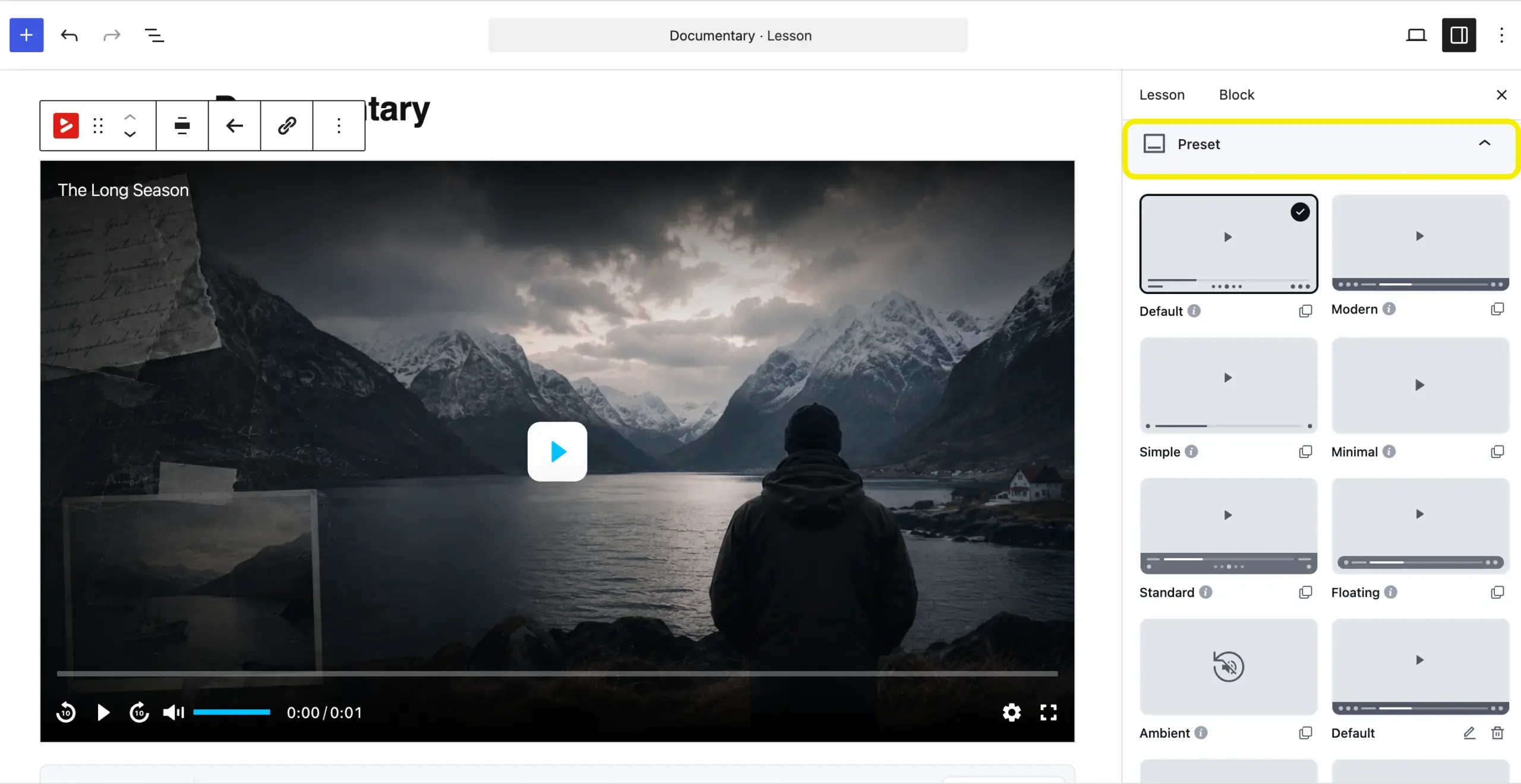
Pick a preset that matches your film’s tone before launch. Default or Minimal both read as intentional. Set a custom thumbnail instead of relying on the first frame.
If captions matter to your audience, toggleable subtitles are a Pro feature, not something the free player includes. Worth knowing before you promise viewers the same on/off caption control they had on Vimeo.
If the film is valuable enough that casual re-sharing is a real risk, Mux offers signed URLs and DRM, Widevine and FairPlay included. FluentPlayer Pro’s Mux integration doesn’t get in the way of any of it. The protection setup lives on Mux’s side, not inside FluentPlayer’s own settings.
That’s not available on VOD at any price. It’s worth setting up for a $19 rental only if piracy is an actual pattern for your audience, not a hypothetical one.
Notify buyers before the cutoff
Export what Vimeo lets you export from the seller dashboard before November 20. It’s not the full buyer list, only the viewers who opted into updates, so don’t treat it as complete.
Tag those contacts in FluentCRM as legacy VOD buyers. Send them a direct message with a redemption link to the new FluentCommunity course, framed as where the film lives now, not as a sales pitch. They already paid once.
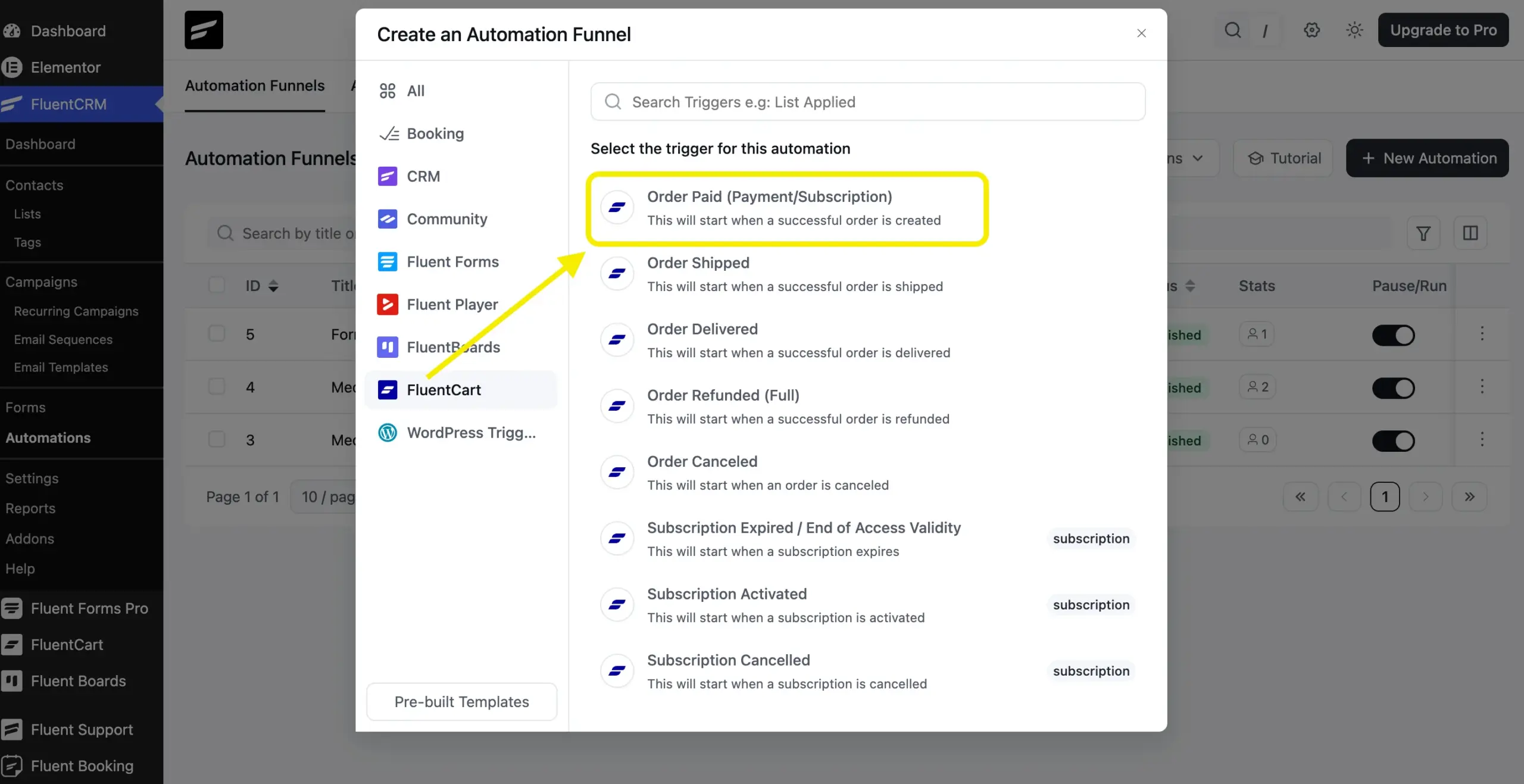
Going forward, you won’t need to do this manually. FluentCRM’s Order Paid trigger tags every new buyer the moment FluentCart marks their purchase complete, free, no automation upgrade needed.
This is the first place FluentPlayer earns its keep, and it costs nothing to try. Install FluentPlayer free and get the branded player running before you touch pricing.
Here’s what a finished Path 1 setup looks like:
- A Private Space in FluentCommunity
- A one-time FluentCart product behind it
- A Lock Screen as the sales page
- FluentPlayer handling playback inside
- Every buyer tagged in FluentCRM the moment they pay
Path 2: Replacing Recurring or Subscription Access
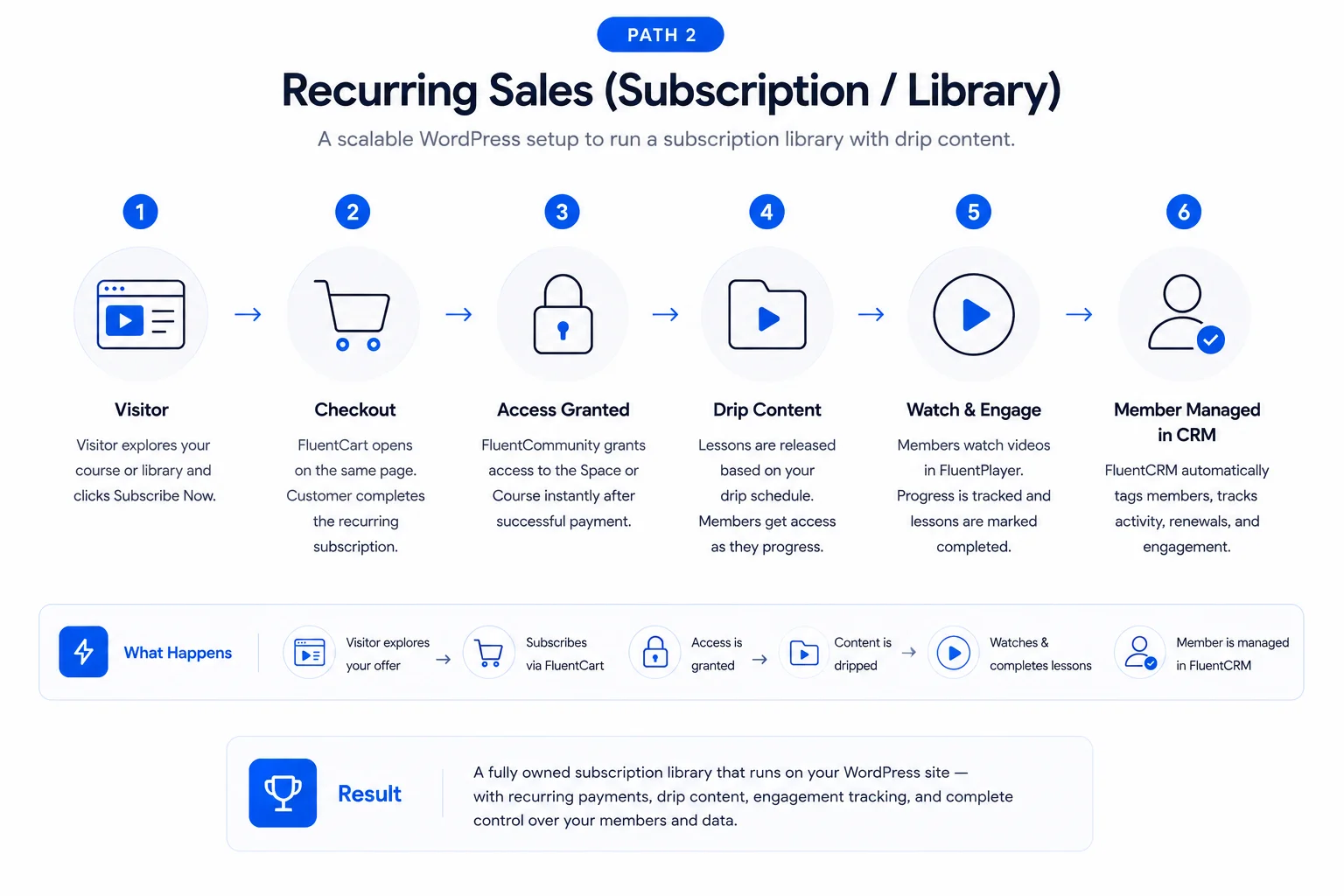
Structure the library as a course
Build the library in FluentCommunity as a Course, then use Drip Content to release new lessons on the same cadence your subscribers are used to.
A weekly technique video beats dumping the whole archive on day one. Drip content is part of why people stay subscribed instead of binging and canceling.
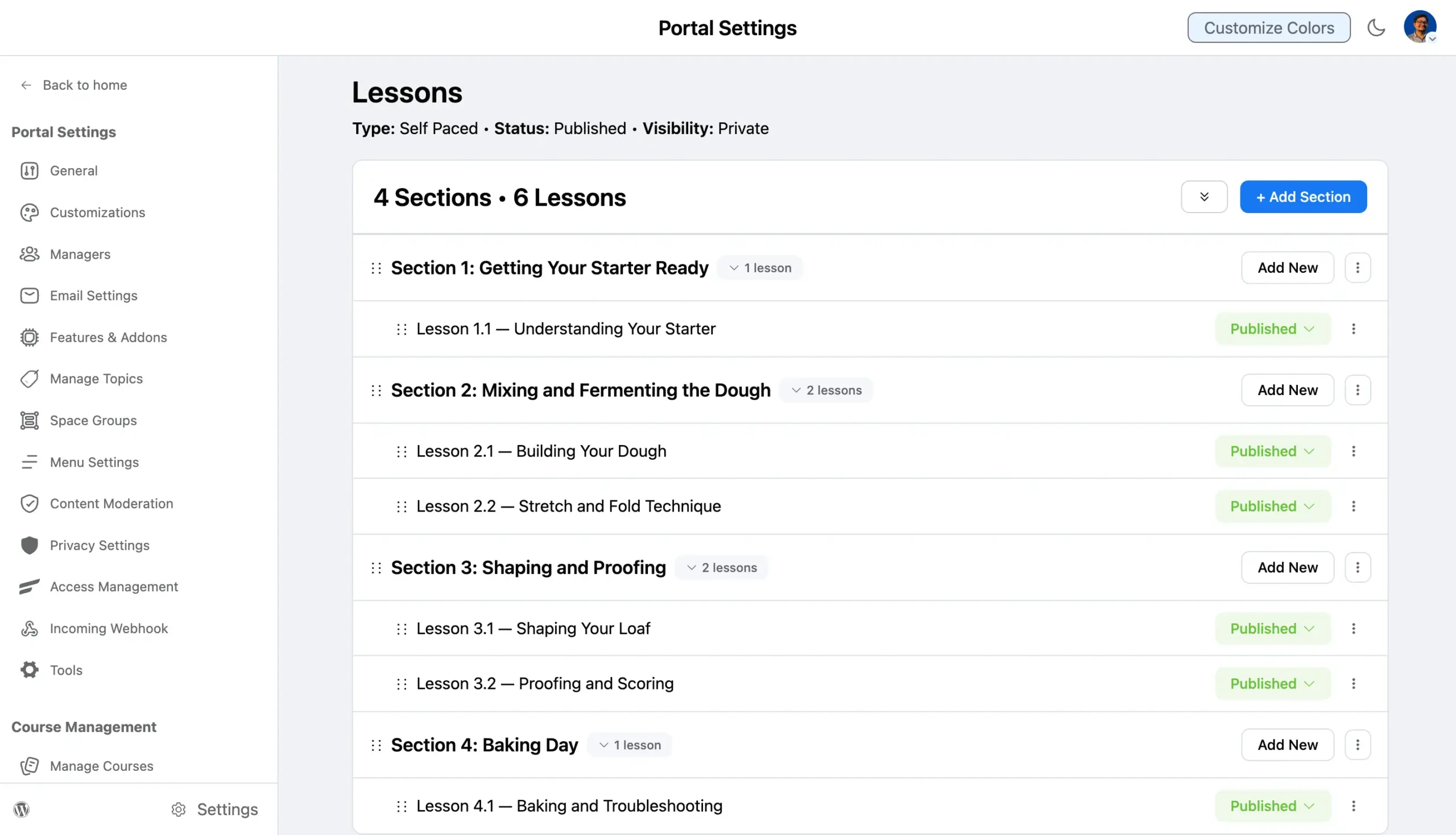
FluentCommunity also lets you reorder or duplicate course sections instead of starting from a blank course. That’s useful if you’re pulling old VOD episodes into a new lesson order.
Set the paywall to recurring
This step rebuilds VOD’s subscription option, minus the platform fee.
Create the subscription product in FluentCart first: Products → Add Product, then toggle Subscription on in the Pricing section and set the billing interval, monthly for the cooking library. FluentCart can add a free trial here too if you want one.
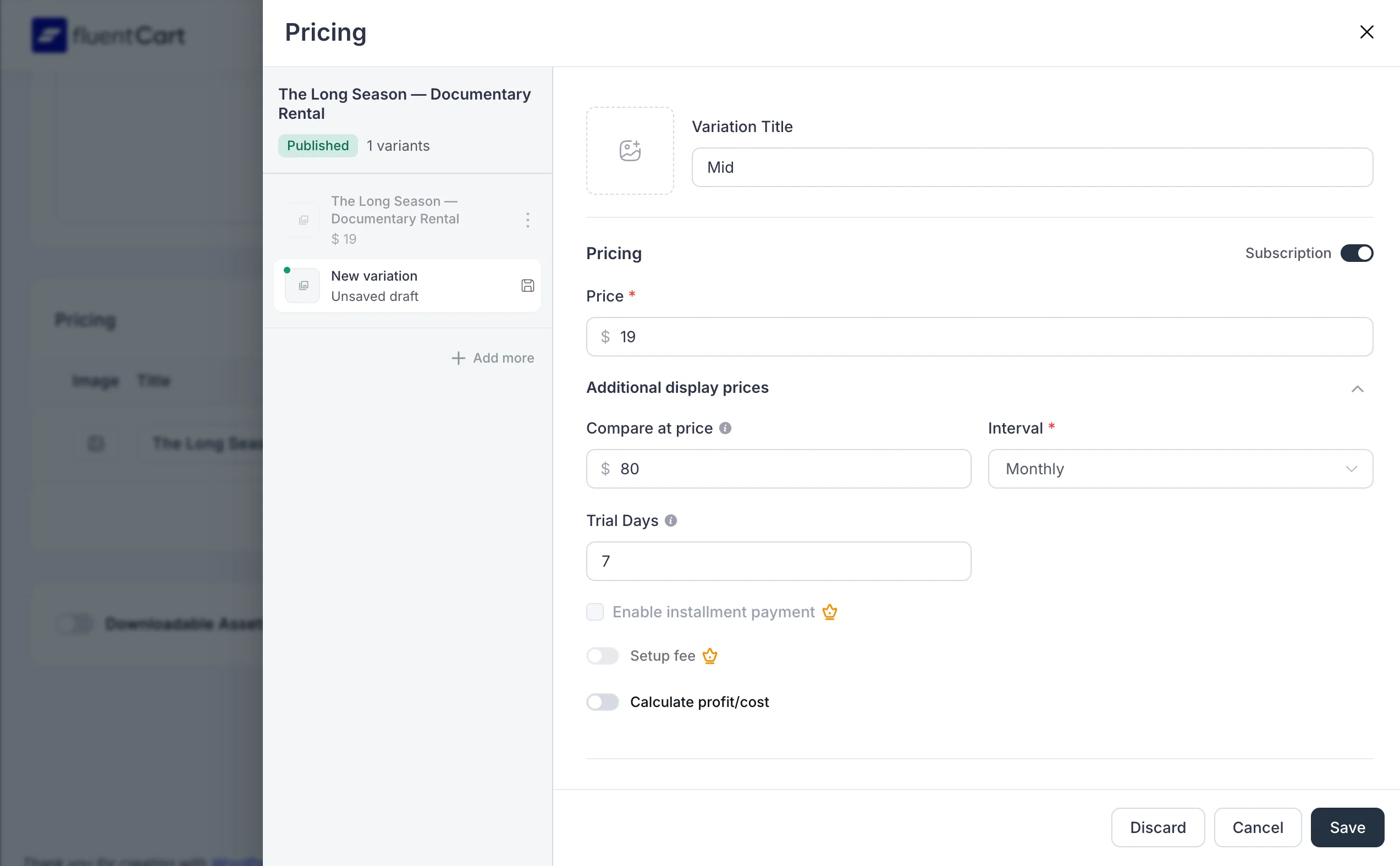
Back in FluentCommunity, open the Paywalls tab and link that product, the same screen Path 1 uses for a one-time purchase, just pointed at a subscription product this time.
Want both a monthly and an annual price? FluentCart’s Simple Variations let one product hold multiple billing intervals, so you’re not managing two separate products or two separate Paywall links.
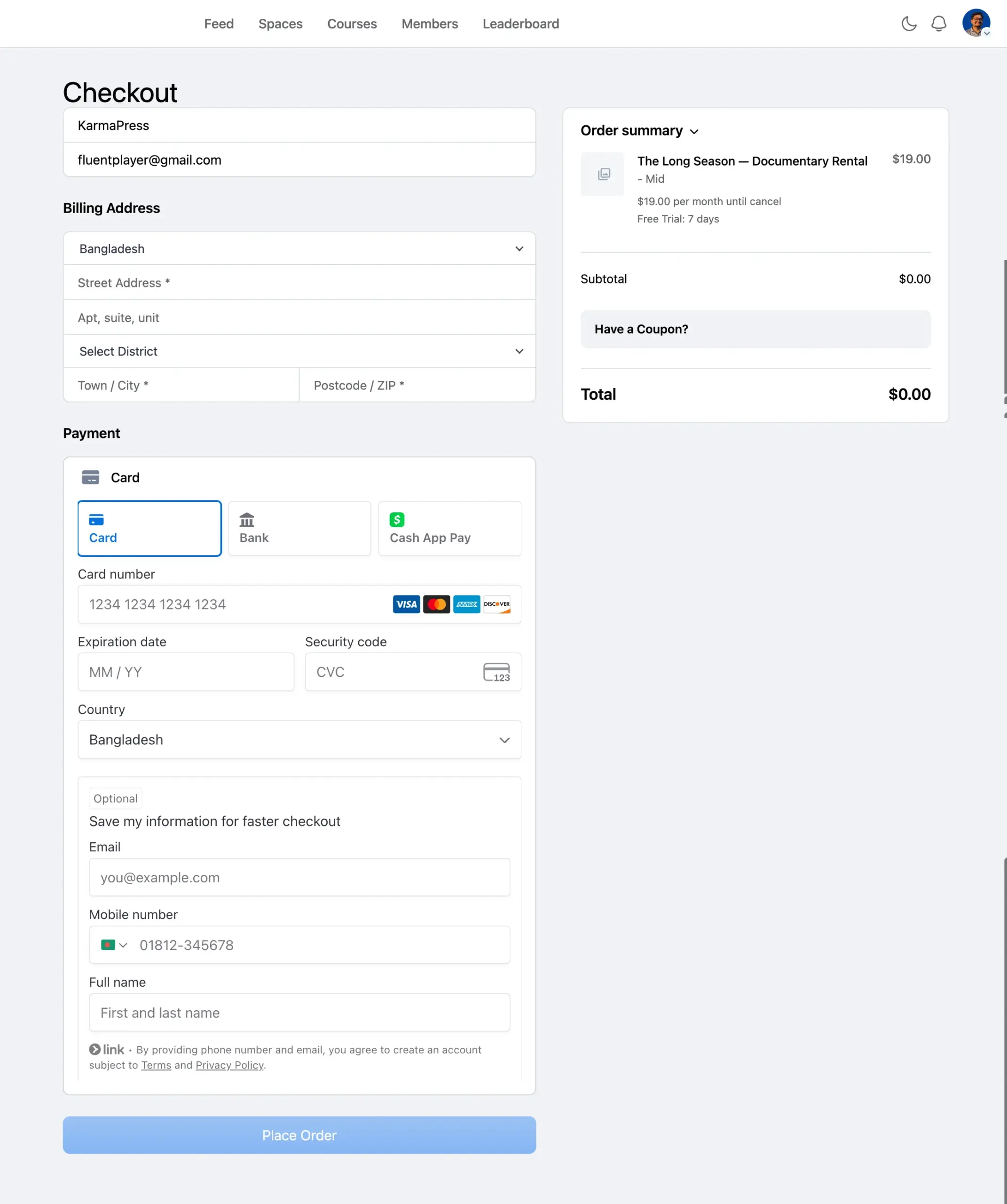
FluentCart’s free tier includes basic subscription selling. Renewal notifications go out automatically, and access gets revoked if a subscription lapses, once you set that rule in the product’s Integrations tab.
Track engagement, not just access
Watch time is the number that actually predicts renewal, more than login counts ever will.
FluentPlayer Pro’s analytics track completion rate and audience retention, showing where people drop off across a lesson.
FluentCRM can also trigger a check-in automation the moment someone hits Media Milestone Reached, a trigger FluentPlayer feeds into FluentCRM. That’s before they’ve decided to cancel, not after.
FluentCommunity feeds its own Section Completed trigger into the same system. That gives you two independent signals inside FluentCRM: one from the video itself, one from finishing the lesson page around it.
Both triggers run on FluentCRM’s free tier, no automation upgrade required to wire either one up.
The subtitle caveat from Path 1 applies here too: toggleable captions are Pro, not free.
If you’re already running this course on LearnDash, FluentPlayer Pro embeds directly inside LearnDash lessons instead of requiring FluentCommunity’s course structure.
For the full build, including enrollment flow and nurture sequence, see the complete FluentCommunity and FluentPlayer course setup.
The free tier gets the paywall, the player, and the buyer-side automation all running. If you want the drip-focused watch-time analytics and completion data that go beyond the free triggers, FluentPlayer Pro covers that, and the lifetime deal closes September 17.
Here’s what a finished Path 2 setup looks like:
- A Course in FluentCommunity with Drip Content
- A recurring FluentCart product behind it
- FluentPlayer handling playback and analytics inside
- FluentCRM triggers on Media Milestone Reached and Section Completed, both free
- Multiple pricing plans if you’re offering monthly and annual
Free vs Pro: What Each Path Actually Needs
Here’s where each plugin’s free tier stops and Pro picks up, mapped to what each path in this post actually uses:
| Feature | Free | Pro |
| One-time Paywall (FluentCommunity + FluentCart) | Yes | Yes |
| Recurring billing (FluentCart) | Yes, basic | Yes, advanced |
| Branded FluentPlayer, chapters, picture-in-picture | Yes | Yes |
| Drip Content (FluentCommunity) | Yes | Yes |
| Automated triggers (Order Paid, Media Milestone, Section Completed) | Yes | Yes |
| Toggleable subtitles | No | Yes |
| Mux DRM / signed playback URLs | No | Yes |
| Watch-time, completion rate, and audience retention | No | Yes |
| LearnDash video embed | No | Yes |
| Email capture and tagging (FluentCRM) | Yes | Yes |
The paywall, the checkout, and the buyer-tracking automation all run on free plugins. Pro is where the video layer earns its keep: deeper analytics, protection, captions, and LMS sync, not payment or automation.
Your Migration Checklist Before November 20
Work through these in order, starting now if you haven’t already:
- Export your Vimeo sales data, opted-in subscriber list, and video metadata or thumbnails you’ll reuse, before access to it disappears too.
- Download offline copies of your source video files, since your storefront ends but your own archive shouldn’t depend on Vimeo staying reachable.
- Build the new gate in FluentCommunity and FluentCart: a single product for Path 1, a recurring one for Path 2.
- Set up FluentPlayer as the playback layer inside that gated space, branded and chaptered before you publish.
- Test playback on a phone, a tablet, and at least one older browser before you send anyone a link.
- Email existing buyers or subscribers their new access link through FluentCRM, framed as a redemption, not a pitch.
- Redirect old Vimeo VOD links to the new page wherever your CMS or link shortener allows it.
Before the Deadline Decides for You
Pick a path today, not after the LTD window closes. Install FluentPlayer free, build the gate in FluentCommunity, and link the FluentCart product behind it. That’s an afternoon of work, not a migration project.
Do it before November 20, and you keep the buyer relationship VOD never really gave you. Wait, and Vimeo makes the decision for you. See what FluentPlayer includes and start today.
Frequently Asked Questions
What’s the best Vimeo On Demand alternative for WordPress sellers?
For sites already on WordPress, pairing FluentCommunity’s Paywall with FluentCart for checkout and FluentPlayer for video replaces VOD’s storefront. It does that without moving to a new hosted platform or giving up ownership of the buyer list.
Does this replacement work if I’m not using WordPress?
No. FluentCommunity, FluentCart, and FluentPlayer are WordPress plugins. If you’re not running WordPress already, this specific stack isn’t your path, though the two-path thinking, one-time versus recurring, still applies wherever you land.
Does the Vimeo On Demand shutdown affect all of Vimeo?
No. It’s specific to the On Demand storefront, the buy-and-rent product. Vimeo’s core hosting and Vimeo Streaming continue operating after November 20, 2026.
Should I just move to Vimeo OTT instead?
Vimeo will notify your buyers on your behalf if you set up an OTT account, but its export policy still limits you to opted-in contacts only. OTT is also built for running your own subscription channel, not selling a title here and there, and it shows in the setup. It’s a different cost model too: a 10% fee plus $0.50 per transaction on buy-and-rent sales, on top of the plan itself, versus VOD’s flat plan pricing. You’d be trading one platform’s storefront for a more complicated, pricier one and still wouldn’t own the buyer list.
What happens to a rental I already sold if it hasn’t expired yet?
Vimeo honors the original rental window until it expires or the shutdown date arrives, whichever comes first. After November 20, 2026, that access ends regardless of how much time was left.
Can I restrict a video’s availability by country the way I could on Vimeo On Demand?
Not natively. FluentCart handles tax and shipping by region, but it doesn’t include per-product country restriction the way VOD did. If territory-based licensing is a hard requirement, you’d need a separate geo-restriction solution and should confirm it works with FluentCart’s product model before relying on it.
Can I get a refund if I lose access to a video I bought on Vimeo On Demand?
Not automatically. Vimeo reviews refund requests case by case if you contact support with proof of purchase.
What happens to my uploaded videos when Vimeo On Demand shuts down?
The underlying video files stay in your Vimeo account under your plan’s storage terms. What disappears is the storefront and purchase flow built around them, not the files themselves.
Can FluentCommunity sell a single video, or only full courses?
Both. The Paywall setup is identical for a Course or a Space, and a Space can hold just one film with a one-time product attached to it.
Does FluentCart support subscription billing for recurring video access?
Yes, on the free plugin. Renewal notifications and auto-cancellation on non-renewal are both included at no cost. Pro adds more advanced subscription management on top.
Is FluentPlayer free to use for gated or paid videos?
Yes. The branded player, chapters, and picture-in-picture all work on the free plan inside FluentCommunity. Deeper analytics, DRM, subtitles, and LMS sync are Pro.