

The course is recorded, the lessons are in order, and the launch feels done. Then you open a player’s features page to pick one, and it lists the same things every plugin lists: chapters, branding, analytics. None of it says whether it will hold up once real students are watching.
That depends on where your course actually lives. Some of you run courses inside FluentCommunity, where the structure is already built in. Others build their own pages and use another tool to lock them. Those are two different setups, and they need two different answers.
This post walks through both setups, FluentCommunity and everything else, and measures FluentPlayer against what a course actually needs from its video player: lesson structure, visibility into who’s engaged, and content that behaves the way a paid course should.
TL;DR
- FluentPlayer‘s free plan connects natively to FluentCommunity, and Courses get full player controls where Spaces only get basic styling.
- Chapters, speed control, inline mobile playback, and the Fluent Forms and email capture layers are all free, not Pro.
- Video analytics, playlists, Remember Playback Position, and drip-style Timed Content sit on Pro.
- Private media stays off public URLs and search by default, a detail that matters but isn’t the main decision here.
- LearnDash has a confirmed integration on Pro: FluentPlayer tracks actual watched coverage against a required percentage and writes completion back into LearnDash’s own system.
- FluentPlayer is the player and engagement layer on top of your course structure, not the LMS or the hosting itself.
What Fit Actually Depends On
Whether FluentPlayer is worth it for a course depends on five things, and none of them show up on a features page.
- Where the course lives: Inside FluentCommunity’s own Courses feature, or on pages you built yourself.
- How much structure the player needs to carry: Chapters and resume playback, or just a single unbroken video.
- Whether release needs to be scheduled: Everything available at once, or lessons that unlock on a drip.
- How much visibility you need into where students drop off: A retention curve, or just enrollment counts.
- Who’s building this: A developer on staff, or a course creator setting it up alone.
See the Player Before You Commit→
Where Course Creators Get Confused
| What people assume | What’s actually true | How to check it |
| FluentCommunity Spaces and Courses give the same player controls | Courses get full FluentPlayer controls; Spaces are limited to skin, brand color, control bar color, play button color, and a progress bar toggle | Confirm you’re building the lesson inside a Course, not a Space, if branding or interactive layers matter |
| Gating the course page also protects the video file | Private media returns a 404 on its own standalone page and stays out of sitemaps and search, a separate layer from page-level access control | Try loading the raw video URL outside the protected page and confirm it doesn’t resolve |
| Playlists and resume-watching are basic features, so they’re free | Playlists and Remember Playback Position are both Pro | Check the plan before promising multi-lesson navigation or resume-across-sessions to students |
| Timed Content releases lessons on a schedule, like drip content | It shows a specific block below the player during a set time range inside a single video, not a release schedule across days | If you need content to unlock over days or weeks, this isn’t that. It’s tied to the video’s own timeline, not a calendar |
| Every LMS plugin connects to FluentPlayer with the same depth | Course integration is confirmed for FluentCommunity (free) and LearnDash (Pro) | Check current integration status for your specific LMS before assuming progress data flows anywhere else |
If You’re Building Courses on FluentCommunity
If you’re structuring lessons inside FluentCommunity, video sits inside the Courses feature, not the more limited Spaces area. Courses carry full FluentPlayer controls: presets, branding, chapters, and interactive layers for quizzes or capture mid-lesson. Access ties to FluentCommunity’s membership rules, so a lesson only shows to the members it’s meant for.
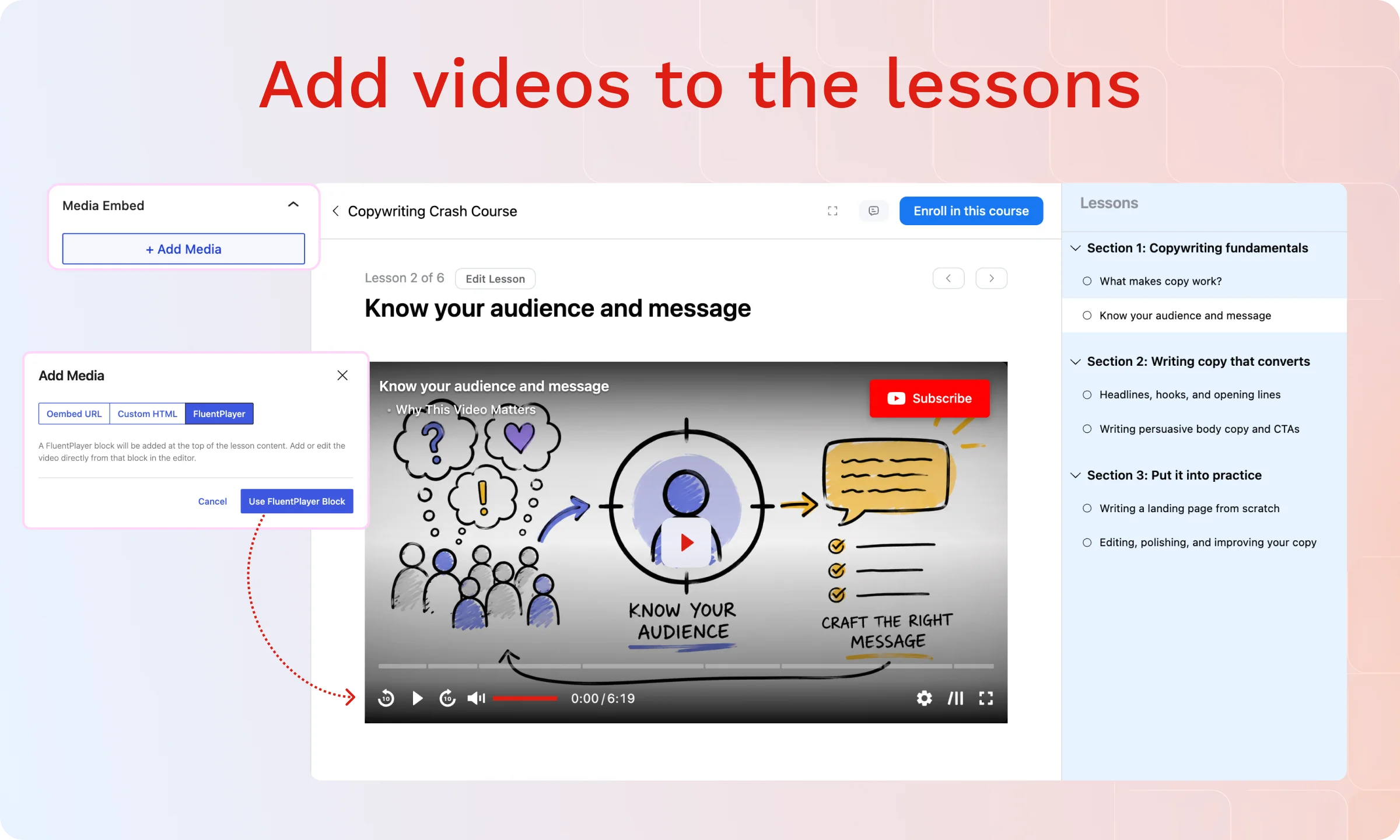
Access ties to FluentCommunity’s membership rules, so a lesson only shows to the members it’s meant for. Any video created from a FluentCommunity lesson also defaults to private, off search and off a stray link.
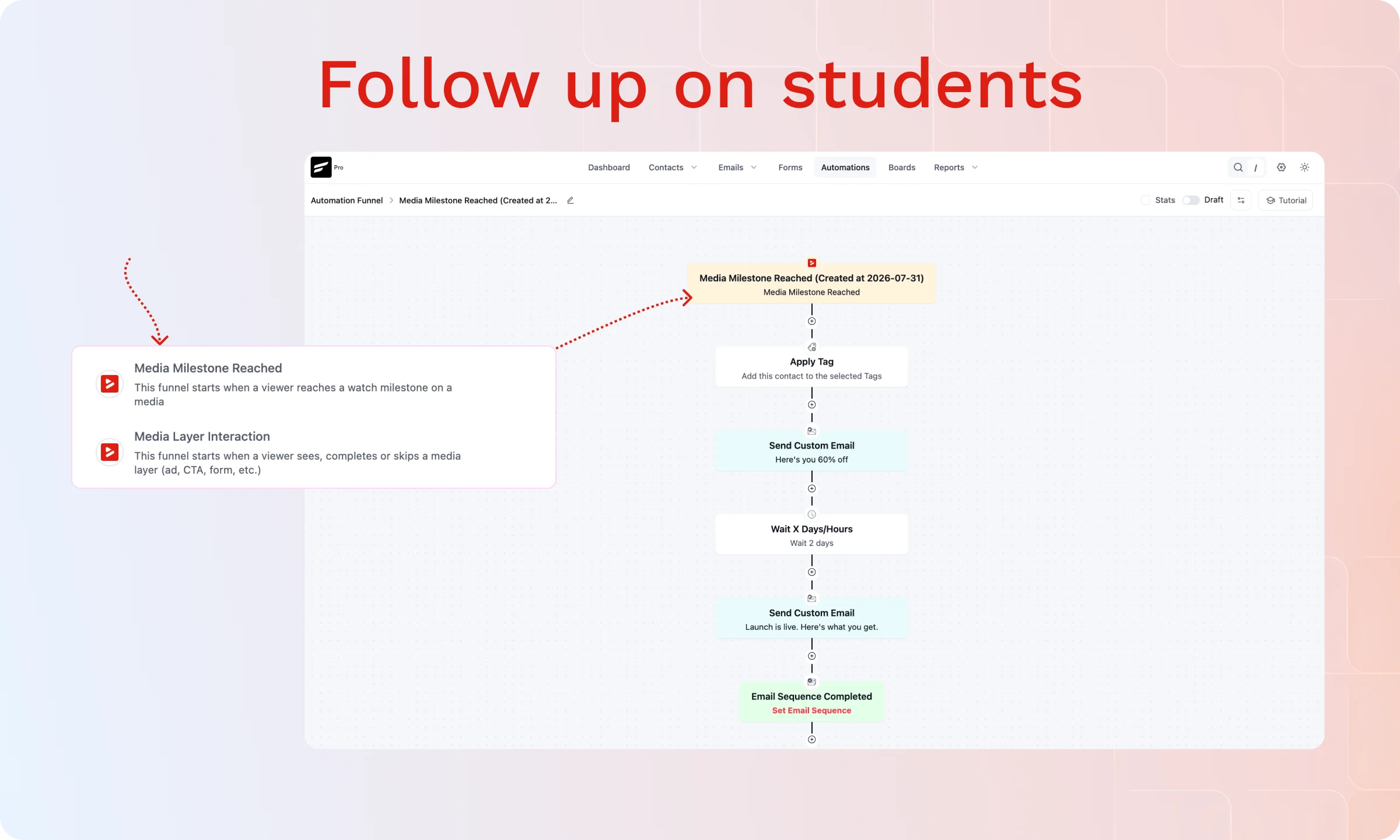
The Media Milestone Reached trigger fires into FluentCRM when a student reaches a specific milestone of a lesson video. Treat it as a checkpoint for a follow-up sequence, not a verdict on the student.
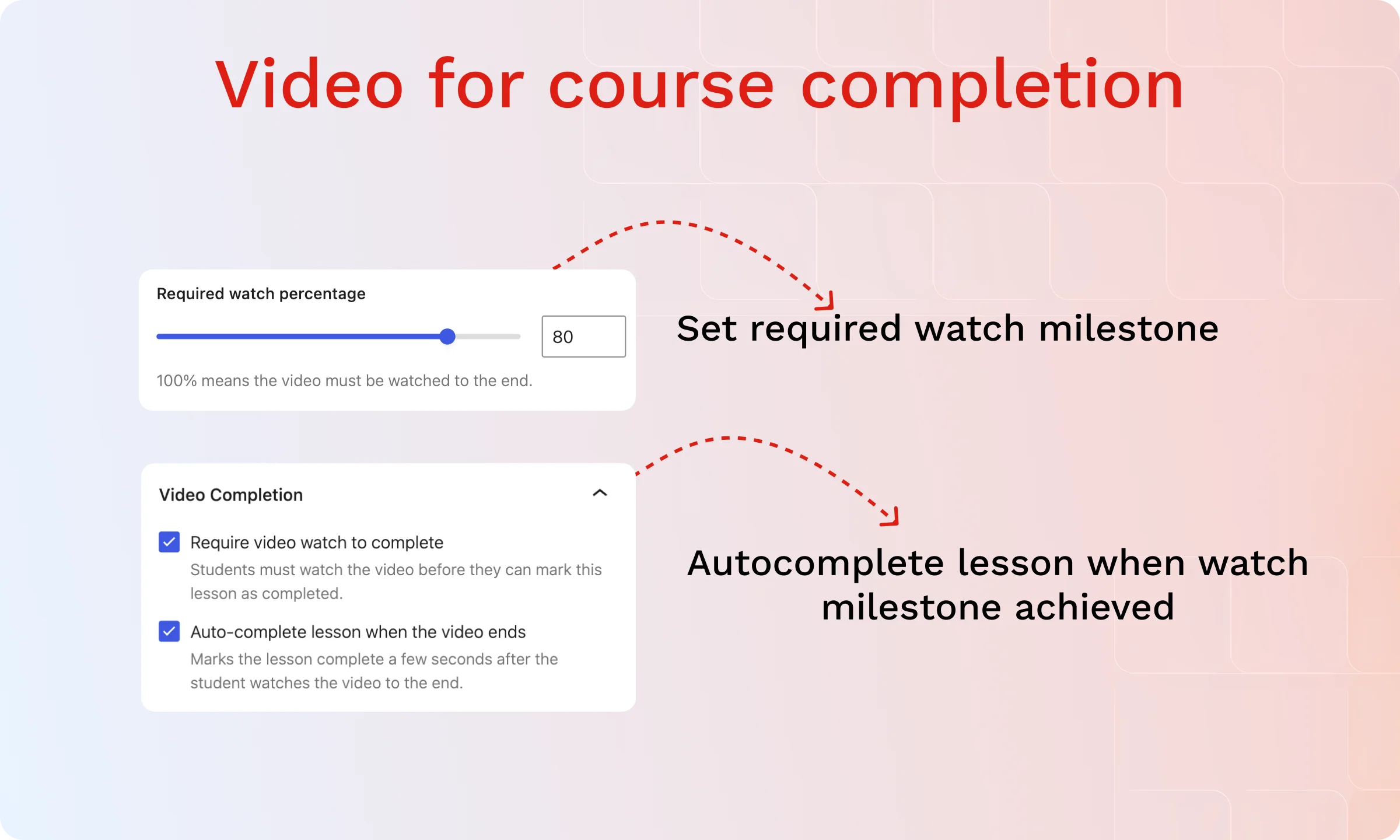
FluentCommunity Courses can also require a set percentage watched before a section counts as finished, not just reaching the end of the video. Completion then happens automatically at that threshold, or waits for the student to confirm it manually, depending on how the course is set up.
See Every Control Courses Can Use→
If You’re Running Courses Outside FluentCommunity
FluentCommunity already tracks completion this way on the free plan. LearnDash is the one exception with a confirmed integration, and it’s Pro: enable Video Progression and Use Fluent Player Video on a lesson or topic, and the LearnDash integration with FluentPlayer becomes the completion source, tracking actual watched coverage rather than just where the playhead sits, against a required percentage you set.
Watched coverage shows how much of the video a student actually watched, not whether they understood it, so treat the threshold as a coverage check, not a comprehension one. Completion can happen automatically at that threshold or wait for the student to click LearnDash’s own Mark Complete button, matching whichever setting the course already uses.
No Skip stops students from scrubbing past their furthest watched point, and a playback speed cap keeps a lesson from being finished at 2x. Completion writes back through LearnDash’s own system, so course structure and access rules stay exactly where they were.
Use FluentPlayer With LearnDash→
What’s Free and What Needs Pro
| Feature | Plan |
| Presets (Default, Modern, Simple, Minimal, Standard, Floating) | Free |
| Ambient preset | Pro |
| Chapters | Free |
| Speed control | Free |
| Inline mobile playback | Free |
| Custom branding (logo, brand color, control bar color) | Free |
| Fluent Forms and email capture layers | Free |
| CTA banner, hotspot, ad, and shortcode layers | Pro |
| FluentCRM connection, including automation triggers | Free |
| FluentCommunity connection, including Courses | Free |
| Private media protection (no public standalone page) | Free |
| Remember Playback Position | Pro |
| Video playlists | Pro |
| Timed Content | Pro |
| Video analytics dashboard | Pro |
| Subtitles | Pro |
| Media sources: self-hosted, YouTube, Vimeo, audio | Free |
| Media sources: BunnyCDN, Mux | Pro |
| LearnDash video progression and completion tracking | Pro |
See the Full Free vs Pro Breakdown→
When This Isn’t the Priority
FluentPlayer isn’t the right fit for every course setup. Worth naming plainly:
- The course platform is fully bundled, hosting, quizzes, certificates, and player in one, and switching the video piece alone doesn’t change enough to justify the move.
- The video is a single free preview with no gating, no progress tracking, and no lead capture attached to it.
- Quizzes, grading, or certificates need to live inside the player itself. That’s LMS territory, not what a video player is built to do.
How to Tell If It Fits Your Situation
| This fits if | This isn’t the priority if |
| You’re building courses inside FluentCommunity and want native player controls, not a workaround | Your course platform already bundles video, hosting, and grading, and it’s working |
| Students need to navigate by chapter or pick up where they left off, not just hit play | You’re publishing one free, ungated preview video with no real course structure around it |
| You want a completed lesson to trigger a FluentCRM follow-up, not just log a view | Your course has no CRM or email follow-up attached to it |
| You want a resource or note to appear at an exact moment in the video, not buried in the description | You don’t need extra content tied to specific video moments, the video and description alone are enough |
| You’re setting this up yourself and want it inside WordPress, not a separate dashboard | Your LMS plugin’s native progress tracking is the deciding factor and its FluentPlayer integration isn’t confirmed yet |
| You’re on LearnDash and want completion tied to real watched coverage, not just reaching the end | Your LMS isn’t LearnDash, and its integration with FluentPlayer isn’t confirmed yet |
How to Test It Before You Commit
Run this on one real lesson first.
- Install FluentPlayer free and embed one real lesson video, not a placeholder clip.
- If you’re on FluentCommunity, build the lesson inside a Course, not a Space, and confirm you get full player controls.
- Add chapters to the lesson and see whether resume playback would actually get used before assuming you need it.
- If you’re gating pages another way, protect the page first, then confirm the video file also stays out of reach at its direct URL.
- Add a Fluent Forms layer at a real timestamp, confirm the FluentCRM trigger fires, and only then decide whether playlists, Timed Content, or analytics are worth Pro.
- If you’re on LearnDash Pro, enable Video Progression on one lesson, set the required percentage, and confirm it completes the way your course expects, automatically or by the student clicking Mark Complete.
Install Before You Compare Another Feature List
Every extra day spent reading comparison pages is a day the actual test could have already told you whether FluentPlayer covers your course. Waiting has a cost too: a rebuild after Pro is purchased or students are already enrolled.
Install FluentPlayer free and run it against one real lesson. That answer beats anything a features page can give you.
Frequently Asked Questions
Is FluentPlayer free to use for a course?
Yes. The free plan includes chapters, custom branding, Fluent Forms and email capture layers, and a full connection to FluentCommunity and FluentCRM. Analytics, playlists, and resume playback require Pro.
Does FluentCommunity give full player controls, or just basic ones?
It depends on where the video sits. Courses get full FluentPlayer controls. Spaces are limited to skin, brand color, control bar color, play button color, and a progress bar toggle.
Can someone reach my course video without going through the protected page?
A video set to private returns a 404 on its own standalone page and stays out of sitemaps and search. It plays only where you’ve embedded it.
Do I need Fluent Forms Pro to add a quiz or registration form inside a video?
No. The free Fluent Forms layer works inside FluentPlayer’s free plan; no Pro on either plugin is required for a basic form or email capture placement.
What if I use an LMS plugin instead of FluentCommunity?
FluentPlayer still works as the video layer on the lesson page. LearnDash has a confirmed integration on Pro, with completion tied to actual watched coverage. Other LMS plugins don’t have this yet; check current status before assuming the same depth.