

A video sales letter is supposed to close the sale before a prospect ever talks to a human. Most of them stop short of booking a single call.
The video usually lives on one platform, Vidalytics or Wistia, and the booking link sits somewhere below it on the page. A viewer watches most of the pitch, closes the tab, and leaves no record they came close to saying yes.
The problem isn’t the script. The problem is where the booking request lives once the pitch ends.
Move it inside the video itself, into an interactive layer using FluentPlayer, right where the viewer has enough context to say yes. No second page required to close.
TL;DR
- Move the booking request inside the video itself, timed to the moment the pitch earns it, instead of leaving it on a separate page
- Show a different layer to a first-time visitor than to a contact FluentCRM already knows
- Tag anyone who sees the booking layer and skips it, so the follow-up goes to people who almost said yes
- Use FluentPlayer’s retention data, not a guess, to decide where that ask actually belongs
The Gap Between a VSL That Gets Watched and One That Gets Booked
The gap isn’t attention. It’s distance: how many steps sit between believing the pitch and landing on a calendar.
Every extra step is a place to lose someone who was already sold. A viewer who finishes the video and believes it still has to act on that belief somewhere else, and if they never make the click, nothing on the other end knows they were one step from booking.
Here’s what the detached setup actually costs:
- A viewer reaches 90% completion and never finds the link
- The drop-off leaves no trace if they don’t click through
- A follow-up sequence, if one exists, treats them the same as someone who watched ten seconds
- A booked call and an abandoned pitch look identical in the data
Here’s the same moment with the request inside the player:
- The calendar renders over the video at the exact point the offer lands
- Booking happens without leaving the player
- A skip becomes a signal instead of a dead end
- FluentCRM knows exactly how far someone got, watched or skipped, before any follow-up gets written
None of this repairs a weak pitch. Before wiring any of it, the script still has to do its job first.
Get the Script Right Before You Wire the Pipeline
The hook, the problem, the promise, the proof, the offer. This structure isn’t a secret. Search how a VSL works and the AI Overview lays out the same five beats a dozen YouTube channels already teach.
None of that structure is broken. What’s broken is where the offer points once the pitch lands. Fixing it is the rest of this post’s job.
Use these five prompts in order, one at a time, filling in your own specifics before touching what’s on screen:
1. Hook
My audience is [specific role or situation]. Their biggest frustration with [problem] is [the pain, in their own words]. Write three 10-second hooks naming this frustration in the first sentence, no throat-clearing.
2. Problem
List the three consequences my audience is living with because [problem] stays unsolved. Write each one the way my audience would say it out loud, not the way a marketer would summarize it.
3. Solution
My system for solving [problem] works like this: [your actual steps]. Explain why this beats [the alternative they’re already trying], plain language, no jargon.
4. Proof
Here are three real results: [actual numbers, outcomes, or client names]. Turn each into one sentence I could say on camera without sounding like a testimonial slide.
5. Offer and CTA
The call I’m asking people to book is [what happens on it, how long it runs]. Write the exact line telling the viewer what to do next, one sentence, no urgency language, no “don’t miss out.”
A script built this way still needs somewhere to send the yes. Nobody selling VSL templates writes about where the yes lands next.
Putting the Booking Request Inside the Video
FluentPlayer places the booking request with one setting: a layer’s Start Time.
Every Interactive Layer runs on that same field. Set a timestamp, and the layer appears over the video at that exact second, no redirect, no separate page to load. The free version ships with two layer types built on it, a Fluent Forms layer and an email capture layer, both placed the same way.
Pro adds three more: CTA banners, hotspots, and Shortcodes. The Shortcode layer accepts any WordPress shortcode, including FluentBooking‘s, so a live booking calendar renders directly inside the player at whatever timestamp the pitch actually earns it. This is the booking layer this post keeps coming back to, technically a Shortcode layer holding a FluentBooking calendar underneath.
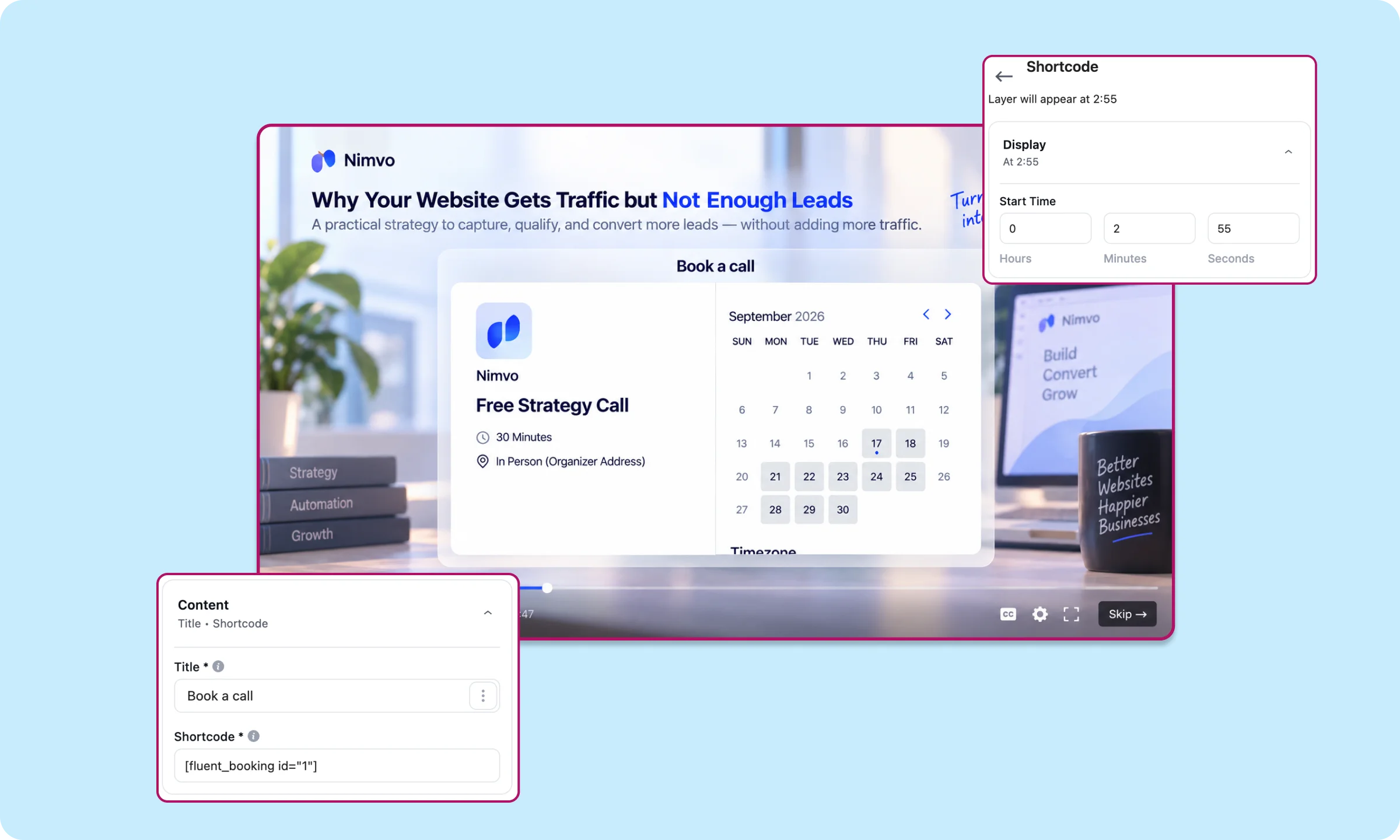
The layer behaves like any other. A Skip control sits in the corner, and dismissing it doesn’t pause or lock the video. Nobody gets forced into booking, the calendar just sits where the pitch already built the case for it.
Start with whichever free layer fits, Fluent Forms for a fuller qualifying question or two, email capture for a single field, and place it wherever the pitch first asks the viewer to identify themselves.
The same layer can also say something different depending on who’s already watching.
Download FluentPlayer For Free→
Showing the Right Layer to a Returning Contact
The same layer, the same Start Time, can show something different depending on who’s watching.
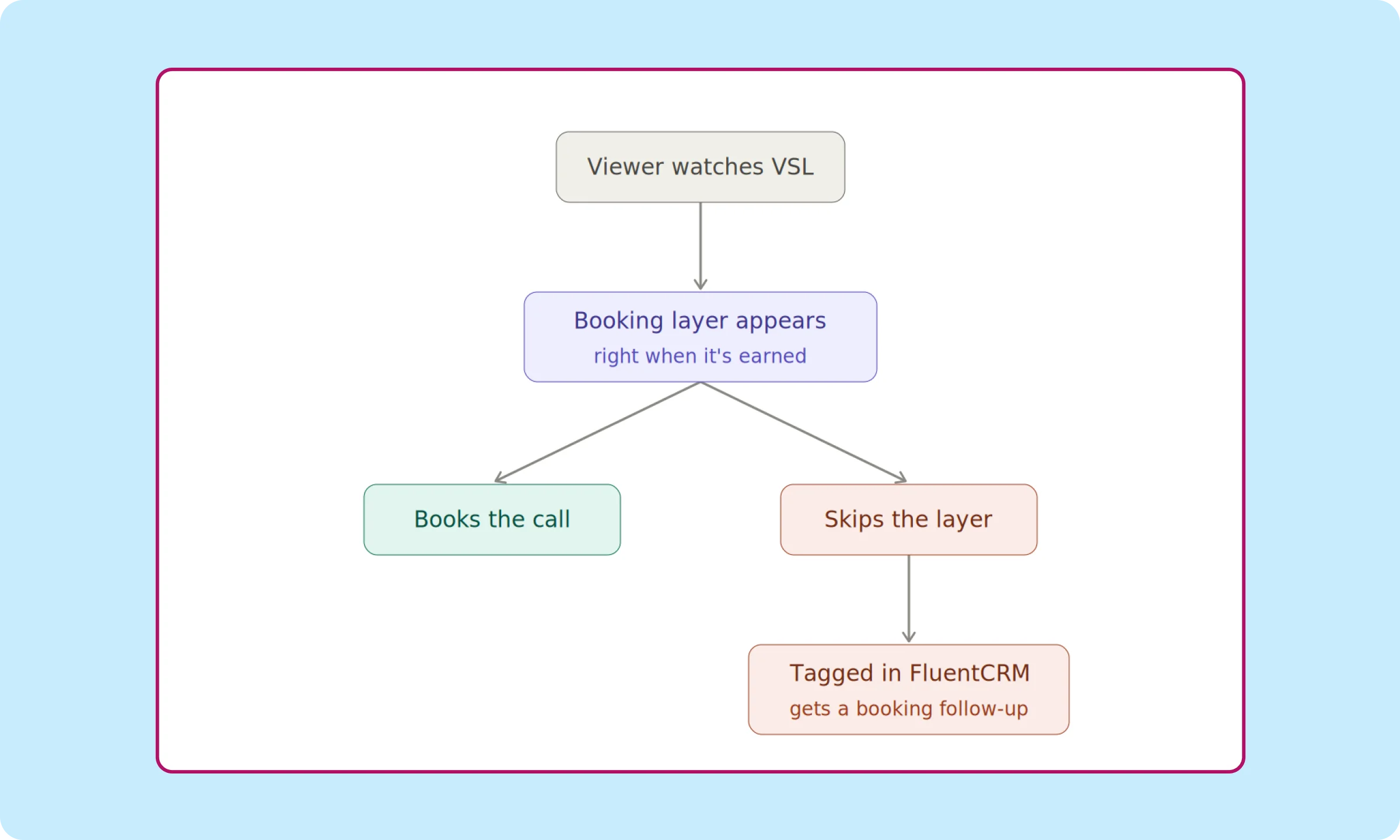
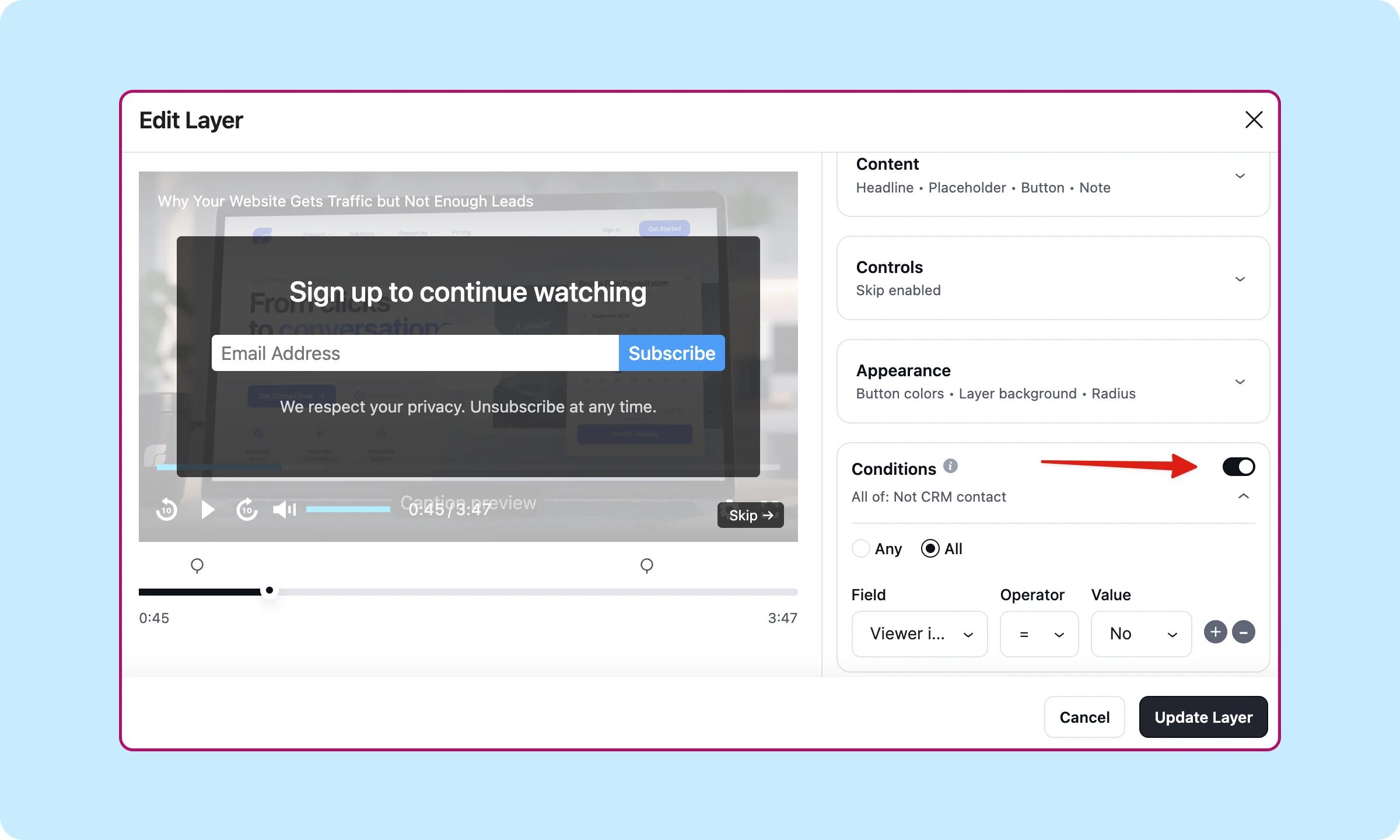
Conditional rules attach to a layer and check it against FluentCRM before deciding what renders. WPManageNinja’s own launch copy uses almost this exact setup as the example: a first-time visitor sees the email form, a returning FluentCRM contact skips it and sees something else instead, configured in the layer’s Conditions panel.
Applied to a VSL, that split looks like this.
A visitor not yet in FluentCRM
- Condition: no existing contact record
- Layer shown: the free Fluent Forms or email capture layer, same timestamp as always
- Outcome: enters FluentCRM as a new contact, tagged, ready for the automation covered next once they interact with the booking layer
A contact already in FluentCRM
- Condition: tagged from an earlier form fill, lead magnet, or prior visit
- Layer shown: the booking layer, FluentBooking calendar, same timestamp
- Outcome: skips the email request entirely, since the pitch already has their contact info, and goes straight to booking
A first-time visitor and a known contact are already sitting at different points in the pipeline. The layer should already know which one is watching.
Catching the Viewer Who Watched but Didn’t Book
The Skipped event fires the moment a known contact sees the booking layer and dismisses it, not at some general drop-off point in the video.
The trigger sits in FluentCRM under Fluent Player, “Media Layer Interaction”.
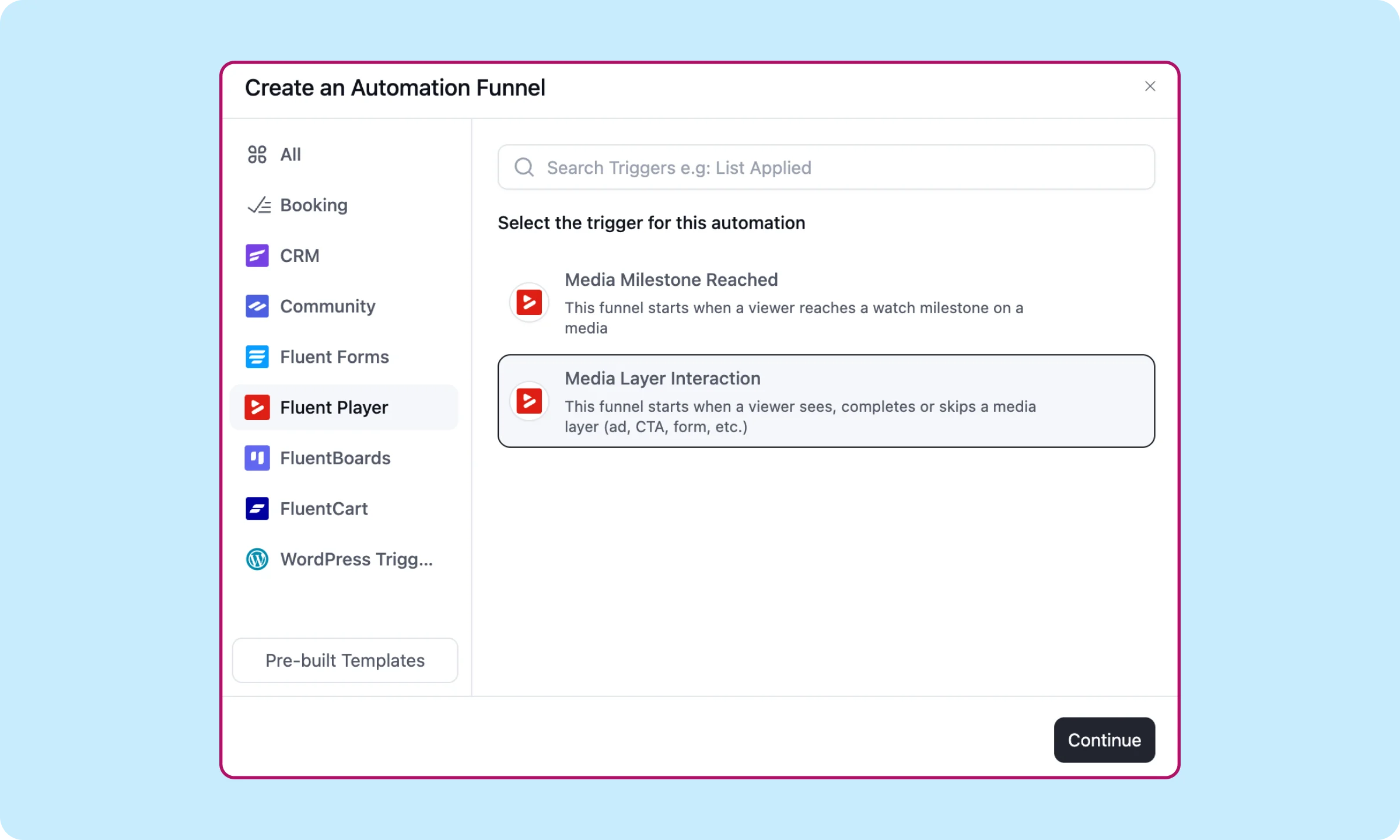
Target Layers selects the specific booking layer, not the whole video, so the signal stays precise; someone saw this exact ask and passed on it. Layer Event is set to Skipped.
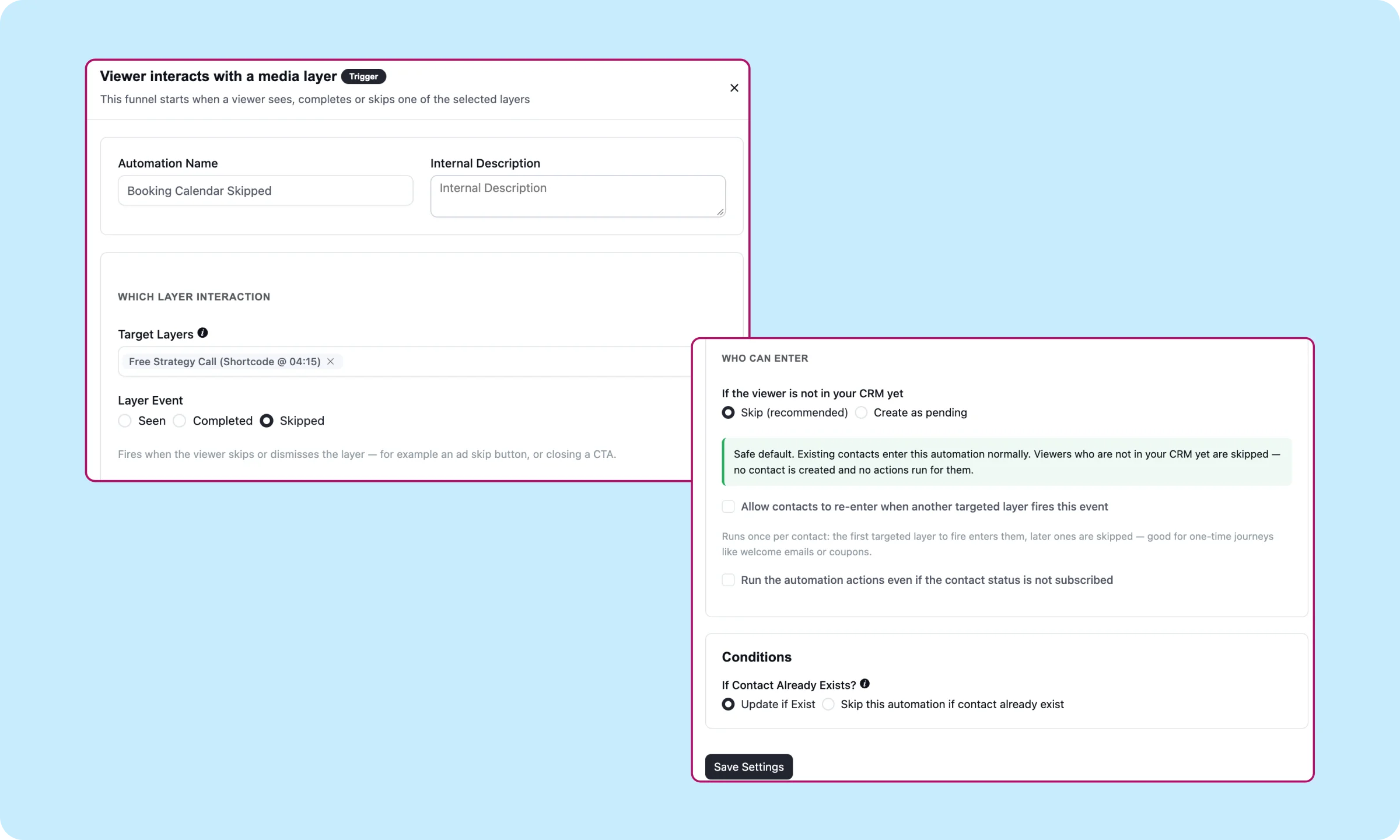
One setting decides whether this fires at all. Who Can Enter defaults to skipping any viewer not already in FluentCRM, safely, no contact created, no action run. An anonymous visitor who skips the booking layer generates nothing.
That’s why the free capture layer covered earlier isn’t just a lead magnet. It’s what makes a viewer visible to this trigger in the first place. Someone has to be known before they can be caught skipping.
Funnel action from there: tag the contact, something like “Saw the booking layer, didn’t book,” then straight into a follow-up sequence with a direct booking link. No re-pitch needed, they already sat through the offer once.
One close needed before this counts as done. FluentBooking has its own trigger, New Booking, fired the moment a booking confirms. Wire it to strip the “didn’t book” tag the instant that happens, or the sequence keeps chasing someone who already said yes.
Catching a skip only matters if the layer was sitting somewhere worth watching to begin with.
Learn the full setup about automation triggers→
Reading the Drop-Off Before You Touch the Script
Section 3’s Start Time field is a setting made on a guess until something proves it right.
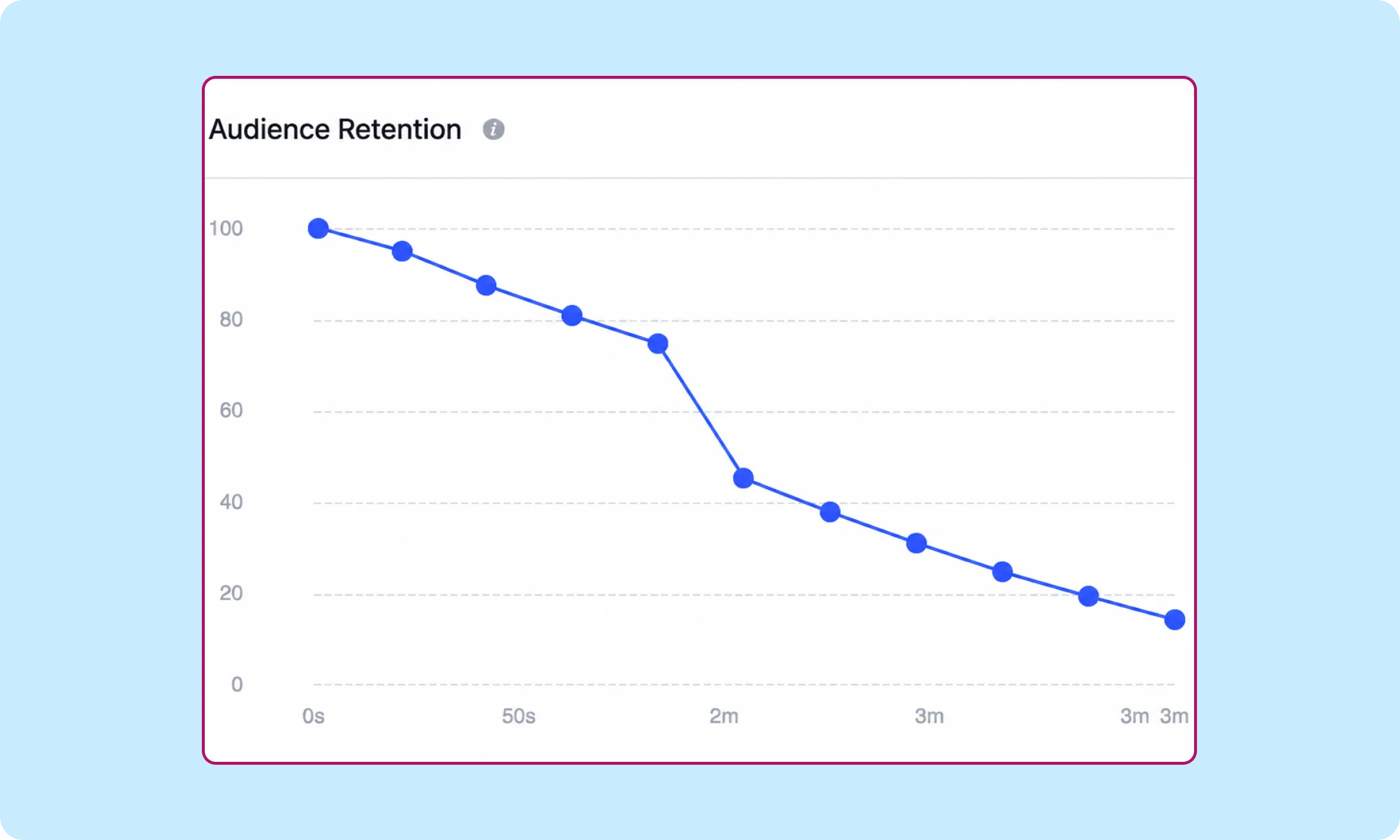
FluentPlayer’s Pro analytics dashboard includes an audience retention graph, a second-by-second view of what percentage of viewers are still watching at each point in the video, not just a single completion percentage at the end.
That graph is what actually answers where the booking layer belongs. A completion rate of 40% says something happened. The retention curve says where. A sharp drop right after the proof section starts means the case studies aren’t landing, and no layer placed after that point will get seen by the people who already left.
A plateau instead of a cliff at that same point means the pitch is holding, and that’s where the layer should sit, timed to the moment retention shows people are still there in force, not wherever felt right when the video was built.
Worth a related read here too: Video Analytics for WordPress Courses: What Creators Should Track covers the same retention-graph mechanism in more depth, built for course lessons rather than VSLs, but the read applies directly.
This isn’t a one-time check. Retention shifts as more people watch, and the Start Time set on day one is worth rechecking once real viewers have actually run through it, not left as a guess that happened to get lucky.
None of this costs anything to check. What it costs to build out fully depends on what’s already running.
Get FluentPlayer Pro to use video analytics→
When This Is Worth Building and When It Isn’t
The tools aren’t the decision. The question is whether not knowing why a booking didn’t happen actually costs you anything.
Worth building
The site is already on WordPress, FluentBooking or FluentCRM is already running or easy to add, and the VSL gets enough volume that a handful of watched-but-skipped viewers every week is worth a wired-up follow-up rather than a shrug. The payoff compounds. Every viewer who skips the booking layer becomes a known, tagged contact instead of a number that vanished from the analytics.
Fine as-is
The VSL is one piece inside a ClickFunnels page with Wistia hosting and a Calendly link already doing the job, volume is low enough that a spreadsheet could track who booked by hand, or nobody on the team is going to open FluentCRM’s automation builder more than once. Bolting a CRM-wired pipeline onto a funnel that already converts fine is work with no one on the other end to benefit from it.
Free gets the Fluent Forms and email capture layers, both with the same Start Time control. It’s real, and it’s enough to test whether an in-video request changes anything at all. What Pro adds is the part that turns a single video into a system, the booking layer, the conditional split between cold and known viewers, and the Skipped trigger that catches the ones who almost said yes.
A VSL that converts is still just a video. The pipeline is what happens to everyone it doesn’t convert.
Start With the Layer You Already Have
The free version already ships the layers this piece is built around: Fluent Forms or email capture, both with their own Start Time field. Download FluentPlayer free from WordPress.org, add whichever fits, and set the timestamp before touching anything else.
The booking layer, the conditional split, and the Skipped trigger turn one layer into a pipeline. Explore FluentPlayer Pro once the free version proves the idea is worth the rest. One setting is the whole difference.
Frequently Asked Questions
What is a video sales letter?
A video sales letter is a single video built to replace a long-form sales page, walking a viewer from a problem straight through to an offer, with no salesperson on a call needed to close it.
How does a VSL work?
It moves a viewer through five beats: a hook that names who this is for, the problem stated in the viewer’s own words, a solution or system that fixes it, proof that the system works for others, and an offer with a clear next step. None of this is new, the structure is documented everywhere. What’s not usually covered is where the final step sends the viewer, which is the focus of this post.
What’s the difference between a VSL and a VSL funnel?
A VSL is the video itself. A VSL funnel is everything built around it, the landing page, the booking or checkout step, and whatever follows if the viewer doesn’t convert on the first watch. Most VSL funnel advice covers the page and the script. This post covers the follow-through most of it skips.
What if my VSL doesn’t use an in-video booking layer?
FluentCRM’s Media Milestone Reached trigger works off overall watch behavior instead, Started, 25%, 50%, 75%, or Completed, with Completed pairing to its own Completion Threshold field, 90% by default, since outros get skipped and a literal 100% rarely fires. It’s a broader signal than the Skipped trigger this post builds around, watched enough to matter, rather than confirmation someone saw and passed on a specific request, but it works without an in-video layer at all.