

It’s the Tuesday before Thanksgiving, and the Black Friday email is ready to send, discount code tested. The list it goes to hasn’t heard from you since a product update in July.
Most advice on pre-Black Friday video campaigns stops at a deal video for that email. The video lands in the same cold inbox as the text, in front of people who stopped opening months ago.
Your full list holds everyone who subscribed since spring. A much smaller group watched an October video to the end and asked for early access, and pre-sale revenue concentrates there.
Adobe reports Black Friday growth outpaced Cyber Monday for the second year running in 2025, as shoppers took early deals. The video has to reach buyers before the deal email does.
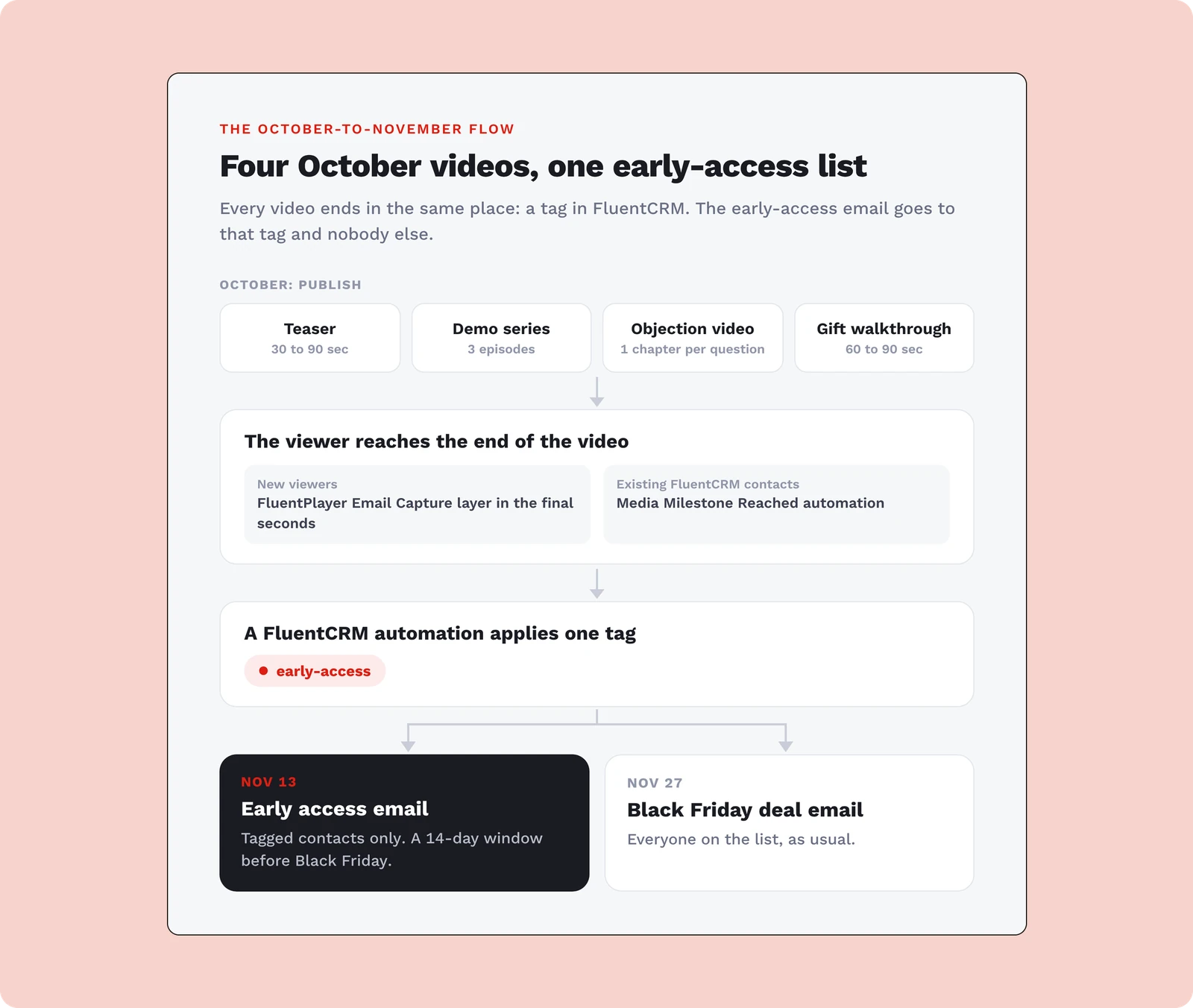
Each campaign below ends in an email capture, so each one helps you grow your email list with video before the sale. The case starts with why an October video beats a November deal email.
TL;DR
- Early access before the BFCM rush earned more per send in 2025
- Put the email capture in the final seconds of the video, after viewers get what they came for
- Pick one of five campaigns, from a teaser to a gift walkthrough
- Tag the viewers who submit, and send the early-access offer to that tag only
- Record in October and check the player before November traffic arrives
Why an October Video Beats a November Deal Email
An October video beats a November deal email because it builds the list your early-access offer goes to. Klaviyo’s 2025 agency case studies show why that list matters. Samplize’s 14-day early-access window brought in over $87,000 and was the single biggest driver of its year-over-year growth.
Harmless Harvest saw a similar pattern. Its early VIP sale earned 110% higher revenue per recipient than campaigns sent during the core BFCM window. Across 10,000 Klaviyo brands, repeat-customer revenue grew 13.5% in BFCM 2025, as shoppers answered early access and VIP perks over blanket discounts.
These numbers come from email and text campaigns, not video, and Klaviyo labels its recap data approximate and unaudited. The argument here joins two findings. Early-access lists earn more per send, and the end of a video is where viewers most often hand over an email.
Take a hypothetical seller as the running example: a $149 photo-editing course on WordPress and a list of 2,000 subscribers. This seller’s October video has one job. It finds the people who finish, collects their email, and tags them for early access.
How Every Pre-Black Friday Video Campaign Collects the List
Every campaign here collects emails the same way: an email capture placed in the final seconds of the video. Wistia’s lead-form data shows why placement matters. Ask too early and as few as 5% of viewers fill out the form. The end of the video is usually the best spot.
Here is how placement plays out for the photo-editing teaser:
- A capture at 0:05 fails because the viewer doesn’t know what the course covers yet
- A required capture at the midpoint forces sign-ups from people who only wanted the rest
- A skippable capture in the last 10 seconds works because the viewer has seen the lesson
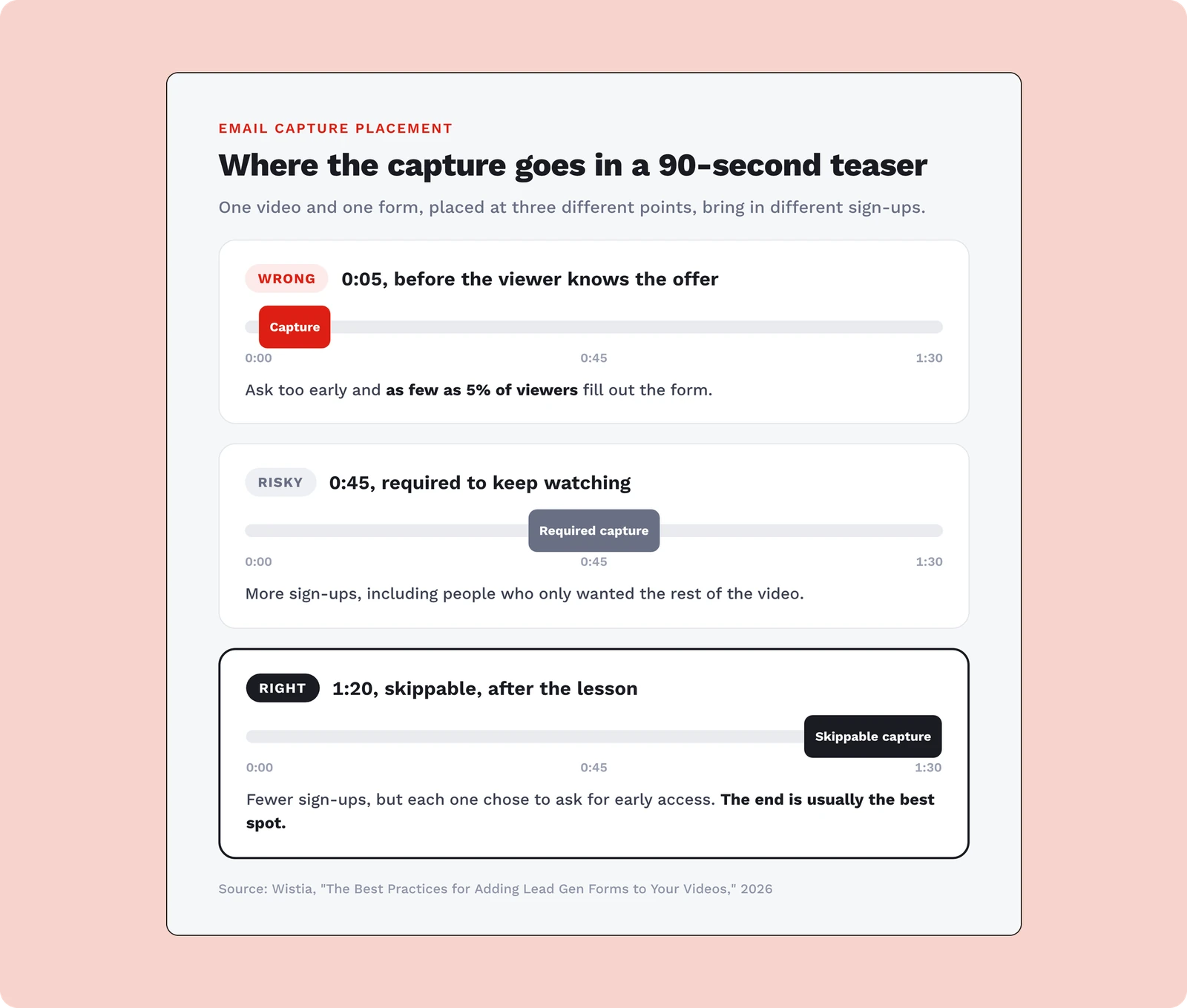
Gating is a tradeoff too. Requiring the form inflates sign-ups with people who only wanted the rest of the video. Leaving it skippable means every email came from someone who chose to give it, and Wistia notes those viewers are likely to convert. For an early-access list, keep it skippable.
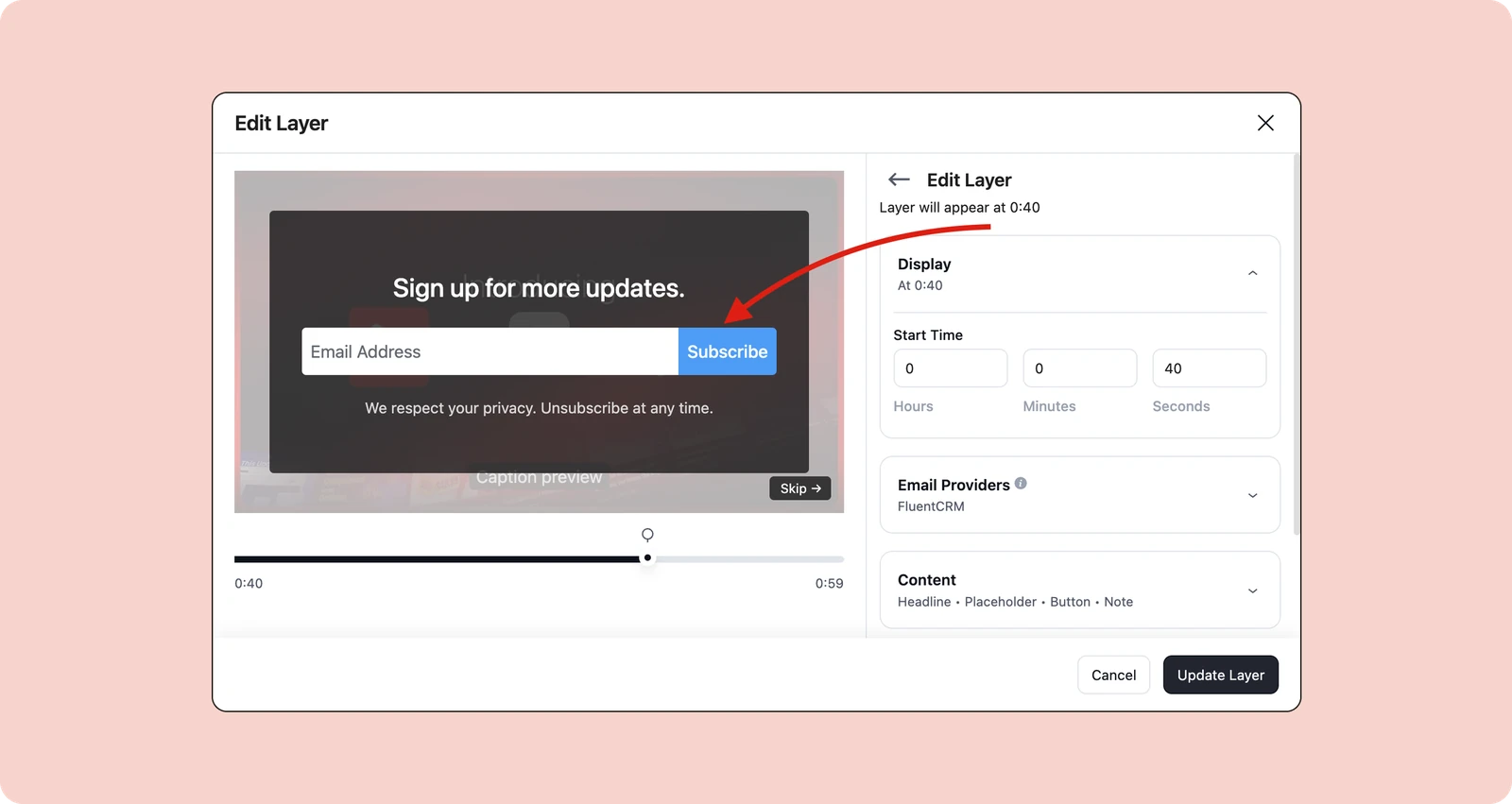
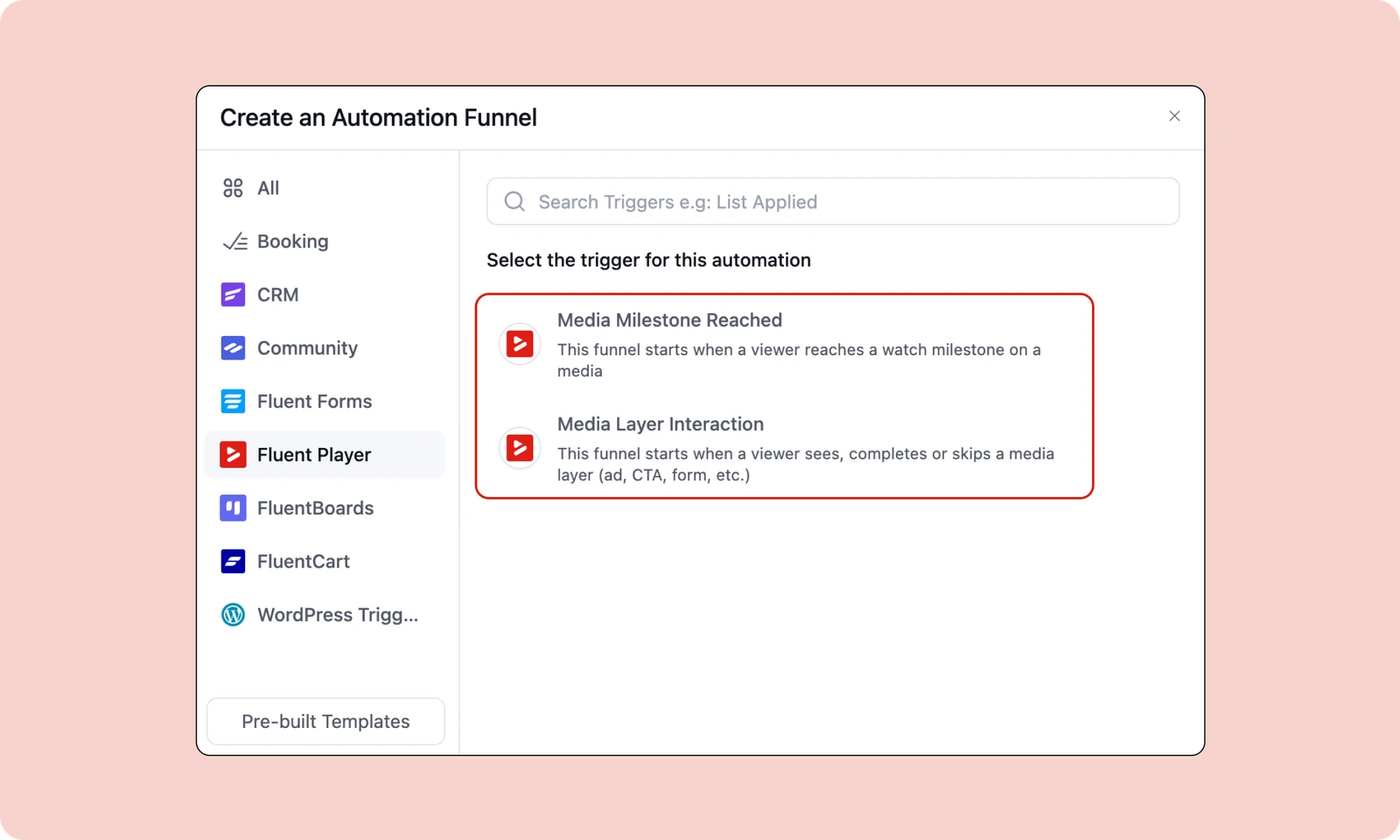
In FluentPlayer, this is the free Email Capture layer, set to appear in the video’s final stretch. A FluentCRM automation with the Media Layer Interaction trigger then tags each viewer who submits. With double opt-in on, the contact stays Pending, and the automation starts once they confirm.
If you haven’t added a capture layer before, install FluentPlayer free from WordPress.org and add one to any existing video. The tagging steps, including two settings people often miss, live in the guide to tagging viewers who finish a video.
1. A teaser video that collects emails before the deal exists
A teaser announces a sale without naming the discount, and it exists to collect emails. Klaviyo used a teaser for its Beyond Black Friday docuseries, releasing a trailer on November 30. Alicia Thomas, who ran the series, told Wistia the tease was one reason it succeeded.
Klaviyo’s timing ran the other way. Its first episode went live right after Black Friday, aimed at the post-holiday lull in ecommerce. For a seller with a sale to fill, the quiet window is October, before competing sale emails start landing.
Here is the teaser campaign for the photo-editing course:
- Publish in mid-October
- Keep it to 30 to 90 seconds, built on one before-and-after edit from the course
- Close with “Get early access to the course sale” in the final seconds
- Tag everyone who submits for a first look at the offer in November
A teaser needs one video and one layer, which makes it the easiest campaign to ship this week. Getting it in front of enough viewers is a separate problem, and the guide to growing your email list with video covers that side.
2. A demo series that sorts buyers from browsers
A short demo series, released one episode a week through October, shows the product working and sorts serious buyers from casual viewers. Wistia’s lead-capture data puts the original series first. They convert 30% of viewers into leads on average, against 20% for sales videos.
For the photo-editing seller, that means three episodes of two to four minutes, each fixing one common editing problem. If a viewer is already a FluentCRM contact, a Media Milestone Reached automation tags them at one of its preset points.
FluentCRM runs each trigger once per contact by default. If one automation covers all three episodes, a viewer who finished episode one won’t enter again for episode three. Allow re-entry, or build one automation per episode, as the guide to video-triggered automations shows.
Here is the demo series for the photo-editing course:
- Publish one episode a week, starting mid-October
- Keep each episode to two to four minutes
- Close episode one with an email capture for viewers not yet on your list
- Tag finishers per episode to see who watched the whole series
3. An early access announcement only watchers recieve
The early access announcement is where the October work pays off, because it goes only to contacts tagged in the first two campaigns. Everyone else gets the standard Black Friday email later. The setup matches Harmless Harvest’s, where the early VIP sale out-earned core-window sends per recipient.
The video is short: you on camera, naming the offer, the opening date, and what tagged viewers get first. Send the link in a FluentCRM email to that tag only. Samplize ran its window for 14 days, so a November 13 send gives you the same window before Black Friday.
Here is the early access campaign for the photo-editing course:
- Publish on November 13, two weeks before Black Friday
- Keep it under 60 seconds
- Close with a link to buy at the early-access price
- Send it only to contacts tagged during the teaser and demo series
- Hold everyone else for the standard deal email on November 27
4. An objection video built from your support inbox
An objection video answers the three or four questions that stop people from buying, using wording from your support inbox and presale emails. Wyzowl’s 2026 survey found 63% of people would most like to learn about a product through a short video, against 12% for articles.
That survey drew on 266 respondents, so treat it as a direction, not a benchmark. Your support inbox is the stronger evidence. The photo-editing seller’s repeat questions are whether the course works with free apps, how long lessons take, and what happens after purchase.
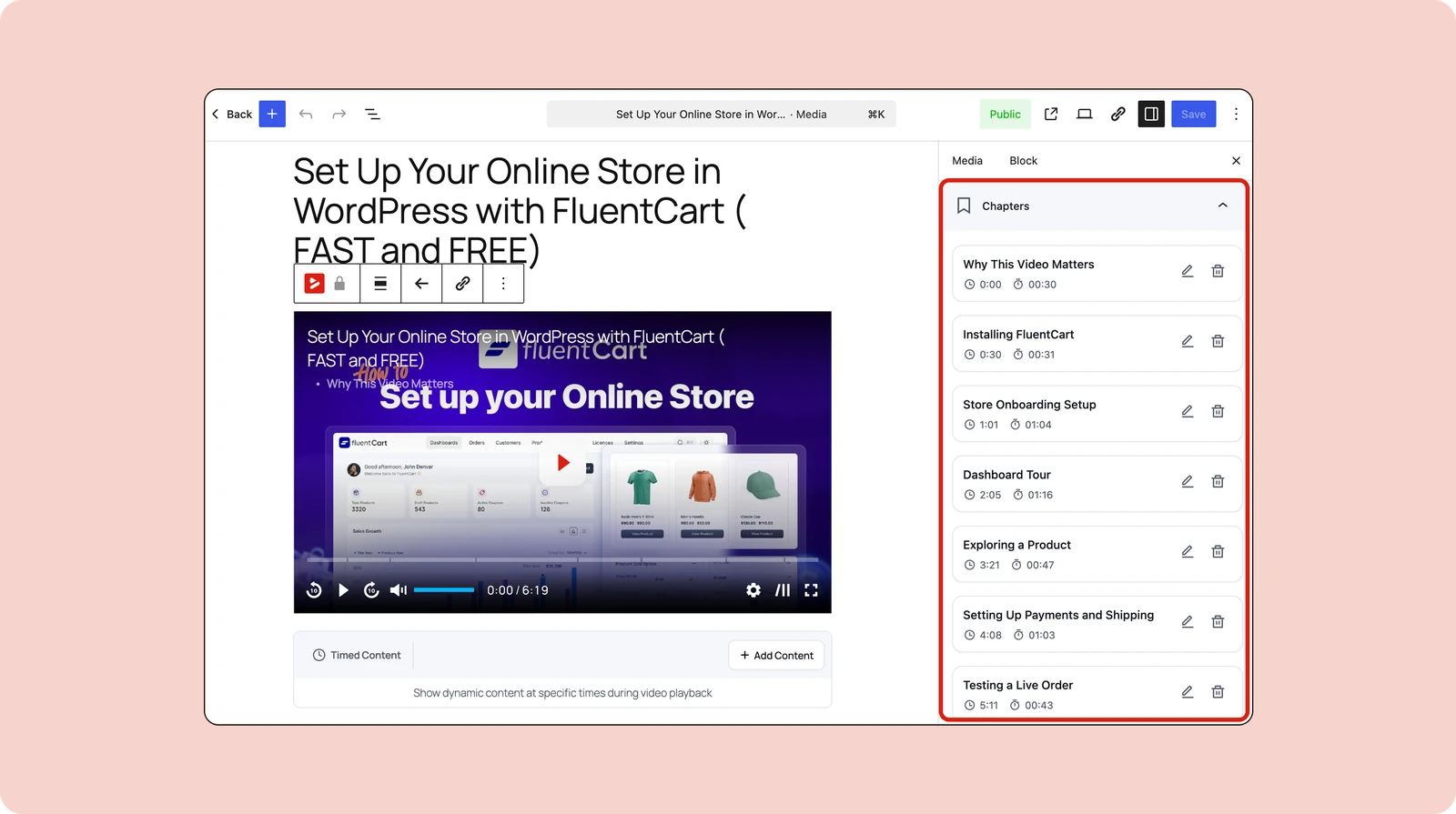
Give each objection its own chapter. Chapters are free in FluentPlayer, and timestamp links let you answer a presale email with a link to the exact chapter. The third question, what happens after purchase, is best answered by showing the first minutes of your onboarding video.
Here is the objection video for the photo-editing course:
- Publish in the last week of October and link it from presale replies
- Keep it to three to five minutes, with one chapter per question
- Close with an early-access ask in the capture layer
- Tag everyone who submits, the same as teaser viewers
Showing the first minutes of onboarding answers the setup worry directly. Buyers see the login, the first lesson, and where to start before they pay.
5. A gift walkthrough for course and membership sellers
A gift walkthrough shows a buyer how to give your course as a gift and what the recipient receives. It fits only sellers whose platform supports gifting. MemberPress sells a Gifting Add-on for this, and Tutor LMS calls October through December the peak season for course gifts.
The gift buyer is a different person from your usual student. They may never take the course, so a demo of lessons answers the wrong question. A gift buyer wants to see what the recipient receives: the email, the login, and the first lesson.
Course gifting is well documented, but published results from gifting videos are hard to find. Treat this as the experimental campaign in the set. It costs little to try when your platform already supports gifting, and it reuses footage from your onboarding video.
Here is the gift walkthrough for the photo-editing course:
- Publish in early November and keep it on the sale page through December
- Keep it to 60 to 90 seconds
- Close with an email capture offering a reminder before the sale opens
- Send recipients to the onboarding video as soon as they log in
Every gifted seat lands on your onboarding video, which makes it the first impression for someone you never sold to. The onboarding guide for new buyers applies to gift recipients as much as direct customers, so record it before you promote the gift option.
Check the Player Before October Traffic Reaches It
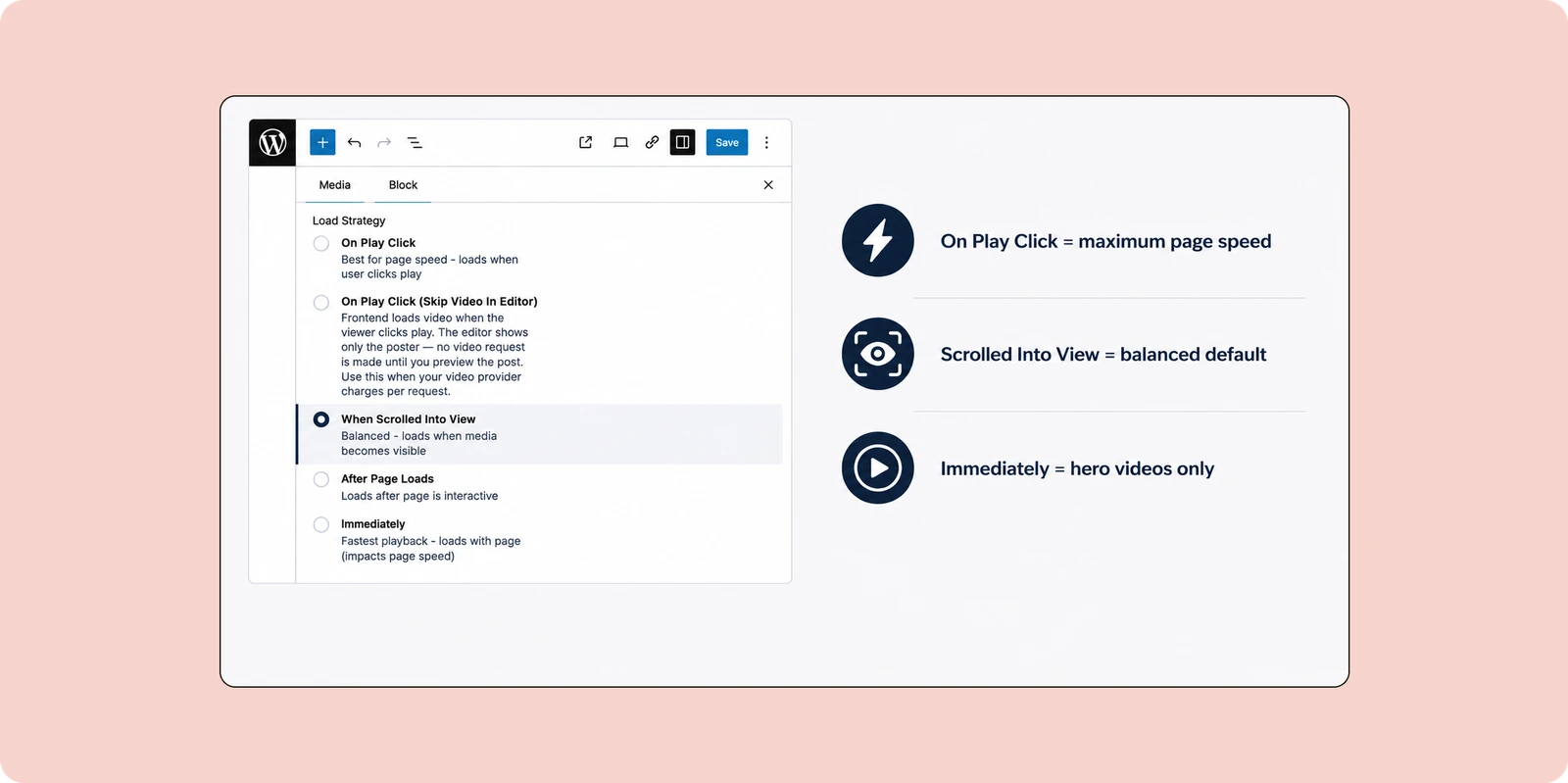
A teaser that stalls on a phone collects no emails, so check the player before any campaign goes out. Three free FluentPlayer settings cover the failures that stop viewers before the final seconds, where your capture layer waits. Run through them on a real phone, not only a desktop preview.
Check these before you publish:
- Inline mobile playback, so phone viewers stay on the page instead of jumping to full screen
- Load strategy, so the player doesn’t slow the page it sits on
- A custom thumbnail, so the video looks like a lesson before anyone presses play
Finding a playback problem on your own site during the sale week leaves no time to fix it. The guide to fixing common video problems covers the rest of the pre-launch checklist, such as Dropbox and Google Drive links FluentPlayer won’t fetch.
A Pre-Black Friday Video Calendar From October to Cyber Monday
The calendar below runs the photo-editing seller’s campaigns against Black Friday on November 27, 2026, and Cyber Monday on November 30. Each week holds one recording or sending task, so it fits around a solo seller’s normal work. Skip any campaign you lack material for.
| Week of | Task |
|---|---|
| October 12 | Check the player, set up the capture layer and tagging, record the teaser |
| October 19 | Publish the teaser, release demo episode one |
| October 26 | Release episode two, record the objection video |
| November 2 | Release episode three, publish the objection video and gift walkthrough |
| November 9 | Record the early access video, review who holds the tag |
| November 13 | Send early access to the tagged list only |
| November 27 | Send the Black Friday deal email to the full list |
| November 30 | Send the Cyber Monday email to the full list |
Everything above runs on the free version of FluentPlayer, paired with FluentCRM. The free setup knows who watched, but the video looks the same to everyone who opens it. FluentPlayer Pro adds conditions to layers, so one video shows different layers to different viewers based on CRM data.
The condition list includes “Viewer has CRM tag” and “URL query parameter.” Use either to show the early-access CTA Banner layer only to tagged viewers or visitors from the early-access email link. “Viewer is CRM contact” set to No hides the capture layer from people on your list.
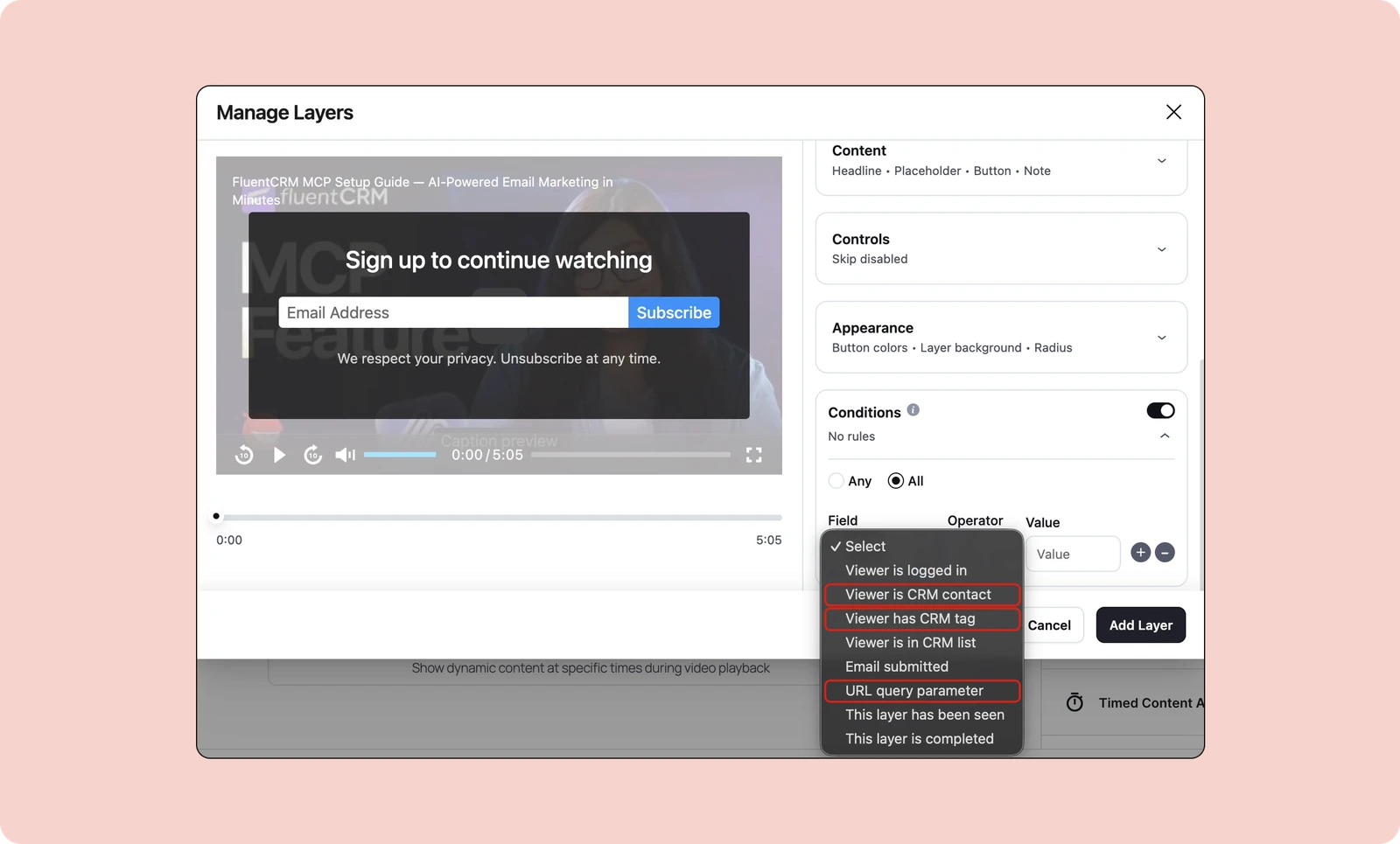
Conditional layers turn one video into both the public teaser and the early-access offer, with no second upload or separate page. The FluentPlayer Pro lifetime deal covers layer conditions, the CTA Banner layer, and audience retention data for every episode.
Start With the Campaign You Have Material For
Your Black Friday result depends on which list the deal email reaches, and October is when that list gets built. Pick the campaign you have material for, add the capture layer to its final seconds this week, and tag everyone who submits. The November email will reach people who watched.
Frequently Asked Questions
When should I start Black Friday marketing?
Start building the list in mid-October and send early access about two weeks before Black Friday. That gives tagged viewers a full 14-day window before the deal email reaches your full list on Black Friday itself. Starting later puts your teaser beside everyone else’s sale emails.
How long should a pre-Black Friday teaser video be?
Keep a teaser between 30 seconds and two minutes. In Wyzowl’s 2026 survey, 71% of marketers rated that range as most effective. That’s a self-reported opinion from a small sample, so check it against your own completion rate. A teaser viewers abandon never reaches the capture layer.
Should I gate my video behind an email form?
For an early-access list, no. Wistia’s data shows required forms collect more emails, while skippable forms filter for intent, because the people who submit chose to. Put a skippable capture at the end, after the viewer has seen the value, and tag the people who submit.
Do these campaigns work with a small email list?
Yes, because the campaigns build the list instead of depending on it. A teaser shared on social posts and your blog collects emails from people who never subscribed. A small, tagged list of finishers makes a stronger early-access audience than a large list that stopped opening.
Do I need a separate video for each campaign?
No. The demo episodes, objection video, and gift walkthrough reuse the same footage in different cuts. The onboarding walkthrough appears in two campaigns. A practical split is two recording sessions: one for the teaser and demo lessons, one for the objection and onboarding material.