

While researching Black Friday data for our BFCM series, I kept landing on the same split. Sale-day numbers looked strong in every report, with conversion rates up and new customers arriving in record volume. The repeat-purchase numbers in those same reports told a different story.
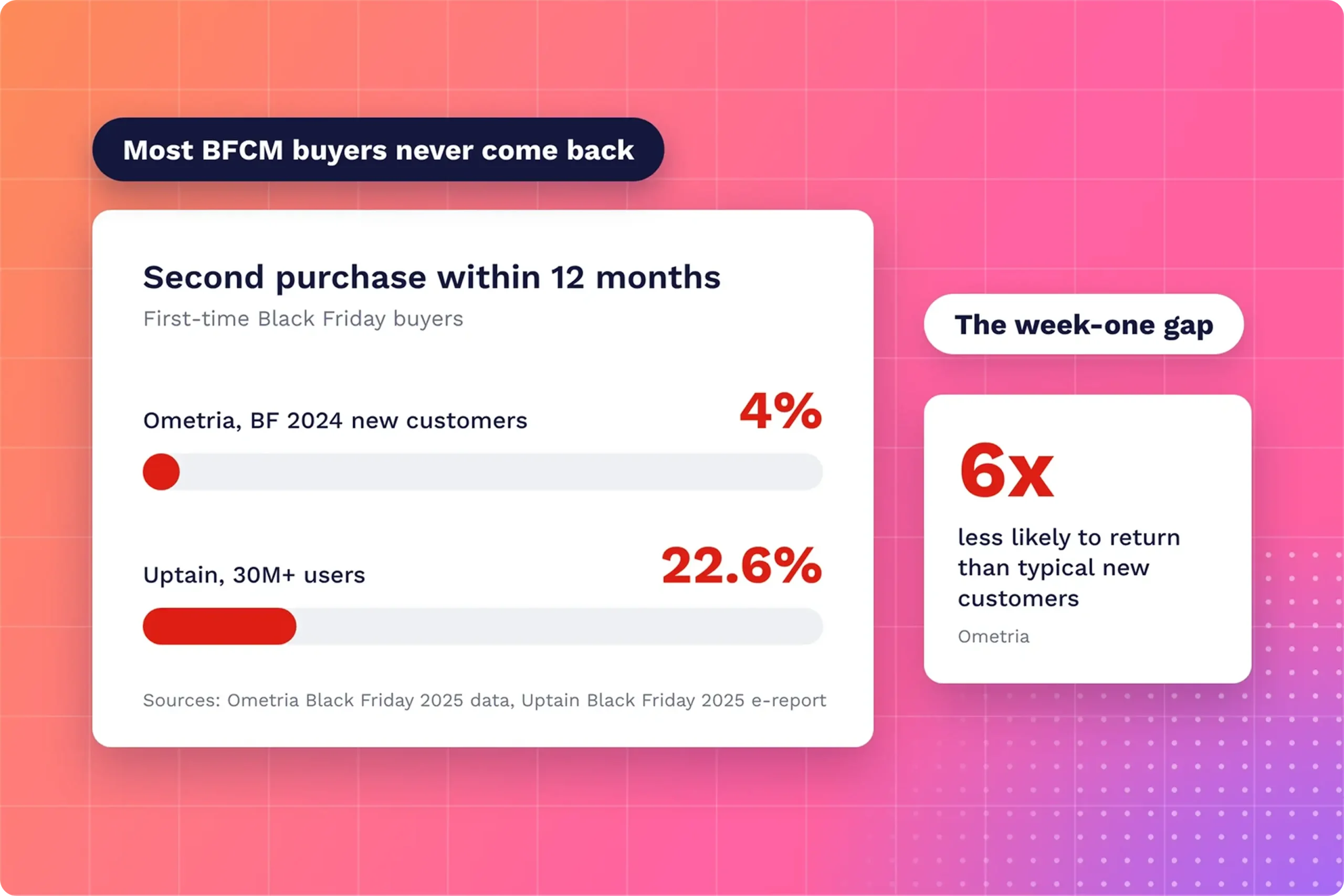
Ometria found only 4% of Black Friday 2024 new customers bought again within 12 months. Most sellers celebrate the November spike and never check what those buyers do in December. By then, a buyer who never opened the product has little reason to come back.
Week one is where that happens. A buyer who logs in, gets lost, and closes the tab has nothing pulling them back once the discount is gone. A short onboarding video in front of every new buyer gives them a reason to stay.
Below, I cover why Black Friday and Cyber Monday (BFCM) buyers rarely return and what an onboarding video does in week one. Then comes how to make one buyers finish, and the FluentPlayer features behind it. If you ran the pre-Black Friday video campaigns, this video is where those buyers land.
TL;DR
- Only 4% to 22.6% of first-time Black Friday buyers buy again within 12 months, depending on the dataset
- Most stores treat peak-season buyers like everyone else, with no onboarding built for them
- Build the onboarding video around one first win and send it within hours of purchase
- Split longer setups into chapters so buyers jump to the step they need
- Send gift recipients the video too, since they never saw your checkout
- FluentPlayer gives you free chapters, plus resume playback, playlists, subtitles and analytics in Pro
Why BFCM Buyers Rarely Become Repeat Customers
BFCM buyers rarely become repeat customers because most stores win the sale and skip the follow-up. Ometria’s 2025 analysis found Black Friday-acquired customers were 6x less likely to return than typical new customers. Only 11% of 2024 Black Friday shoppers came back for Black Friday 2025.
Other datasets report higher rates but show the same direction. Uptain’s study of over 30 million users found 22.6% of first-time Black Friday buyers bought again within a year. Older Conjura benchmarking, covering 2018 to 2020, put six-month lifetime value 9% lower, at 13% higher acquisition cost.
The cause shows up in Airship’s analysis of shopping app users. By week three, peak-week customers averaged 18% lower weekly retention than pre-holiday customers. Retailers still treated both groups the same, so a discount buyer got the welcome built for a loyal one.
Ometria’s own fix suits a WordPress seller well: build onboarding for peak-period customers and show value beyond the discount. For a course, plugin, or digital product, the value appears the first time the buyer uses it. Most stores stop at the receipt and leave the first use unguided.
What an Onboarding Video Does in Week One
An onboarding video gets a new buyer to a first win before the discount stops being the reason they bought. A first win is the moment the product proves its worth, such as a finished lesson or a published form. Without one, the purchase stays a deal.
Here is what the onboarding video does for a BFCM buyer in week one:
- Shows the first step after login, so the buyer never stares at an empty dashboard
- Answers setup questions before they turn into support tickets or refund requests
- Gives every buyer the same guidance at a volume no support team matches in sale week
- Shows what the product does beyond the discount, which sets up the second purchase
A confused buyer often asks for a refund. NRF and Happy Returns put 2024 US returns at about $890 billion, or 16.9% of sales. Not every return comes from confusion, but a buyer who never figured out setup has the easiest reason to ask for a refund.
Digital products add buyer’s remorse to the mix. MemberMouse, a WordPress membership plugin, lists a warm welcome and a quick start guide among its ways to lower refund rates. A buyer who uses the product on day one has less room for regret before the refund window closes.
Video suits this better than a help doc because buyers see the exact screen they’re about to use. A chaptered video also doubles as reference material. Buyers return to one step weeks later, and each return visit keeps the product in use past the first login.
How to Make an Onboarding Video Buyers Finish
An onboarding video buyers finish teaches one outcome, opens on the first step, and splits longer setups into sections. The six steps below cover planning, length, structure, and delivery. Each one targets a point where viewers commonly drop off, based on Wistia’s engagement data and research on self-paced courses.
Pick one first win
Choose the single result a buyer should reach in their first session. For a course, the first win might be finishing lesson one. For a plugin, it might be publishing the first form. Everything in the onboarding video leads to this result or moves to a later video.
For a course seller, an onboarding video built around the first win might follow this outline:
- An instructor hello and what the course delivers, in under a minute
- A platform tour showing where lessons, downloads, and the community live
- The opening of lesson one, so the buyer starts learning on day one
- Where to ask for help, in under a minute
Match the length to the job
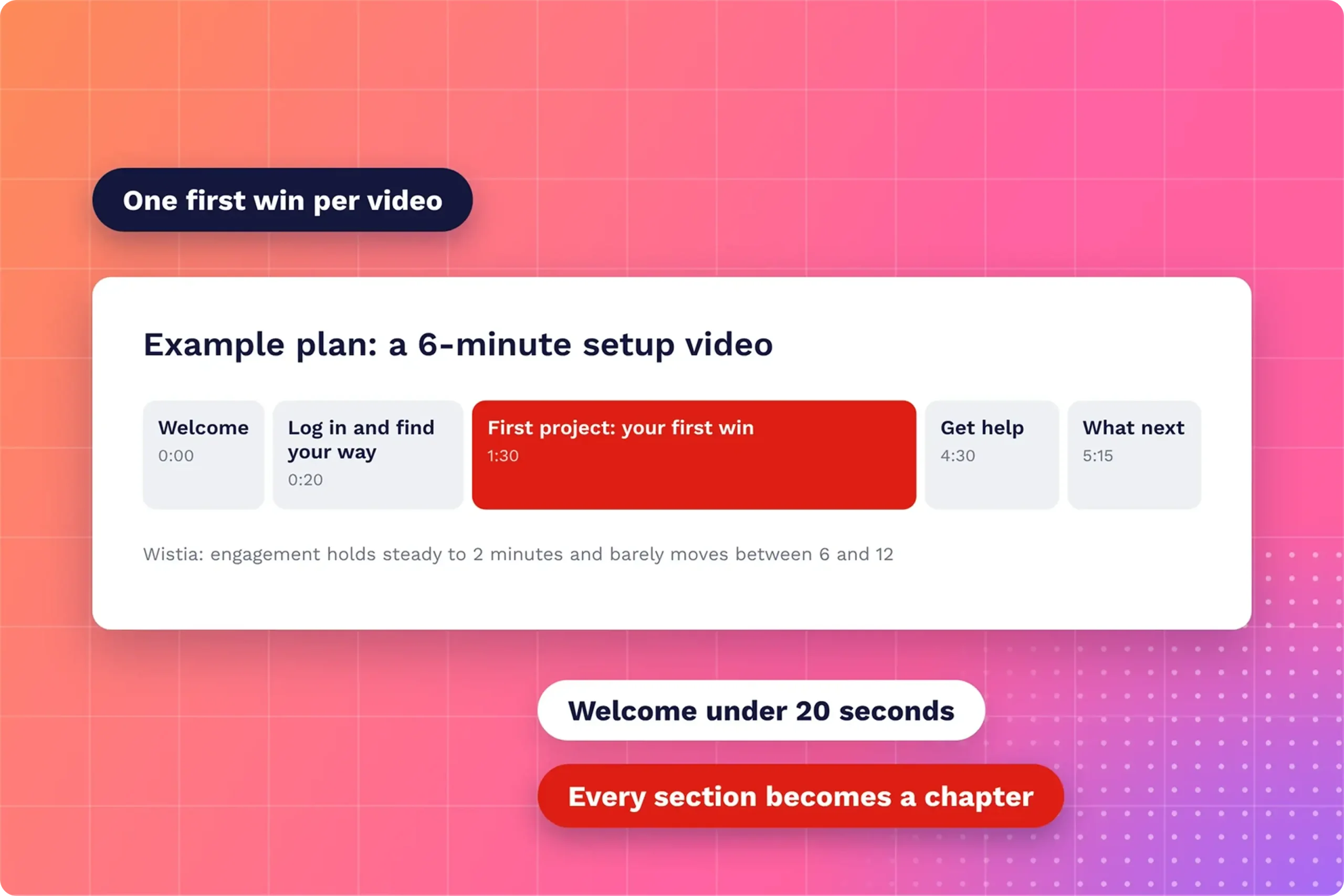
Wistia’s study of 564,710 videos found engagement holds steady up to two minutes, then drops sharply until about six minutes. Between six and 12 minutes, it barely moves. Keep a welcome video under two minutes. A setup walkthrough runs longer, as long as buyers can jump to any section.
Here is how that plays out by onboarding video type:
| Video type | Length | Purpose |
| Welcome video | Under 2 minutes | Says hello and states the first win |
| Single-task tutorial | 1 to 2 minutes | Walks through one step |
| Setup walkthrough | 3 to 6 minutes, chaptered | Covers the full setup in one sitting |
| Full onboarding course | A playlist of short videos | Spreads the setup across several sessions |
Longer is not a failure by default. Wistia’s State of Video report found a 30 to 60 minute video earns roughly half the engagement rate of a one to three minute video. It also earns over 10 times the total watch time, which matters more for onboarding.
Cut the warm-up
Viewers decide in the opening seconds whether to stay. Wistia’s audience retention data shows an average early drop of 4.9% for one to two minute videos. The drop reaches 17.3% for five to 10 minute videos. Open on the screen the buyer sees after login, not a logo.
Split long setups into sections
Give each step of the setup its own labeled section, because buyers often come back for a single step. A 2016 study of 543 students in self-paced courses found learners who completed work out of the intended order were more likely to finish.
End on one next step
Close the video with one action the buyer takes right away, such as “Open your dashboard and add your first product.” Say it, show the screen, and repeat it as a button or link under the video. A single step is easier to act on than a list of options.
Send it within hours of purchase
Put the video where the buyer already looks after paying. Link it in the order confirmation email, embed it on the thank-you page, and pin it to the account or course dashboard. A buyer who reaches the first win on day one has a reason to return.
Gift purchases need their own route, because the person who opens the product never saw your checkout. Put the onboarding link in the gift or access email the recipient receives, not only in the buyer’s receipt. The gift walkthrough in our pre-Black Friday campaigns post shows the recipient’s side.
FluentPlayer Features That Keep an Onboarding Video Watched
FluentPlayer is a WordPress video player, and six of its features map to the onboarding steps above. Chapters and the playback helpers are free. Remember Playback Position, playlists, subtitles, and analytics come with FluentPlayer Pro, currently part of the FluentPlayer Pro deal for the sale season.
Video chapters (free)
Chapters split one video into labeled sections, shown in the player as a clickable list. A buyer who only needs the login step jumps straight to it instead of scrubbing the progress bar. You add each chapter in the block editor with a start time and a title.
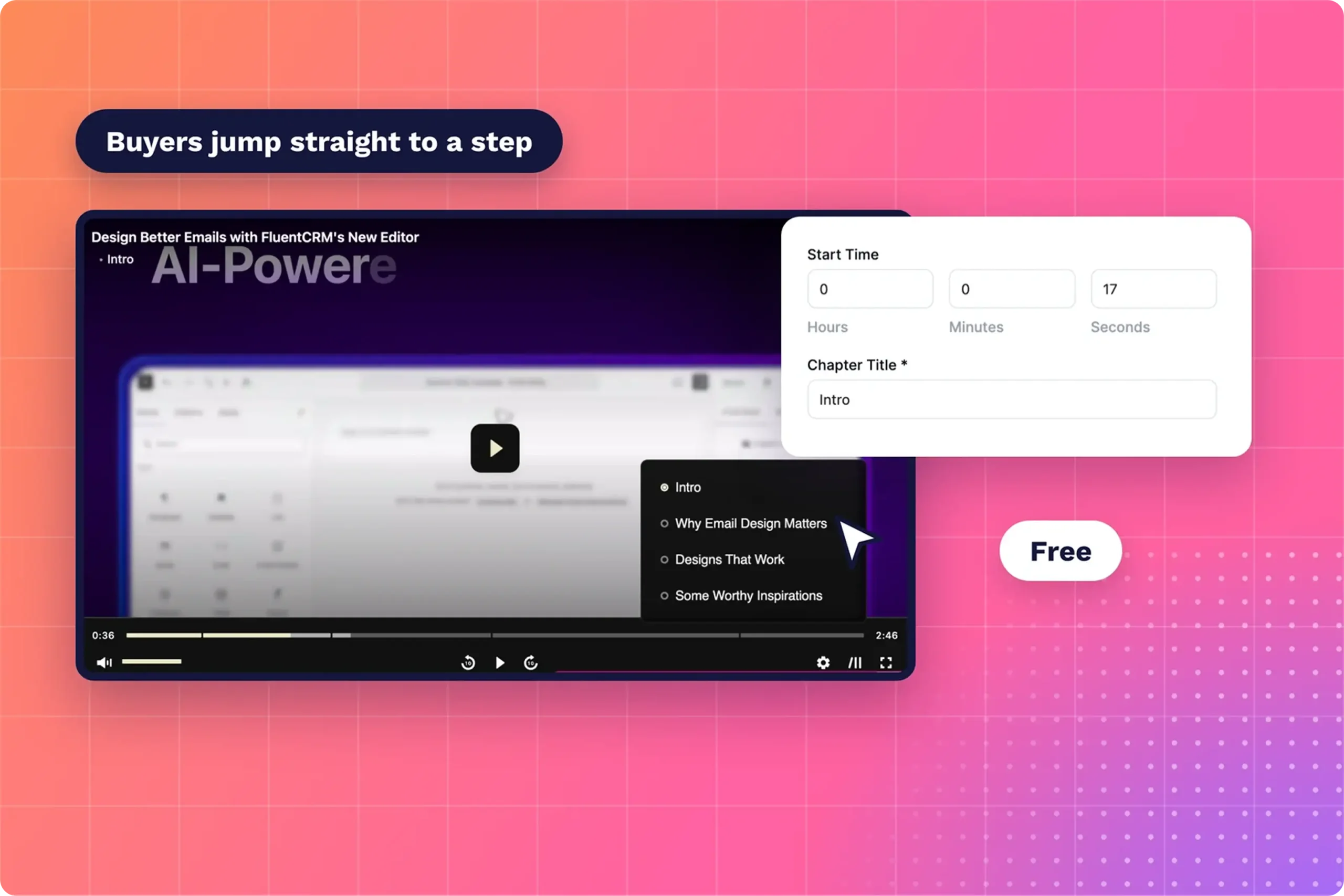
Chapters come with the free plugin, so set them up first. Install FluentPlayer free from WordPress.org, add your onboarding video, and label one chapter per step from the plan above. Use the labels buyers see in your product, such as “Log in” or “Publish your first form.”
Remember Playback Position (Pro)
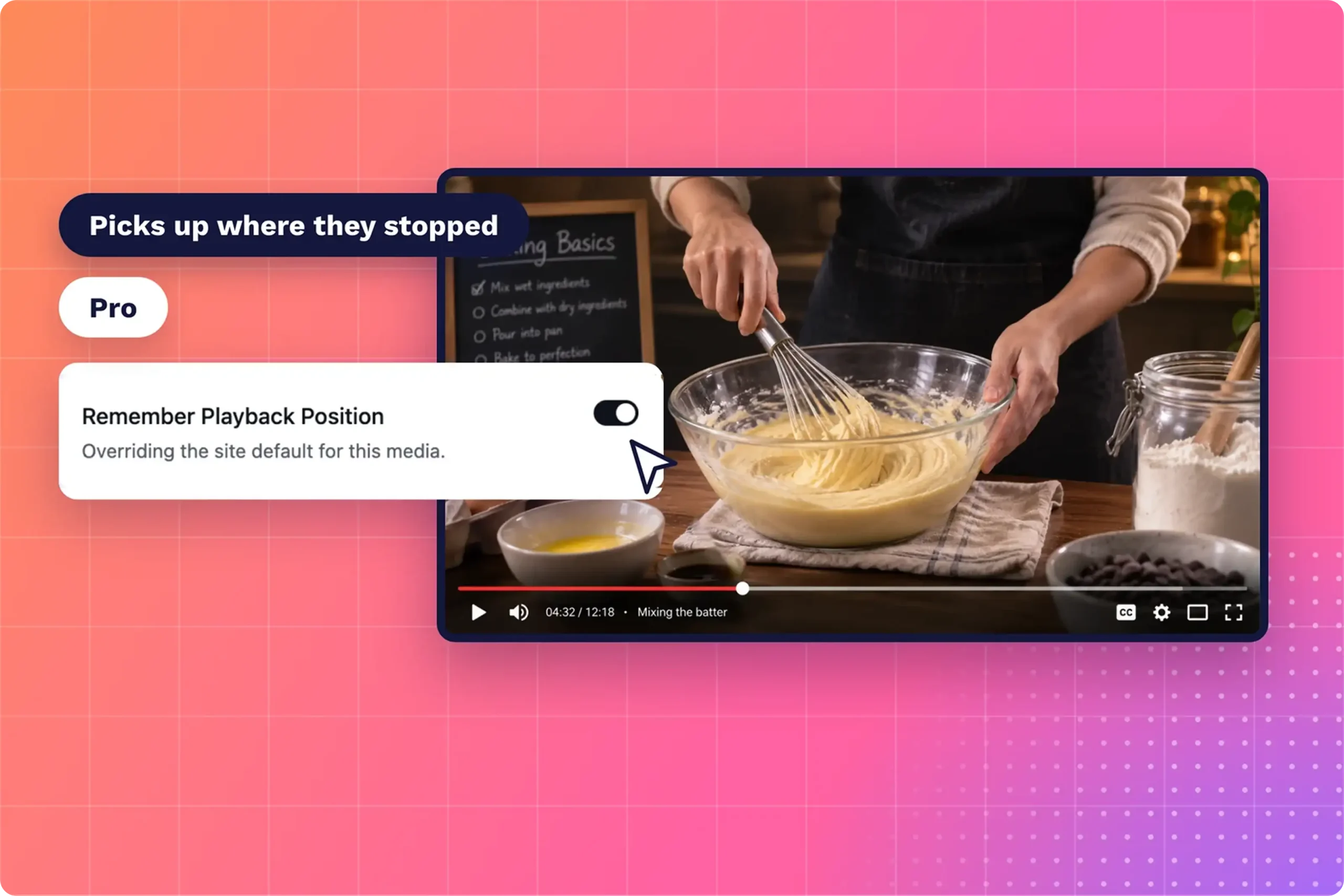
Remember Playback Position saves where each viewer stopped and resumes from that point on their next visit. Onboarding rarely happens in one sitting. A buyer pauses at the four-minute mark to try a step in the product, then comes back to the video without hunting for their place.
Chapters keep working with it on. A buyer who resumes at 4:00 still clicks any chapter to jump to a different step. For a 10 minute setup video or a multi-lesson course, the pairing keeps a returning buyer moving forward instead of restarting from the welcome.
Video playlists (Pro)
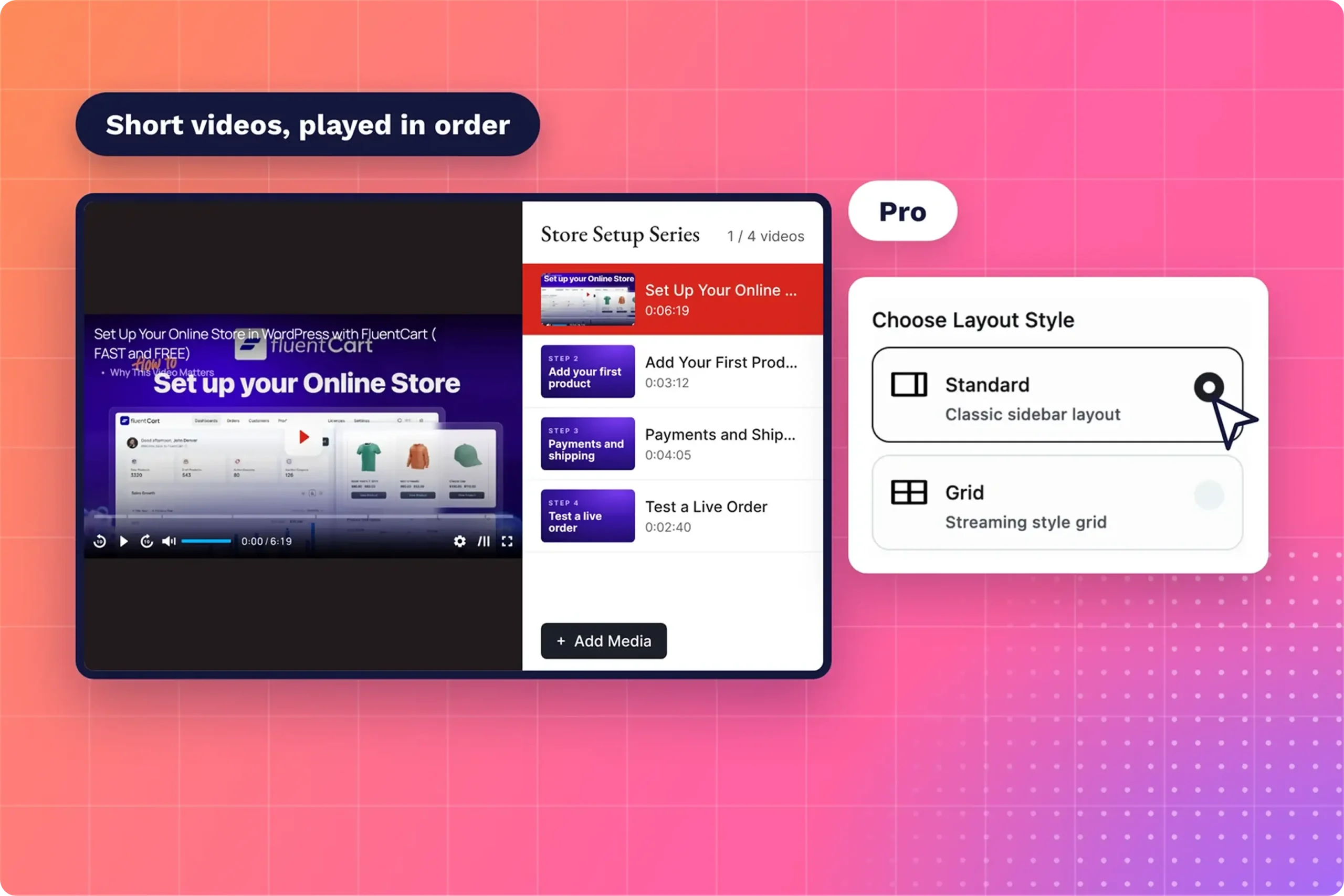
Playlists turn a long setup into a short series that plays in order. Instead of one 15 minute video, a buyer sees five three-minute videos, each covering one step. Each video stays inside the range where Wistia’s data shows engagement holding up, while the series still covers the full setup.
FluentPlayer playlists offer two layouts. Standard shows a sidebar list next to the player, which suits a step-by-step sequence. Grid shows thumbnails in a streaming-style layout, which suits a library of optional how-to videos buyers pick from after the core setup is done.
Subtitles (Pro)
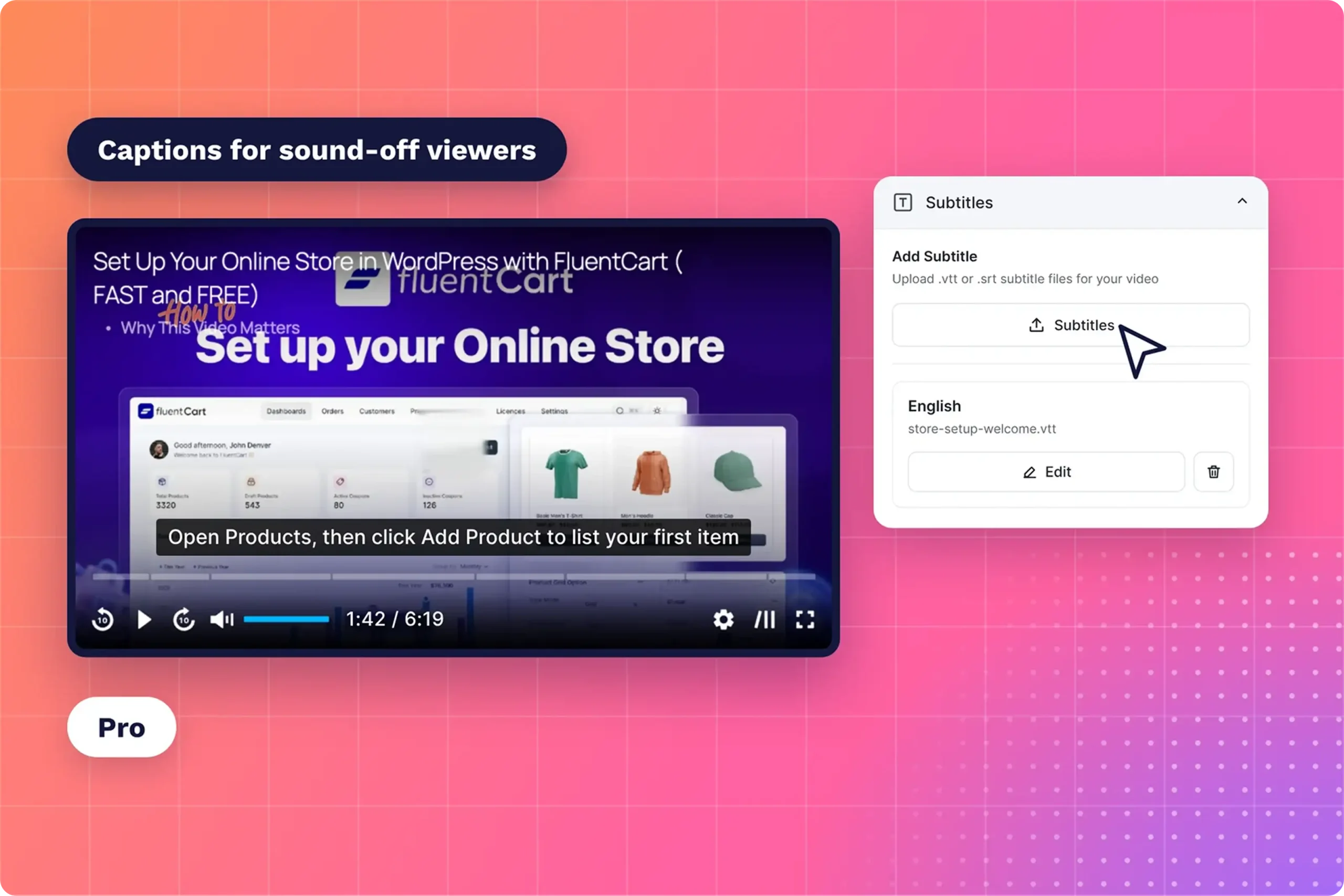
Subtitles show the narration as text, which helps buyers who watch with the sound off at work or on a phone. FluentPlayer Pro adds subtitles to your videos. Match the caption wording to the button and menu labels buyers will click, so the captions double as written steps.
Video analytics (Pro)
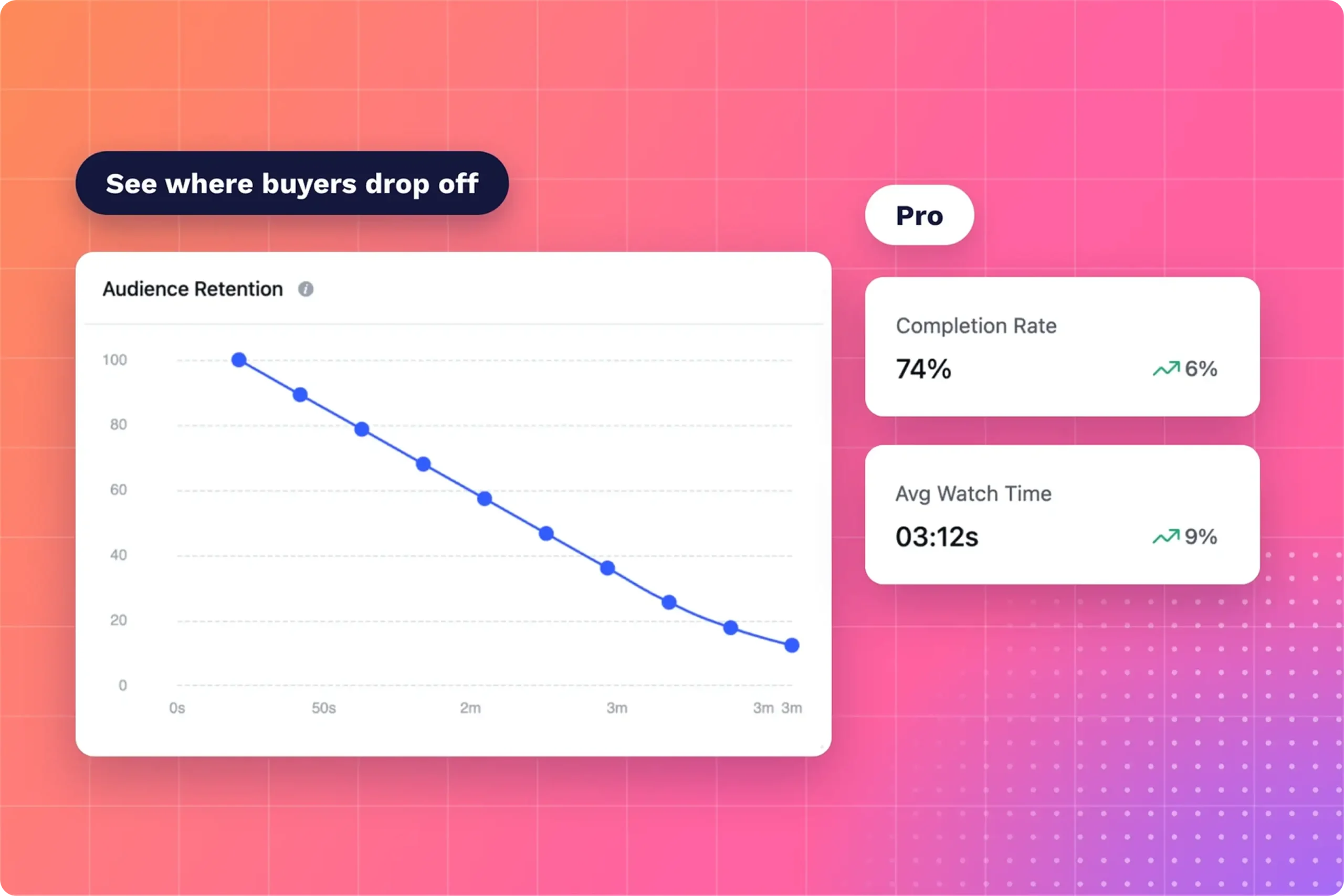
Analytics show whether new buyers watched the onboarding video at all. Completion rate and average watch time give the overall picture after the first wave of BFCM orders. A low completion rate on a short video often points to the opening, so check the first 30 seconds before cutting length.
The audience retention chart shows where viewers leave. A sharp drop at one point marks the section to cut, shorten, or re-record. Compare the drop with your chapter start times to find the step that loses buyers. Re-record any chapter whose screens no longer match your product after an update.
Free playback helpers
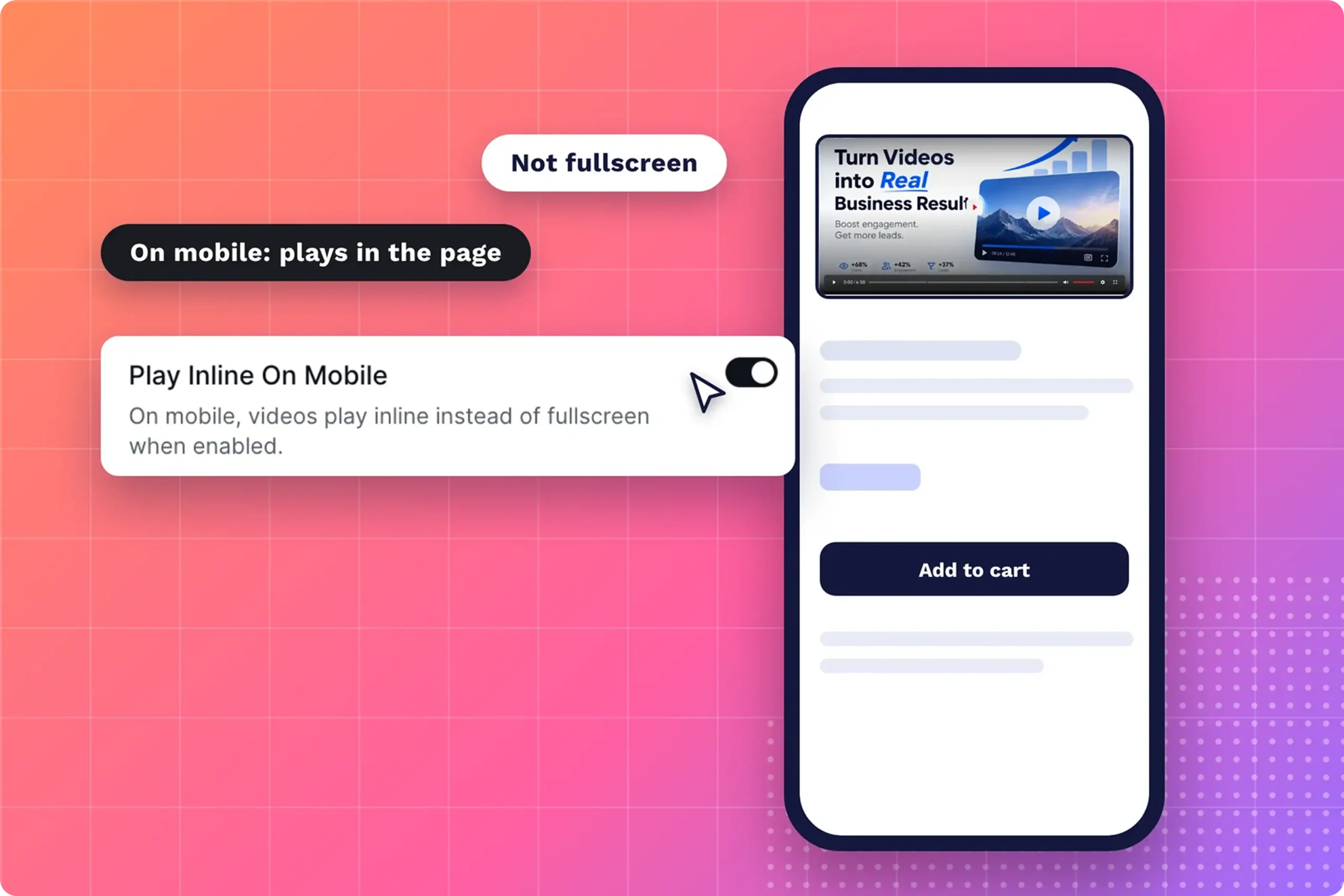
A few free settings remove friction for buyers watching on a phone or next to the product. Play Inline on Mobile keeps the video in the page instead of forcing full screen. Speed control lets confident buyers watch faster, and Picture-in-Picture floats the video while they follow along.
A Simple Nudge for Buyers Who Haven’t Watched the Onboarding Video
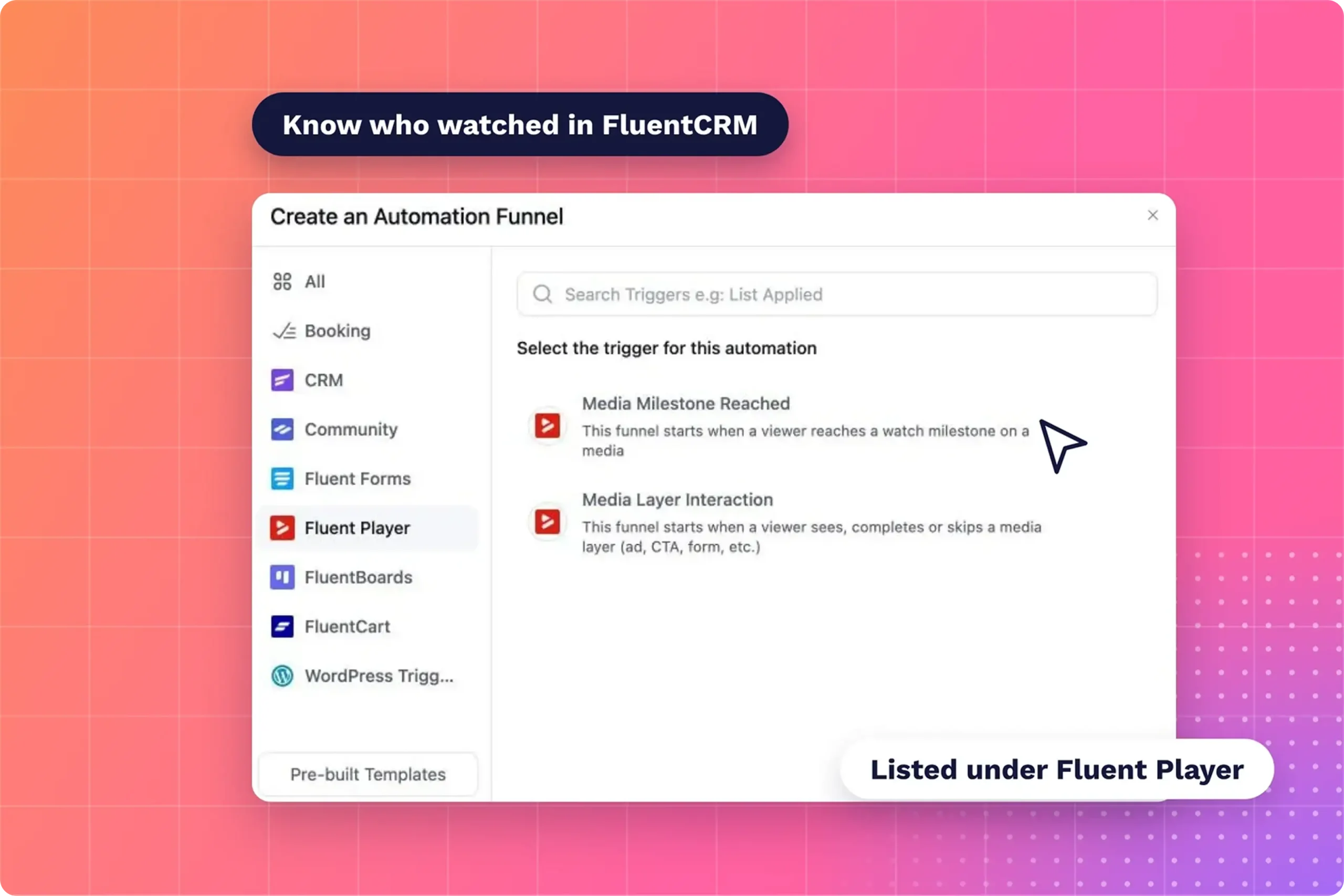
A FluentCRM automation knows which buyers watched the onboarding video, so a reminder goes only to the ones who haven’t. The Media Milestone Reached trigger, listed under the Fluent Player group, fires when a contact reaches a watch milestone such as Completed. Use it to tag every buyer who finishes.
A few days after purchase, buyers without the tag get one short reminder with the video link. Two settings must be on first: FluentCRM’s Event Tracking Module and “Log playback to contact timeline” in FluentPlayer’s FluentCRM settings. The video-triggered automations guide walks through the full build.
The first win also sets up a second purchase. Retention guides point to a non-discount offer, such as store credit, or a January win-back email instead of another sale. Send it to buyers tagged as finishers, using the same video-triggered automations as your nudge.
Record the First Win Before the Sale Starts
A BFCM sale fills your customer list in one weekend, and the onboarding video decides how many of those buyers you see again. Record the first-win video this week, before sale traffic arrives. Link it in the order confirmation email so every buyer sees it on day one.
After the first wave of orders, open the retention chart and fix the section where buyers leave. The FluentPlayer Pro deal adds analytics, playlists, and Remember Playback Position, so every onboarding video you publish this season keeps buyers moving past week one.
Frequently Asked Questions
What is a customer onboarding video?
A customer onboarding video is a short video that shows a new buyer how to start using what they bought. It walks through the first steps, from logging in to reaching a first result, so the buyer sees value early. Sellers usually send it right after purchase.
How long should an onboarding video be?
Keep a welcome video under two minutes, where Wistia’s data shows engagement holds steady. A setup walkthrough runs longer, often five to 10 minutes. Split it into chapters or a playlist so buyers jump to the step they need instead of watching from the start.
When should I send an onboarding video to new customers?
Send it within hours of purchase, in the order confirmation email and on the thank-you page. Buyers who see it before their first login start with a clear first step. The video belongs in front of buyers before they first log in alone.
What should a customer onboarding video include?
Include one first win: the single result a buyer should reach in their first session. Add a short welcome, the login or access step, the first task, and where to get help. Leave advanced features for later videos in the series.
Do onboarding videos reduce refunds?
No study I found isolates the effect of onboarding video on BFCM refunds. MemberMouse, a WordPress membership plugin, lists a warm welcome and a quick start guide among its ways to lower refund rates. An onboarding video covers both before the buyer decides the product doesn’t work.
Does FluentPlayer track who watched the onboarding video?
Yes. With FluentCRM connected, the Media Milestone Reached trigger records when a contact reaches a watch milestone such as Completed, and an automation tags them. FluentPlayer Pro adds video analytics, including completion rate, average watch time, and audience retention for each video you publish.