

FluentPlayer Pro launches today, and you can own every Pro feature with a single payment through the lifetime deal.
If you already use FluentPlayer Free, you know it plays video well. Pro turns that player into a tool that captures leads, keeps viewers watching, and shows you exactly how your content performs. I’ll tell you what Pro unlocks, who benefits most, and how to switch in a few minutes.
TL;DR
- FluentPlayer Pro is live with a one-time lifetime deal, so you pay once and keep every Pro feature.
- Pro adds video playlists, advanced interactive layers (CTAs, hotspots, ads, shortcodes), full video analytics, subtitles, timed content, and playback memory.
- It also unlocks more media sources (Mux, HLS, external URLs) and integrations (Mailchimp, BunnyCDN, Google Analytics, webhooks, Cloudflare R2, Cloudflare Stream, Gumlet Video, Gumlet Stream, LearnDash).
- Free stays free forever. Convert to Pro when you want video to drive engagement, leads, or revenue.
- Upgrade from your dashboard under FluentPlayer > License.
What FluentPlayer Pro Unlocks
Free gives you clean playback, presets, chapters, picture-in-picture, and speed control. Pro adds the features that change how people watch and act on your video. Here’s what you get.
Video playlists and layouts
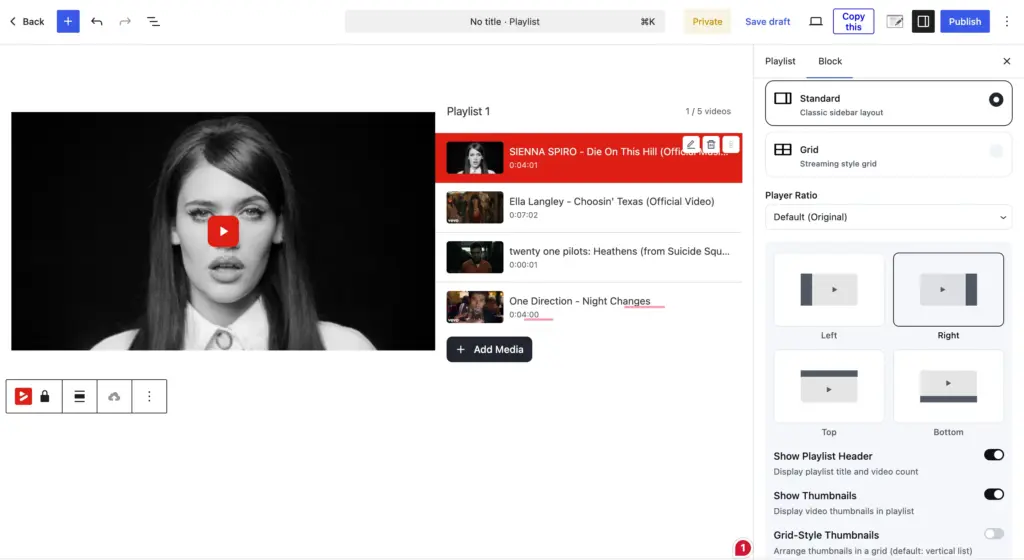
Free plays one video at a time. Pro lets you group videos into ordered playlists with autoplay and resume controls.
You choose how they display with Standard and Grid layouts, then customize the appearance to match your site. This is the difference between a single embed and a structured library your viewers can play through.
Advanced interactive layers
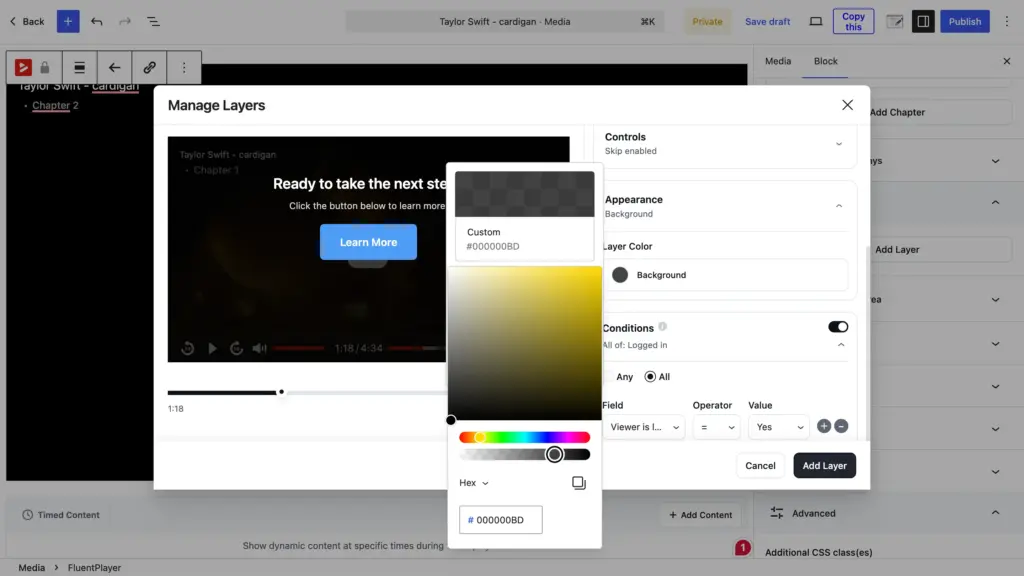
Free includes basic interactive layers for forms and email capture. Pro opens up the rest: CTA banners, clickable hotspots, ads, and shortcodes placed directly on top of your video.
You can also set conditional rules so the right layer shows to the right viewer. Each layer gets its own Conditions panel built on a simple Field, Operator, and Value setup, so you stop showing the same offer to everyone.
These layers fire the exact moment you want them to, timing them strategically ensures your CTA or signup prompts actually convert.
Video analytics
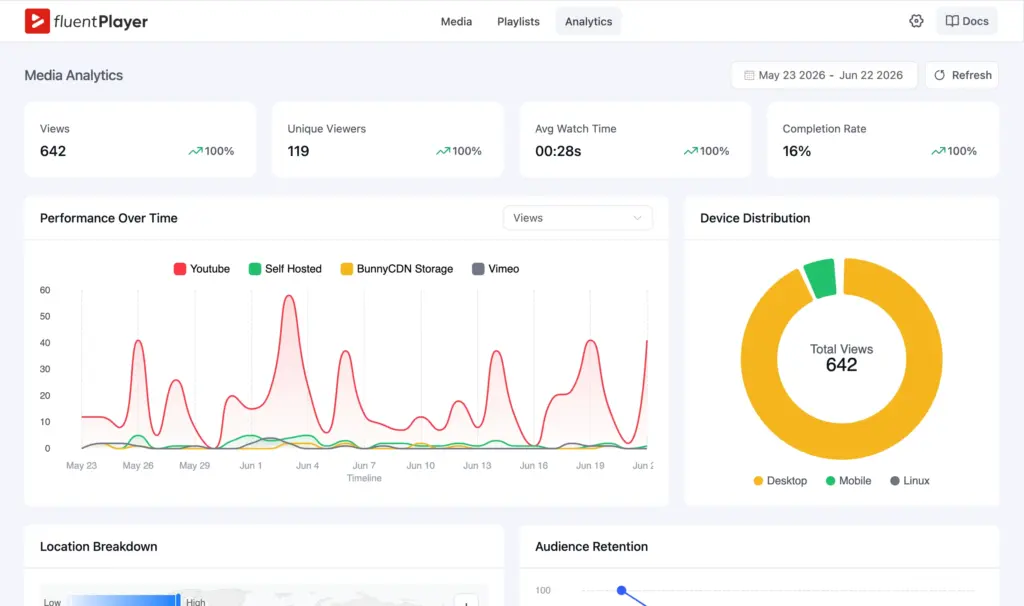
Free gives you no analytics. Pro gives you a full view of how your videos perform.
You see total views, unique viewers, average watch time, and completion rate in one place. You also get reports showing audience retention, new versus returning viewers, top videos, device distribution, and location breakdown.
That data tells you where viewers drop off and what they come back for, so you can make informed content decisions from user behavior. For example, place your lead capture layers at the moment when most users stay engaged.
Subtitles, timed content, and playback memory
Beyond the big three, Pro adds features that improve the watching experience.
- Subtitles: Attach multiple caption tracks so viewers can read along or watch muted.
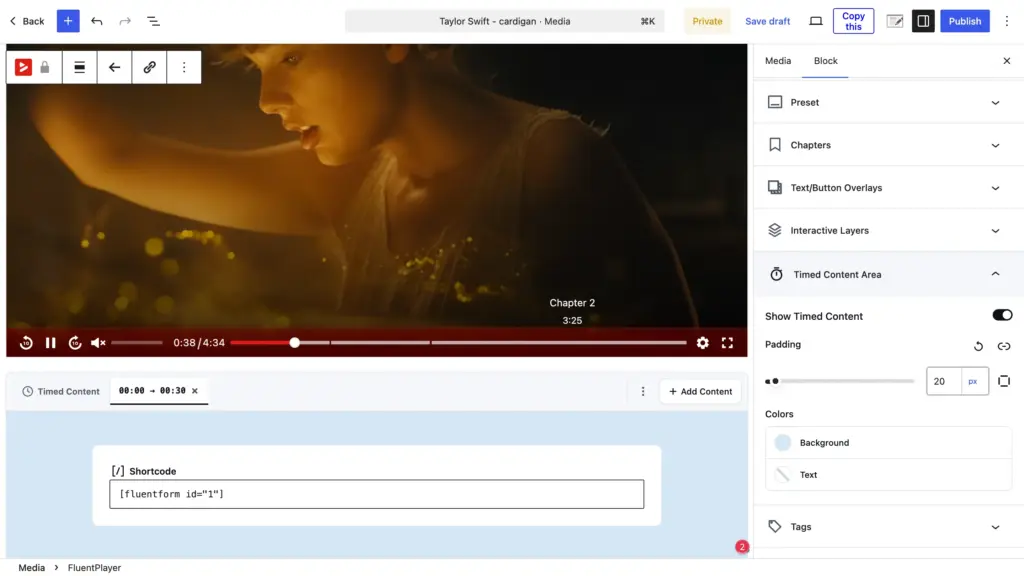
- Timed content: Drop any Gutenberg block into your video and control when it appears along with duration.
- Remember playback position: Videos resume from where each viewer stopped, which matters for long tutorials and courses.
- Text overlays: Show a message (with link) inside the video at the right moment.
- Customizable and Ambient presets: Build your own player presets on top of the built-in seven with the custom preset feature. Add a distraction-free background video with the ambient preset (no controls or sound).
More media sources and integrations
Free supports self-hosted video, YouTube, Vimeo, and audio. Pro extends that to Mux, HLS streaming, and external URLs, so you keep consistent playback across every source.
Pro also connects to Mailchimp, BunnyCDN, Google Analytics, Cloudflare R2, Cloudflare Stream, Gumlet Video, Gumlet Stream, LearnDash, and webhooks, on top of the FluentCRM, Fluent Forms, and FluentCommunity integrations you get with the free version.
Free vs Pro at a Glance
The full feature comparison is on the Free vs Pro page, but here’s the short version of what changes when you upgrade.
| Feature | Free | Pro |
| Custom branding | Yes | Yes |
| Player Presets (Default, Modern, Simple, Minimal, Floating, Standard) | Yes | Yes |
| Video chapters | Yes | Yes |
| Basic interactive layers (forms, email capture) | Yes | Yes |
| Media sources (self-hosted, YouTube, Vimeo, audio) | Yes | Yes |
| Video playlists and layouts | No | Yes |
| Advanced layers (CTA, hotspot, ad, shortcode) | No | Yes |
| Conditional rules for layers | No | Yes |
| Video analytics | No | Yes |
| Subtitles and timed content | No | Yes |
| Ambient and Custom Presets | No | Yes |
| Remember playback position | No | Yes |
| Mux, HLS, external URLs | No | Yes |
| Mailchimp, BunnyCDN, Google Analytics, webhooks, Cloudflare R2, Cloudflare Stream, Gumlet Video, Gumlet Stream, LearnDash | No | Yes |
Free is great for playback flexibilities, Pro covers engagement and conversion.
Who Should Convert to Pro
Not every site needs Pro on day one. These three groups get the most out of it.
Course and community builders
If you teach or run a membership, playlists, chapters, subtitles, and resume playback keep learners moving through your material. Pair that with FluentCommunity to embed courses and track how members engage with each lesson.
Marketers and lead-gen teams
Interactive layers turn passive views into actions. You capture emails mid-video, drive clicks with CTA banners, and route leads into FluentCRM or Mailchimp automatically. Analytics then shows you which videos actually convert.
Agencies managing client sites
Customizable presets let you set player behavior and branding once, then reuse it across the client site. Webhooks and Google Analytics fit FluentPlayer into reporting workflows you already run.
Why the Lifetime Deal Matters Right Now
Most video tools charge every year, and that cost gets higher as your library grows. The lifetime deal removes that entirely. You pay one time and keep every Pro feature, plus updates, for as long as you use the plugin.
The offer is tied to this launch, so the price you lock in today is the best it gets. If you were already weighing the Pro version, buying now means you never have to think about a renewal again.
FluentPlayer Pro Pricing
Every plan offers the full Pro feature set. The only difference is how many sites your license covers, so you pick based on how many sites you run.
| Plan | Sites | Price |
| Personal | 1 site | $199 (lifetime license) |
| Freelancer | 5 sites | $399 (lifetime license) |
| Studio | 25 sites | $599 (lifetime license) |
| Agency | 50 sites | $799 one-time, or $89 x 9 months (lifetime license) |
These plans are a one-time payment for a lifetime license, with the Agency tier adding a monthly option if you’d rather spread the cost.
How to Upgrade to FluentPlayer Pro
Switching from Free to Pro takes a few minutes and keeps all your existing videos and settings. Here’s the process.
- Buy the lifetime deal from FluentPlayer and grab your license key from the confirmation email.
- In your WordPress dashboard, go to FluentPlayer > License.
- Paste your license key and click Activate.
- Activate the Pro plugin file, then keep the free plugin active alongside it.
- Open any video and confirm the Pro features now show under FluentPlayer > Settings.
Your free setup carries over, so nothing you built breaks when Pro turns on.
Get FluentPlayer Pro Today
FluentPlayer Free will keep playing your videos well. Pro is how you make those videos capture leads, hold attention, and prove their value with real data.
The lifetime deal is live now, and this is the lowest price you’ll see for it. Secure FluentPlayer Pro today, then explore what’s possible.