

If you are searching for a Wistia alternative for WordPress, you already know what you want from a video player. You want clean playback, lead capture, analytics, and conversion tools. The question is, which tool actually handles that better for your WordPress site?
This necessarily means:
- Your video player is built for WordPress, not just embeddable into it.
- You can control everything from your WordPress dashboard
- The tool works great with your existing WordPress plugins
Wistia is a polished hosted video platform built for teams that want an all-in-one SaaS solution. FluentPlayer is a WordPress plugin that gives you a modern video player, interactive layers, analytics, and lead capture while letting you choose your own video source (Bunny Stream, Vimeo, YouTube, or self-hosted).
Ultimately, the decision comes down to committing to a hosted platform with a recurring monthly cost or keeping your entire video setup inside WordPress. In this blog, I’ll walk you through both sides fairly, so you can make an informed decision on FluentPlayer vs Wistia for your WordPress site.
TL;DR
- Wistia is a hosted SaaS platform with its own infrastructure and monthly fees; FluentPlayer is a WordPress-native plugin that lets you choose your own video host (Bunny Stream, Vimeo, YouTube, or self-hosted).
- Both offer lead capture, but FluentPlayer provides more in-video interaction options, email capture, forms, CTAs, hotspots, ad layers, and shortcode layers at specific timestamps.
- Wistia has deeper standalone analytics (heatmaps, A/B testing, etc.); FluentPlayer offers focused, conversion-oriented analytics directly inside your WordPress dashboard.
- Unlike Wistia, you get a WordPress native ecosystem with FluentPlayer, which is greatly helpful if you’re using FluentCRM, Fluent Forms, FluentCommunity, or FluentBooking.
- Choose Wistia if you want a vendor-managed hosted platform outside WordPress. Choose FluentPlayer if WordPress is your business hub and you want full control without compromise.
Quick comparison: FluentPlayer vs Wistia
Before going into the details, here is a side-by-side overview of the two products across the features that matter most to WordPress businesses.
| Metric | FluentPlayer | Wistia |
|---|---|---|
| Product type | WordPress player plugin | Hosted video platform (SaaS) |
| WordPress-native workflow | Yes | No (embed-based) |
| Video hosting | Supports Bunny Stream, Vimeo, YouTube & self-hosted | Wistia hosts videos |
| Lead capture | Yes | Yes (Turnstile + forms) |
| Interactive layers | Yes | Limited to Wistia’s built-in tools |
| Analytics | Native video analytics in plugin & GA4 integration | Advanced viewer analytics and heatmaps |
| Best fit | WordPress teams who want flexibility & ownership | Teams that want a hosted platform & are fine with a monthly fee |
Now that you have a general idea, let’s break down the features section by section so you get a deeper insight.
What’s the core difference
With Wistia, you commit to Wistia’s infrastructure and billing model. That gives you a polished hosted setup and mature analytics, but it also means:
- Ongoing monthly payment
- Limits and tiers depending on plan
- Migration friction if you ever want out
With FluentPlayer, you have complete control. Your media and playlists appear right in your WordPress dashboard, so you can edit everything from one place. Besides, you pick where videos are hosted (Bunny Stream, Bunny CDN, Vimeo, YouTube, or self-hosted), so you don’t have to worry about storage.
This means, with FluentPlayer, you can scale your business without worrying about upgrading for more storage. And the best part is, FluentPlayer comes with all the powerful features, so you don’t need to compromise there either.
Feature-by-feature breakdown
To make the right decision, you need to understand how each product handles the specific capabilities your business depends on. Here is a detailed look across the five areas that matter most.
Video hosting & source flexibility
Where your videos are stored determines where you manage them, where your analytics are, and what happens if you ever want to switch. The two products take completely different approaches here.
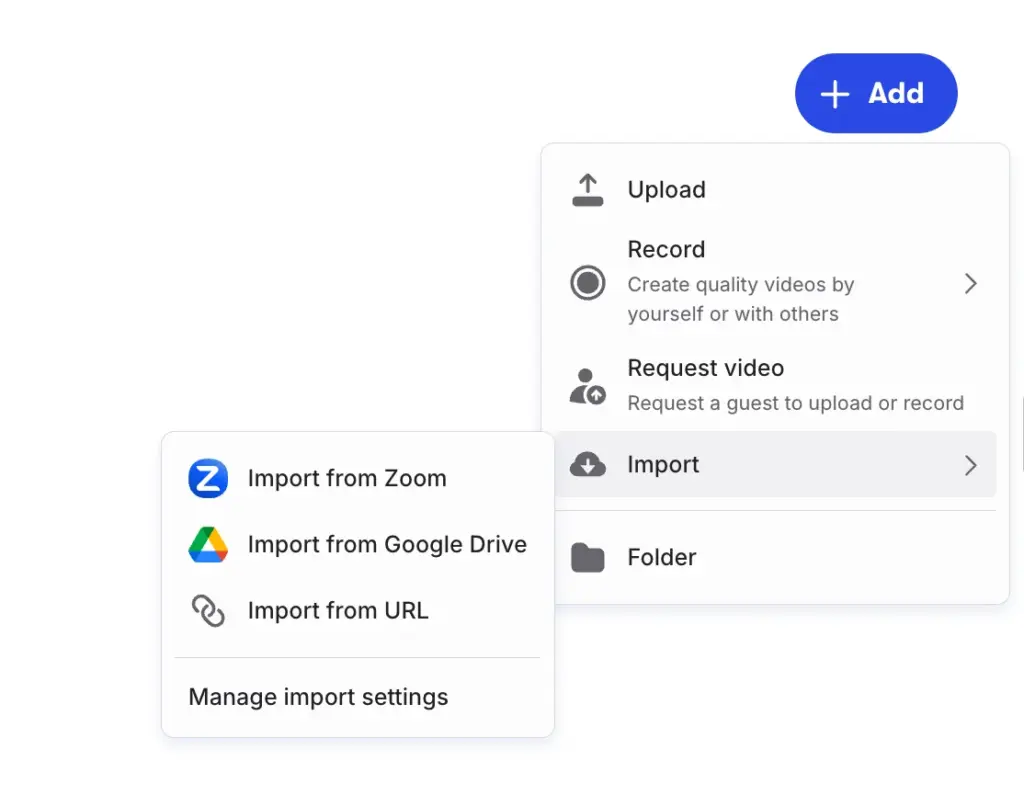
Wistia is built around hosted delivery. You upload to Wistia, then embed. This is great if you want one vendor to control hosting + player + analytics.
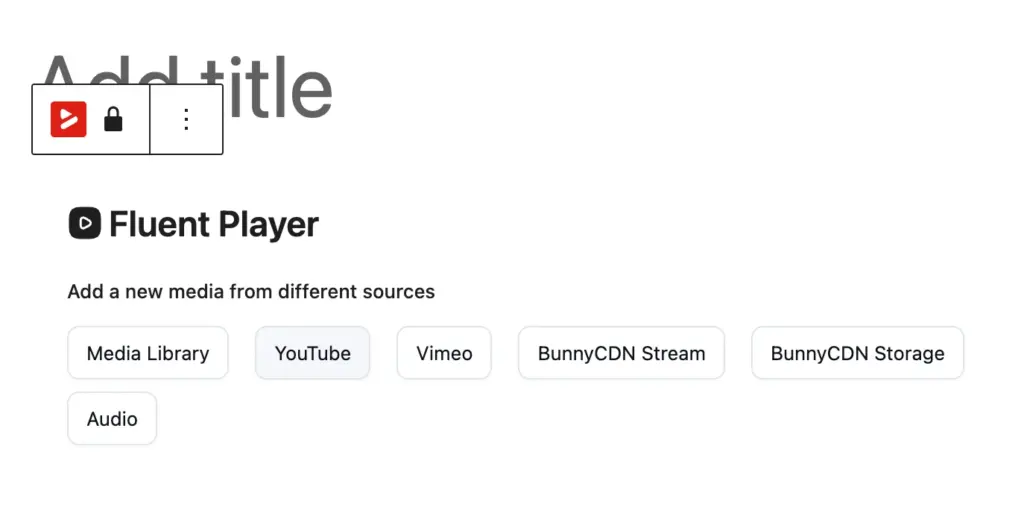
FluentPlayer does not lock you into a single host. It supports multiple sources inside one plugin workflow:
- Self-hosted WordPress media
- YouTube
- Vimeo
- Bunny Stream
Why this matters
If your business evolves, source flexibility protects you. You can:
- Start with YouTube for public content
- Move paid course content to BunnyStream.
- Keep legacy Vimeo library where needed
This flexibility is one of the clearest strategic differences between the two tools, which could work to your advantage. For businesses with mixed video libraries or evolving hosting strategies, this alone can tip the decision in favor of one option.
Lead generation tools
Many WordPress teams are hesitant to replace Wistia because it allows lead capture. But the brand-new FluentPlayer comes with a complete set of lead-generation tools. Let’s explore the lead-generation capability of these players.
Wistia approach
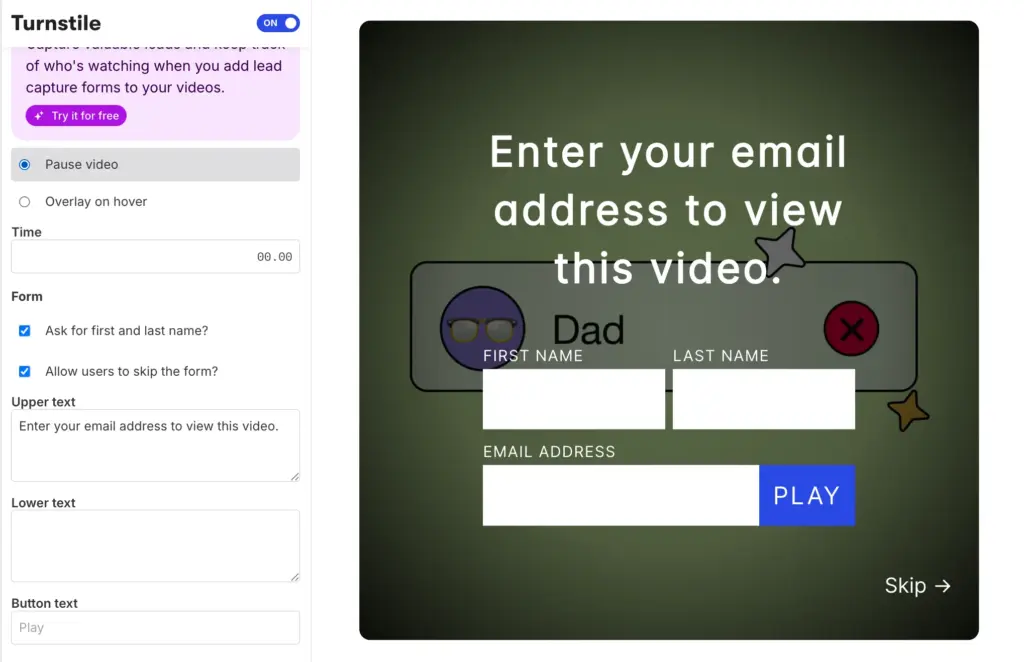
Wistia offers Turnstile and form-based lead collection as part of its video marketing suite. It’s familiar and has a proven reputation. Besides, it also allows you to add CTAs.
FluentPlayer approach
FluentPlayer includes email capture capabilities and, more importantly, Interactive Layers that can place interactive elements inside the video. Interactive media Layers include:
- Email Capture: Capture users’ email during a video and automatically send them to designated contact lists in your CRM.
- Form layers: Embed a form right in the video (with Fluent Forms) to collect leads, add quizzes, or accept payment.
- CTAs: Guide users to complete an action with prominent buttons.
- Hotspots: Use hotspots to draw viewers’ attention and guide them to the next step using URLs.
- Ad layers: Add an Ad during a video with complete control over skip time.
Shortcode layers: Embed forms, calendars, tables, other videos, and more in your videos using shortcodes.
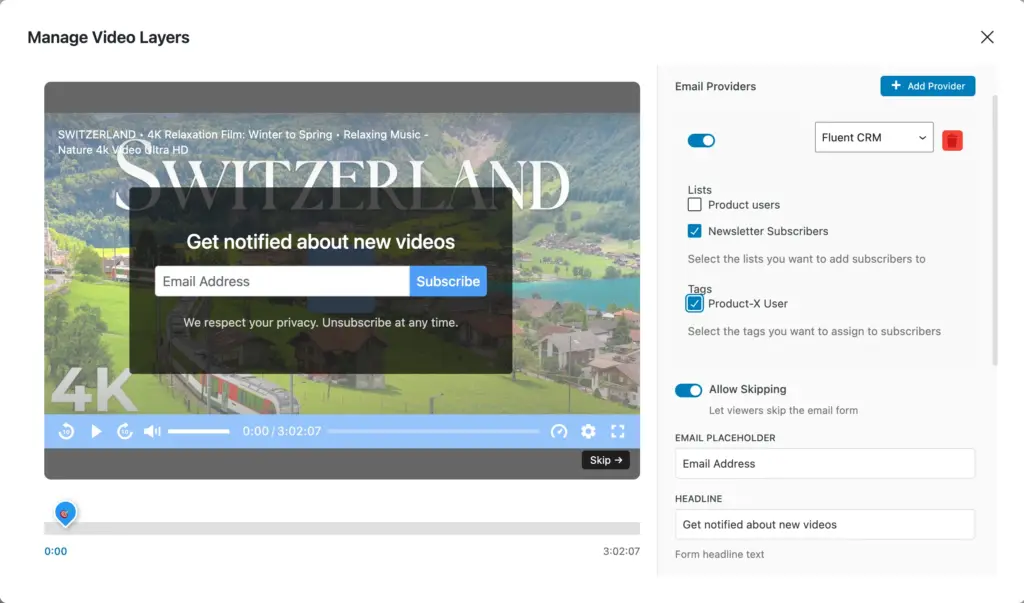
Converting users in more ways always means more leads. If your funnel is content-driven (webinars, mini-lessons, or demos), timestamp-based in-video interactive layers give you more power & flexibility than simple email capture & CTA tools.
Analytics and viewer insight
Video analytics is really important if you want to know what’s working in your video strategies and what needs improvement. Here’s an overview of the analytics tools offered by each player.
Wistia analytics
Wistia is known for advanced video analytics and viewer-level reporting. This is one of the advantages of using Wistia. You get:
- Account-level analytics: Video performance by media, channel, folder, and account.
- Media-level analytics: Visits, plays, engagement & play rate, and time played for individual videos.
- Embed location analytics: Video performance based on where they’re embedded.
- Heatmaps: Shows you how a single viewer engages with your video.
- A/B testing: Test different video versions to see which one drives higher engagement.
- Compare media: Compare video performance side-by-side to identify what’s working better.
If your team needs deep heatmap-style viewer behavior in a hosted platform, Wistia can be a great pick. However, some of this analytics data might be less relevant to a WordPress user. For example, you don’t really need embed-location analytics as you’re mostly embedding on WordPress.
FluentPlayer
Compared to Wistia’s multiple analytics dashboards, FluentPlayer only has one. You can see everything in one place and easily get insights. FluentPlayer analytics offer:
- Total plays
- Unique views
- Average watch time
- Completion rate
- Performance over time
- Device distribution
- Location breakdown
- Audience retention
- Top viewers
- Top videos
- New vs. returning viewers
Aside from these, you can view your embedded form or email-capture analytics using the built-in analytics tools of Fluent Forms and FluentCRM.
FluentPlayer analytics shows you conversion-focused video data, rather than Wistia’s enterprise-level hosted analytics depth. You can easily get insight into which videos need your attention, where to embed a layer for maximum conversion, and more. Besides, all your data is inside your own WordPress environment.
WordPress workflow & integration depth
Your video workflow experience is just as important as the player’s smoothness. Especially if you need other WordPress tools to connect without extra friction. Let’s see where each tool stands.
Wistia
Wistia videos can be embedded into WordPress pages. That part is simple enough. But the embed is where the connection ends.
Everything else, player settings, lead capture configuration, CTA behavior, and analytics, is in Wistia’s own dashboard. To change how a video behaves, you leave WordPress, log into Wistia, make the change, and come back. There is no native integration with WordPress forms or CRM.
Wistia also organizes your video content inside a project and folder structure, similar to a file system. Finding a video means navigating that hierarchy every time.
FluentPlayer
FluentPlayer is native to WordPress and aligns with WPManageNinja ecosystem workflows, including integrations around:
FluentCRM: Capture your viewers’ email addresses during a video and automatically add them to your FluentCRM contact lists with proper tags.
Fluent Forms: Collect lead information and accept payment for premium content directly from a video with Fluent Forms integration.
FluentCommunity: Embed self-hosted videos or playlists directly in your FluentCommunity courses and track exactly how members engage with your content.
The content structure is straightforward: your media are in a list, and playlists are in a separate view. Player behavior, lead capture forms, or CTAs, everything can be managed and configured inside WordPress.
Player customization and branding
Both products care about a clean video presentation. Here’s what you get with each.
Wistia
Wistia gives you solid branding controls for the player itself. You can set a custom player color that matches your brand, show or hide individual controls (play bar, volume, fullscreen button), set a custom thumbnail, and add your logo as an overlay.
The result is a clean, professional player that stays on-brand without much effort. However, the free version doesn’t let you remove Wistia branding.
FluentPlayer
FluentPlayer includes multiple player skins to start from, which you can customize by adding or removing controls. Besides, you get to add a brand logo and set its size & position. You can also add custom brand and control bar colors, and the ability to add custom CSS and JavaScript at the plugin level for added flexibility.
Both players offer you enough branding and customization flexibility to align your videos with your brand and deliver the best viewing experience possible to your audience.
Common objections (answered honestly)
I understand you might still have some concerns. Let me answer them honestly.
“Wistia analytics are still stronger.”
True for advanced hosted analytics depth. If you rely heavily on that specific reporting layer, keep that in the decision.
“We don’t want to manage hosting complexity.”
Fair concern. If you want vendor-managed hosting + player in one place, Wistia offers convenience. If you can manage WordPress hosting, FluentPlayer offers greater capabilities and flexibility. I personally find it easier to manage everything from my WordPress dashboard.
“Will we lose lead capture quality?”
Not necessarily. With better interaction control and thoughtful Interactive Layer placement, you can capture high-quality leads that go directly to your CRM contact list for further nurturing.
The right answer depends on how your team operates, what your business requires, and which tool you’re more comfortable with.
So which tool is right for you
Wistia is a capable product. However, if you’re comfortable in the WordPress environment, it has its limitations. FluentPlayer is built for WordPress businesses that want powerful video player features without building their workflow around an external platform.
If you’re still not sure, use this checklist as a final sanity check before committing either way.
Choose Wistia if:
- You want a hosted video platform first, not a WordPress plugin
- Your team depends on Wistia’s deeper analytics model
- You are comfortable with recurring monthly fees
- You prefer vendor-managed infrastructure over flexible control
Choose FluentPlayer if:
- You need a serious Wistia alternative for WordPress that does not compromise on quality
- You want clean playback, lead capture, and analytics inside your WordPress environment
- You prefer control over hosting choices (Bunny, Vimeo, YouTube, self-hosted)
- You want in-video interaction beyond a basic email capture or CTA
- Your workflow involves WordPress plugins, and you want to benefit from a native ecosystem.
Final verdict: FluentPlayer vs Wistia for WordPress users
Wistia is a mature, well-built hosted video platform, and it deserves its reputation. If your team operates outside of WordPress and needs a standalone video marketing suite with enterprise-grade analytics, it remains a solid choice.
But if WordPress is where your business lives, Wistia feels like an expensive detour. You’re constantly switching between dashboards, paying monthly fees that scale with usage, and relying on an external platform for something that should feel native to your site.
FluentPlayer was built to eliminate that gap. It gives you a modern, customizable video player with lead capture, interactive media layers, built-in analytics, and deep WordPress ecosystem integration, all without locking you into a single hosting provider or a recurring SaaS bill. You manage everything from the same dashboard where you manage the rest of your business.
It ultimately comes down to which tool fits your workflow. If your workflow is WordPress, FluentPlayer is the smarter, more flexible, and more cost-effective choice.