
FluentPlayer vs All-in-One Video Gallery: Make an Informed Choice
Although they’re listed in the same category, FluentPlayer and All-in-One Video Gallery serve different purposes.
All-in-One Video Gallery is a video library plugin. It’s built to organize, categorize, and display collections of videos. It gives you the flexibility to create YouTube-style galleries with search, filters, likes, and comments.
FluentPlayer is a video player with built-in marketing tools. It’s built for turning viewers into leads and automating your workflow. You can insert lead capture forms, CTAs, booking calendars, etc., right inside your videos, send contacts directly to your CRM, and track video analytics.
This comparison will help you figure out which one matches what you’re actually trying to do. Because choosing the wrong plugin means either having features you’ll never use or missing the one functionality you needed most.
TL;DR
- The core difference: All-in-One Video Gallery excels at building searchable, organized video libraries with categories, tags, and user engagement features. FluentPlayer excels at converting viewers into leads with interactive layers, native analytics, and marketing automation.
- All-in-One Video Gallery is for: Content libraries, video archives, and community sites where users browse, search, and like/dislike videos.
- FluentPlayer is for: Course creators, marketers, and businesses who want videos to capture leads, track engagement, and trigger automations.
- Both support YouTube, Vimeo, Bunny.net, self-hosted videos, and HLS streaming.
Stay updated on free vs. pro, pricing & beta.
How to choose the right video plugin
Before we get into the feature lists, let’s take a step back. Because the best way to choose between these plugins is understanding your purpose & the problem you’re trying to solve, not comparing every available feature.
Q. Do I just need to embed a single video?
A. Both work, but FluentPlayer is built for this. Whether you need to embed a demo on your landing page, a welcome video on your homepage, or a lesson in your course, FluentPlayer is your go-to. You get full branding control, interactive layers, and analytics on that one video. AIOVG can embed single videos and offer branding as well, but its strength is managing collections. For standalone embeds, FluentPlayer is the better fit.
Q. Do I need to display a video collection?
A. Both can do this. FluentPlayer offers playlist layouts (sidebar and grid views), which work fine for basic video collections. All-in-One Video Gallery takes it further with categories, tags, search filters, and additional gallery templates.
Q. Do I need community features – likes, comments, engagement?
A. For simple community features, go with AIOVG; it offers built-in community features like likes, comments, and favorites. However, FluentPlayer integrates with FluentCommunity for a much richer experience, private spaces, discussions, member profiles, and deeper engagement tools.
Q. Do I need my videos to generate leads and track engagement?
A. FluentPlayer. It comes with interactive layers, including email capture, call-to-action, forms, booking, native analytics, etc. It also integrates with your favorite CRM tools for automated contact management and lead nurturing.
Now you have a basic idea regarding which tool is right for you, based on your goal. Let’s analyze the features in the next section and see why it’s the right tool for that purpose.
All-in-One Video Gallery: built for video libraries
If you’ve ever wished your WordPress site could feel more like YouTube, with browsable categories, searchable content, and user engagement, that’s exactly where All-in-One Video Gallery comes in. It shines in organization & discovery. You get:
- Unlimited categories and tags for sorting videos
- A search form that filters by title, description, category, and tags
- Multiple gallery templates (classic grid, popup, slider, playlist layout)
- Pagination with Ajax for smooth browsing
- Sidebar widgets for categories, search, and recent videos
If you’re building a video archive, tutorial library, or community video hub, these features work in your favor. Moreover, AIOVG offers basic social features, including:
- Likes and dislikes on videos (with counts displayed)
- User playlists and favorites
- Comments via WordPress’s native system
- View counts (unique and total)
- Social sharing buttons (Facebook, Twitter, LinkedIn, Pinterest, WhatsApp)
For simple community interactions directly on video pages, these built-in features will do your job. Here are some specific features worth looking at.
Gallery display options
The free version gives you a classic grid layout. Premium unlocks pop-up, inline, slider, and playlist templates. You can control the columns, items per page, and which metadata are displayed (duration, author, view count, category names, etc.).
Video SEO
The premium version adds video-specific SEO features: optimized single video pages, custom slugs, Open Graph meta tags, and Twitter cards. These prove useful if search traffic matters to your video content.
Frontend submission (Premium)
You can allow users to submit videos directly from the frontend. It comes in handy for community sites or user-generated content platforms.
AIOVG is focused on display and organization. Let’s have a look at what it doesn’t offer:
- It’s a gallery first tool. The player is there to play videos, not to capture leads.
- Interactive layers (forms, CTAs, hotspots during playback)
- Native video analytics (relies on cookie-based view counts)
- Email capture during video playback
- CRM or marketing automation integration
- Progress tracking across sessions
All-in-One Video Gallery does one thing really well: it turns WordPress into a proper video library. If your goal is to give visitors a polished browsing experience with categories, search, and basic social features, it does a pretty decent job.
Now, let’s have a look at how FluentPlayer stands out.
FluentPlayer: built for lead generation & engagement
What if your videos are meant to sell, convert, or capture leads? That’s a fundamentally different use case, and although FluentPlayer offers basic gallery features, lead engagement is exactly what it was designed for.
Interactive layers
When it comes to user engagement, FluentPlayer is the best in the market. You get to capture leads in multiple ways via different interactive layers, such as:
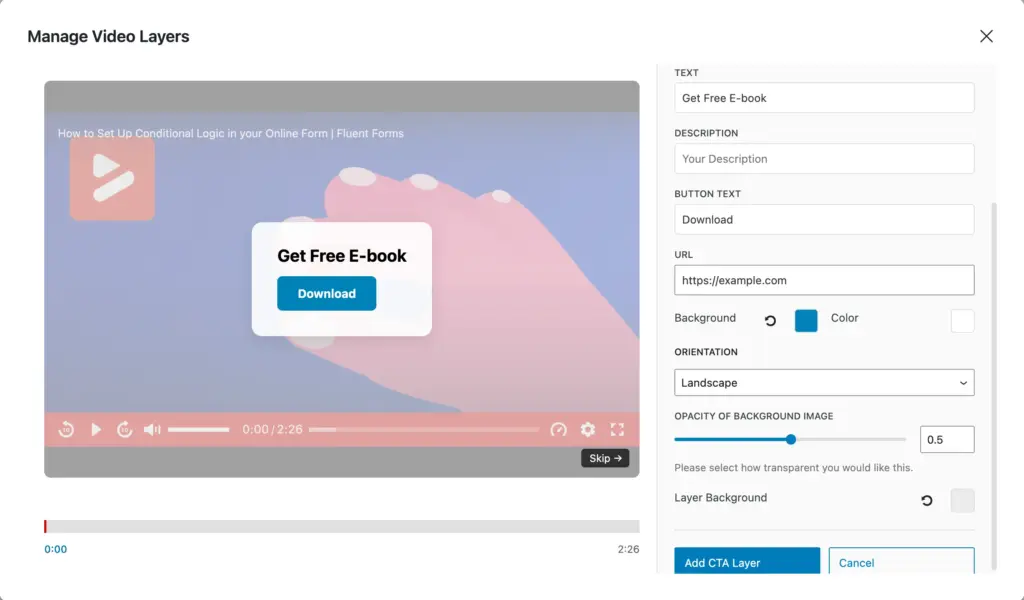
- Forms: Embed Fluent Forms directly in the video. Collect leads, run surveys, and even accept payments mid-video.
- CTA: Customizable call-to-action buttons with headlines, descriptions, and links.
- Hotspot: Animated clickable circles that draw attention and direct to a specific URL.
- Ad: Insert your own ads at specific timestamps with skip controls.
- Email Capture: Collect emails and export them in CSV, JSON, ODS, or automatically send them to your CRM contacts.
- Shortcode: Embed any WordPress shortcode as a layer (custom booking calendars, dynamic data, widgets).
You control when each layer appears, how long it stays, positioning, styling, skip options, and whether links open in new tabs.
WPManageNinja ecosystem
FluentPlayer is built by WPManageNinja, the team behind FluentCRM, Fluent Forms, FluentSMTP, FluentBooking, FluentCommunity, and more. This ecosystem isn’t a coincidence; it’s created with purpose. Because when you use the full power of the WPManageNinja plugins, FluentPlayer becomes more than just a player.
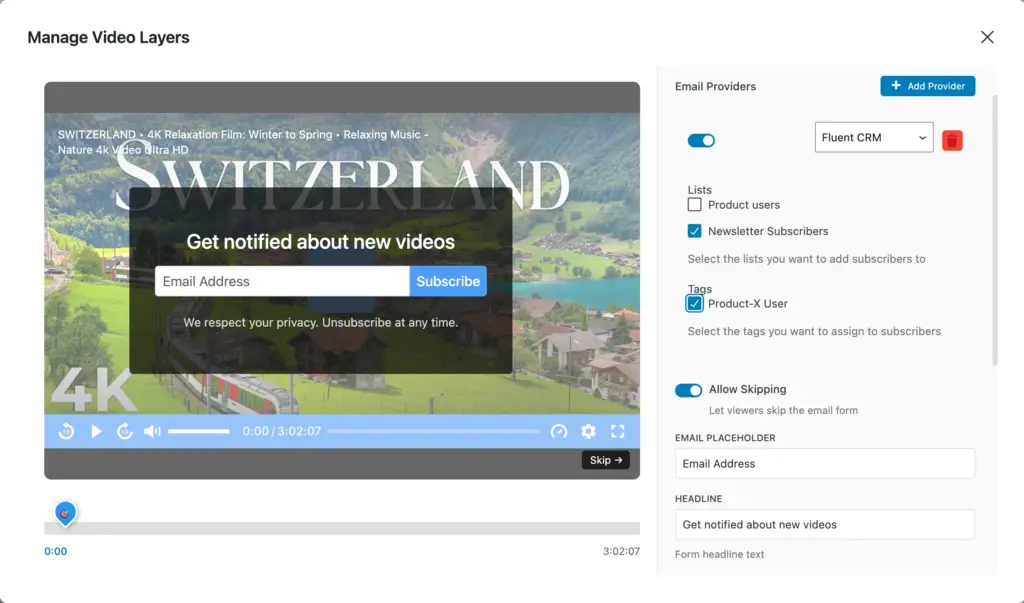
- FluentCRM integration: Emails captured during a video sync automatically to your CRM contacts. You can predefine which list and tag you assign them to right from the video.
- Fluent Forms integration: Display any form mid-video. Since Fluent Forms supports payments, you can sell courses or premium content right in the video. You can also collect user-generated videos via Fluent Forms.
- FluentBooking integration: Show your calendar during playback using a shortcode. Viewers can book meetings without leaving the video.
- FluentCommunity integration: This is where you get the community features. Use a call to action to allow viewers to join your community, where they can have discussions, ask questions, chat, and more. You can also add your FluentPlayer media to your course lessons.
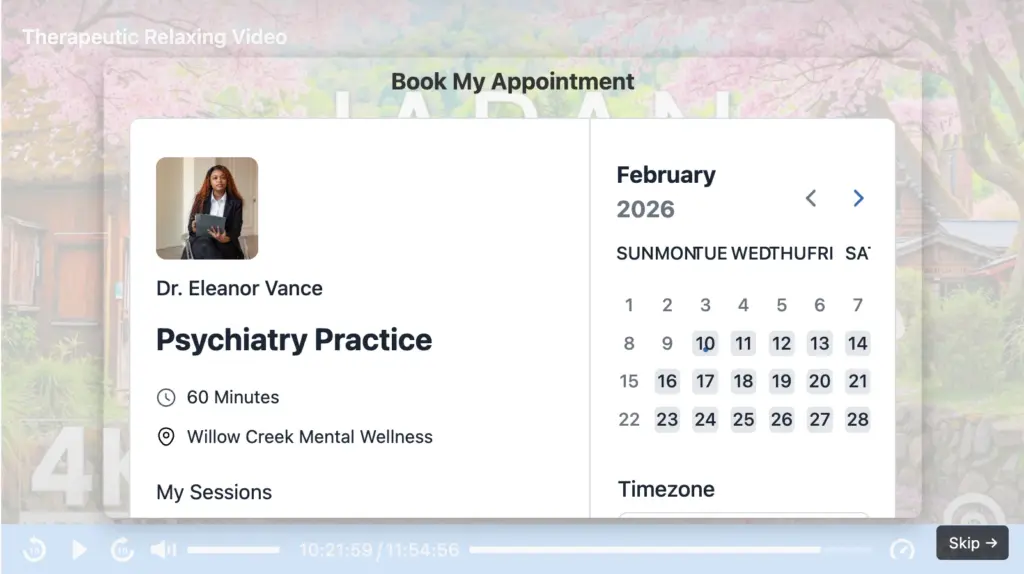
Now that you know what advantages you get with FluentPlayer, let’s cover which gallery features it offers. This way, you can compare its library functionalities against those of AIOVG’s and make an informed decision.
Playlist features & layouts
FluentPlayer’s playlist features are quite comprehensive. You can create a playlist by adding related videos from your media list. It works great for creating courses, tutorials, or a video series.
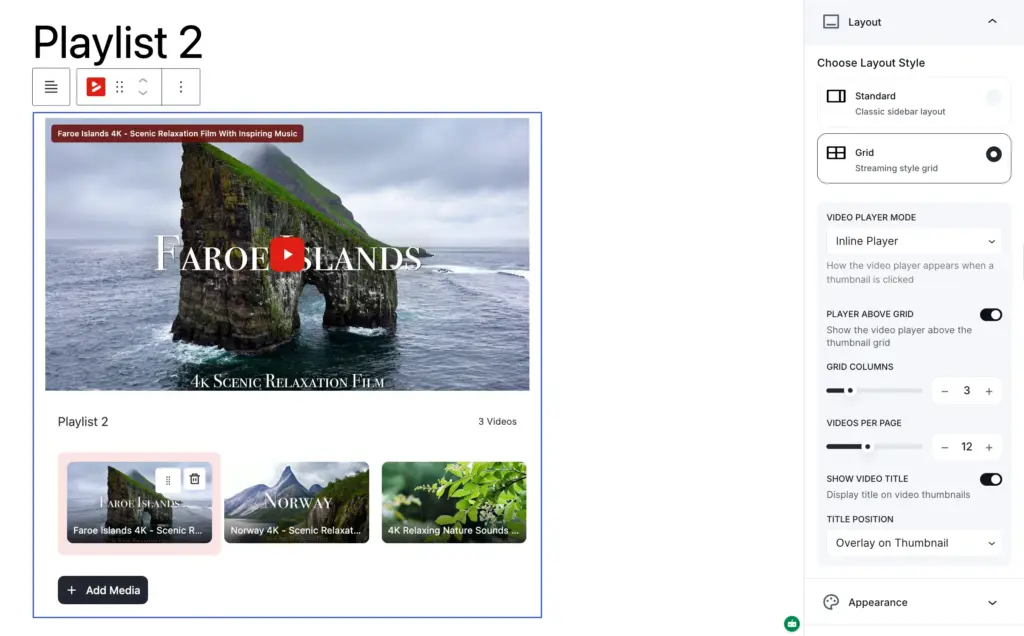
Let’s have a look at the playlist flexibilities you’ll get.
- Sidebar playlist layout (video + playlist on left/right/top/bottom side). The playlist appearance can also be customized (poster image, video information, etc.)
- Grid layout with (you can customize the number of columns and items per page).
- Inline and modal/pop-up display modes.
- Auto-advance to the next video with a smooth transition duration.
- Custom appearance controls (colors, borders, typography, shadows, etc.)
You can create custom playlists of any size using these features and embed them using shortcodes. While we’re on this topic, let’s have a look at some other customization options that FluentPlayer brings you.
Branding & customization
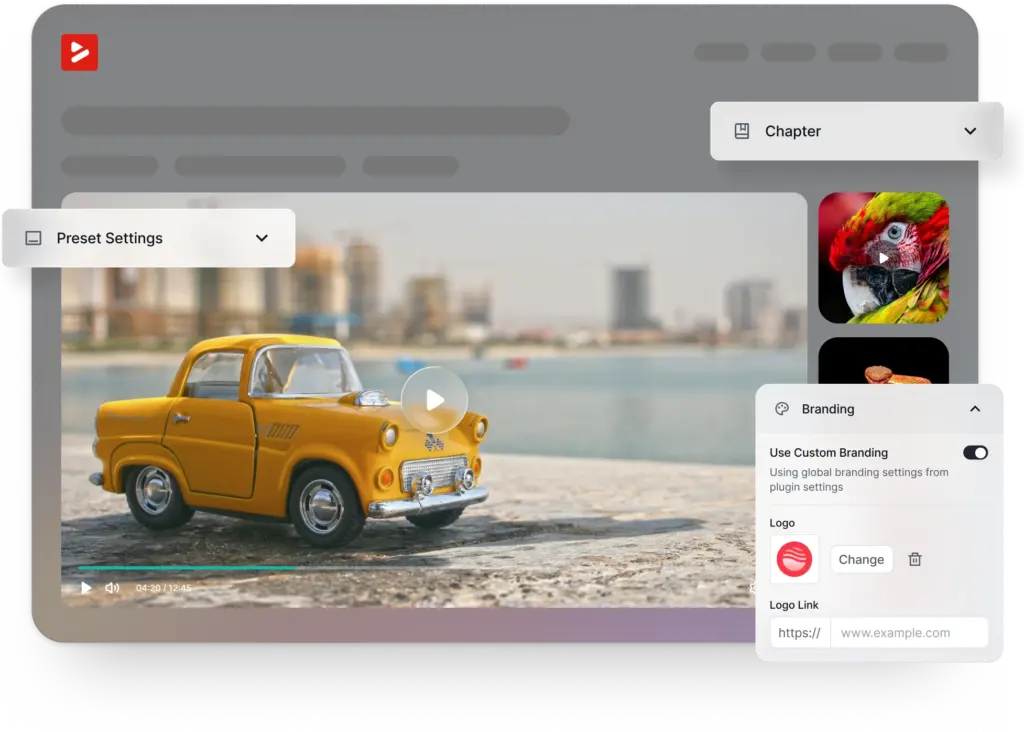
FluentPlayer gives you complete control over how the player looks and what your viewers experience when watching a video. The customizations include:
- Logo upload with custom positioning and a clickable URL
- Brand colors throughout the player
- Multiple skins (Modern, Default, Simple, Minimal, custom)
- Custom CSS and JavaScript support
- Caption styling (font size, colors, background) and multilanguage support.
- Player controls, behavioral controls, etc.
In addition to the features and customizations mentioned above, you can track the number of total plays and viewers, average watch time, completion rate, and more with built-in analytics tools. You can also integrate Google Analytics to get further video analytics.
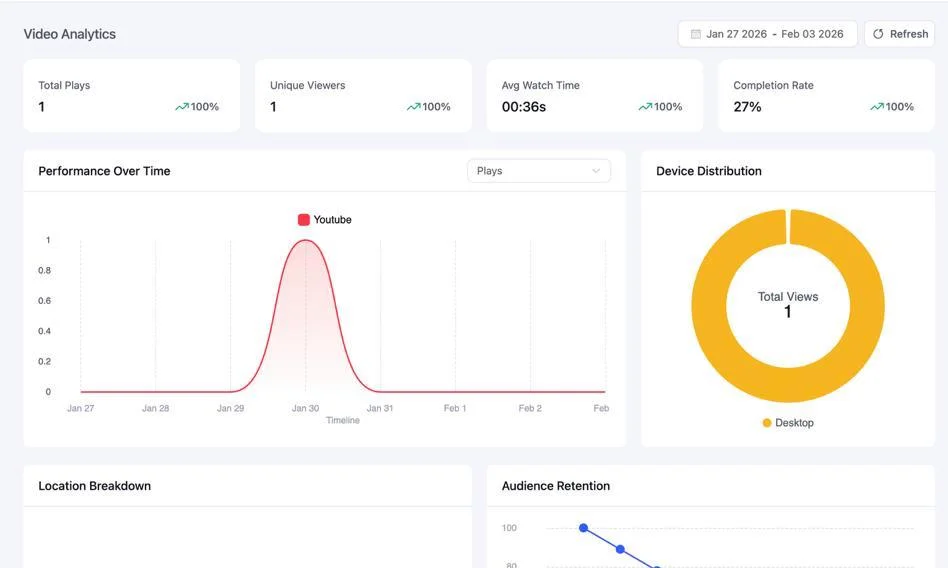
Moreover, when embedding YouTube videos, FluentPlayer offers a privacy mode that prevents tracking until the viewer clicks play, protecting your users’ data.
So, what can’t FluentPlayer do (For now)? Well, here’s your answer.
- Category and tag organization with search/filter.
- Extensive SEO optimization.
- Frontend video submission (although you can do this via Fluent Forms integration).
FluentPlayer treats every video as a conversion opportunity. If you’re embedding a demo on a landing page, running a course, or using video in your sales funnel, FluentPlayer will turn your viewers into leads, subscribers, or customers without you lifting a finger.
So, who’s right for you
If you’re still unsure about which plugin will serve you best, this will make it clear. In this section, I’m listing some actionable insights to help you make an informed decision.
Choose All-in-One Video Gallery if:
- You’re building a video library, archive, or tutorial hub
- Users need to browse, search, and filter through many videos
- You want basic engagement features (likes, comments) built into the plugin
- You want frontend video submissions from users
- Video SEO and dedicated video pages are priorities
- You need Dailymotion, Facebook, or Rumble support
Best for: Educational sites, video archives, entertainment sites, churches, and news sites with video sections.
Choose FluentPlayer when:
- You need to embed a single video, but with full control
- You want videos to capture leads
- You want interactive elements during playback (forms, CTAs, hotspots, etc.)
- You prefer built-in video analytics.
- You’re already using FluentCRM, Fluent Forms, or other WPManageNinja products
- Marketing automation from video leads is your goal
- Branding and player customization are important
- You want to embed customized playlists
- Privacy-first YouTube embeds are important to you
Best for: Course creators, SaaS companies, coaches, membership sites, marketing funnels, demo videos, sales pages, community-driven platforms.
Long story short, if you need users to browse, search, and filter through a large video archive, go with AIOVG. If you need a smooth player with custom playlists & conversion tools, FluentPlayer is your best solution.
Engage viewers with the next-generation video player
Videos are the perfect way to catch your audience’s attention. But to hold that attention, you need a smooth player. You need the player that’ll provide an effortless, comfortable viewing experience.
All-in-One Video Gallery is the mature choice for video libraries. With a generous free tier, solid organization tools, and basic engagement features, it’s a reliable choice if you need to display video libraries with search and browse functionalities.
FluentPlayer treats video as a conversion tool & every viewer as an opportunity. It automates your marketing workflow with forms, CTAs, email capture, and direct CRM integration. It handles playlists and galleries pretty great as well, so you’re not missing out on displaying collections.
There’s no single best; simply pick the one that matches what you’re trying to accomplish. That being said, if you find FluentPlayer intriguing, you’re in luck. FluentPlayer is launching very soon, and you get to be among the first to try it out.
All you have to do is join the waitlist to get early access and be the first to know when free and pro features are finalized.
FluentPlayer: Better control over videos

Sarika writes for FluentPlayer and loves to offer marketing insights to online businesses. She’s curious and enjoys discussing ideas, interests, & perspectives. In her free time, she’s exploring art & culture or relishing comfort food.
Leave a Reply