
Video Marketing Strategy for WordPress: A 7-Step Framework That Works
Most WordPress sites have videos. Very few have a video marketing strategy. Wyzowl’s 2026 survey found that 91% of businesses use video, but only 32% track whether it drives sales. The gap is not production; it is strategy. This guide gives you seven steps to build one on your WordPress site.
TL;DR
- 91% of businesses use video. Only 32% track whether it drives sales
- Your player determines whether a view becomes a lead, a sale, or nothing
- YouTube embeds send your viewers to YouTube. Self-hosted or CDN keeps them on your site
- The best place for lead capture is inside the video, at the exact timestamp where engagement peaks
- Every video needs a buyer stage (awareness, consideration, decision) and a matching player setup
- FluentPlayer gives you timestamp-level control over all of this inside WordPress
Step 1: Define What Video Needs to Do for Your Business
“More brand awareness” is not a goal. It is a wish. A video marketing strategy starts with a number attached to a business outcome.
Pick one specific number of email signups from a product demo. A measurable increase in course completion rates. A target number of qualified leads from a webinar replay. The format of the video follows from this decision.
Your site gives you full control over what surrounds the video, what happens during playback, and what the viewer does next. YouTube does not give you that. The right player setup converts better than any YouTube channel.
Write the goal down. One sentence. One number. That sentence becomes the filter for every step that follows.
Step 2: Audit the Videos You Already Have
You probably do not need to make new videos yet. You need to figure out what the ones you already have are doing.
Pull up every page on your WordPress site that has an embedded video. For each one, answer three questions:
- What is this video supposed to accomplish?
- Is there a way for the viewer to act after watching?
- Do you know how much people actually watch?
Most site owners find the same pattern. The videos are fine. Some are genuinely good. But there is no CTA connected to the video, no lead capture tied to it, and no data on whether viewers watch 10% or 90%.
A simple audit framework
Open a spreadsheet. Create five columns: page URL, video topic, intended goal, current CTA (if any), and current tracking (if any). Fill in one row for every embedded video on your site. This takes 30 minutes for most WordPress sites.
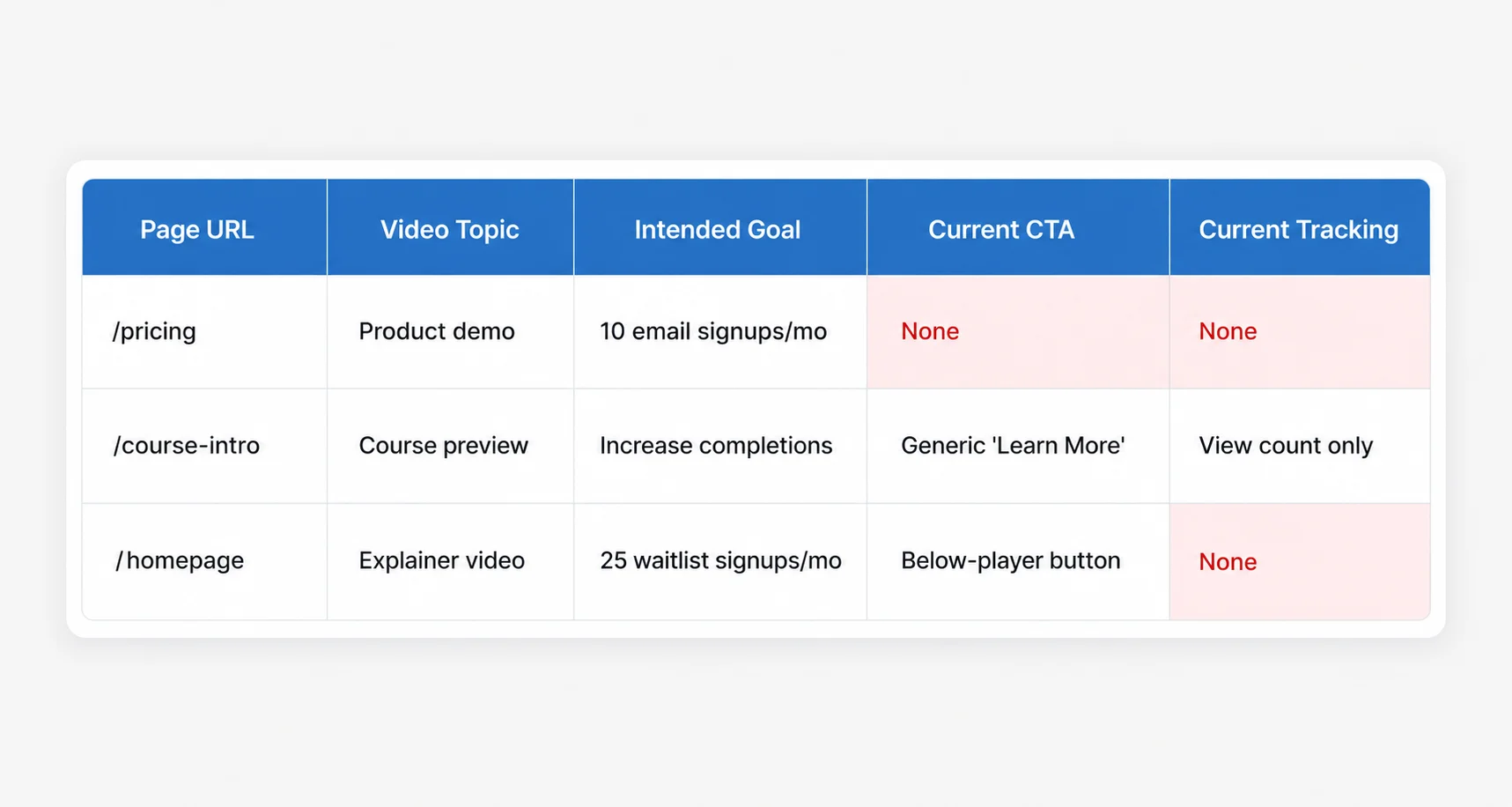
Once done, sort by the intended goal. The videos tied to your highest-value pages (product demos, pricing pages, course previews) get attention first. A product demo with no lead capture is costing you contacts every day it sits there unchanged.
Step 3: Choose Where Your Videos Will Live
YouTube embeds are free and fast to set up. But every embed adds a “Watch on YouTube” button and ends with recommended videos from other channels. You lose branding, you lose analytics, and you lose the viewer when the video ends.
The real cost of “free” YouTube embeds
For a blog post or a social proof clip, this tradeoff is acceptable. For a product demo, a course lesson, or any video tied to a conversion goal, it is a leak in your funnel that runs 24/7.
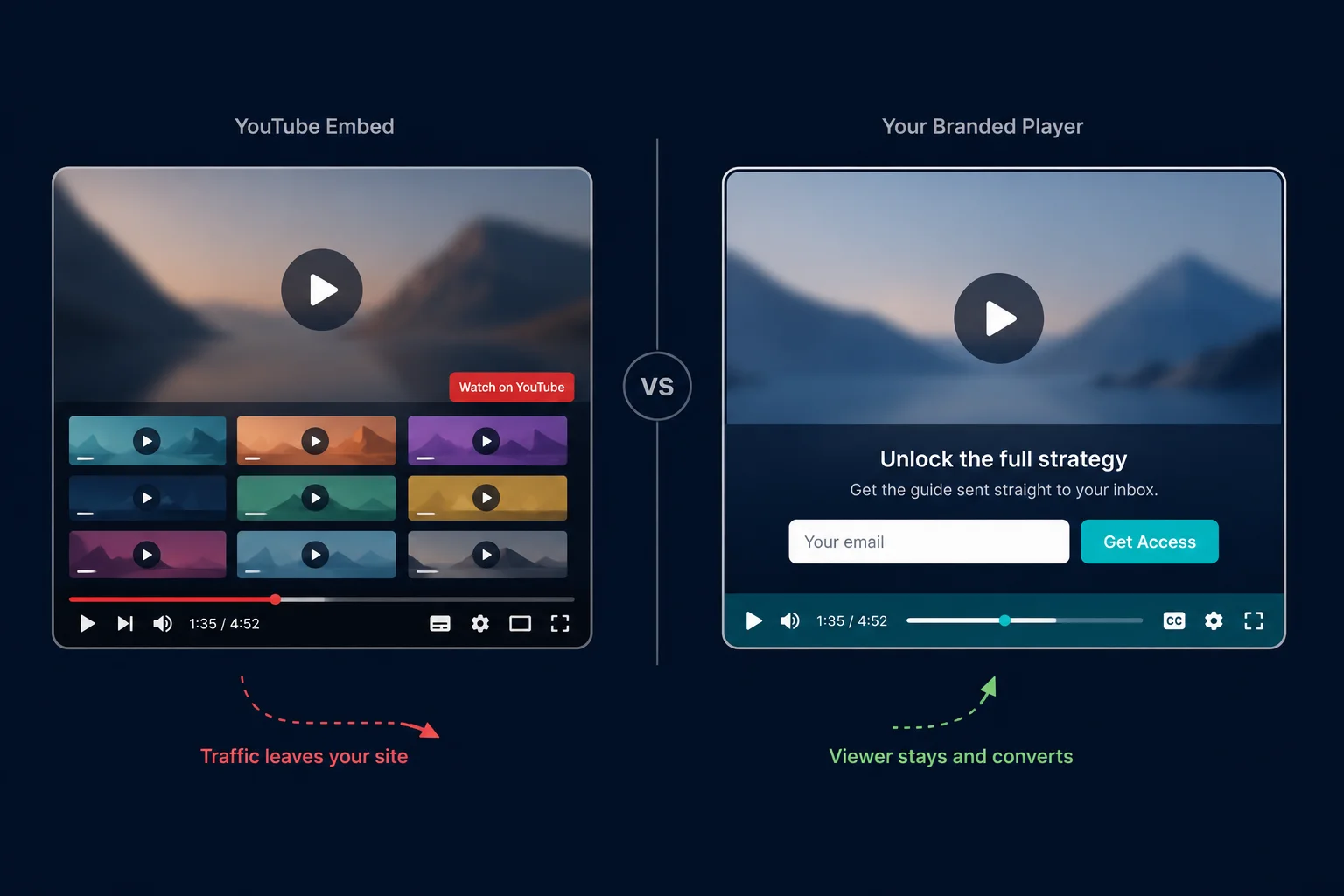
Self-hosted video gives you total control over branding and playback. No third-party logos, no exit doors, no recommendations. The tradeoff is bandwidth. Hosting video files on your own server costs money and affects page load times if you do not set it up correctly.
CDN-hosted video (services like BunnyCDN or Mux) splits the difference. You get the control of self-hosting with the speed of a content delivery network. The video loads fast, plays reliably, and stays branded as yours.
We wrote a full comparison of these hosting options for WordPress.
Step 4: Structure the Viewer Experience Around Each Video
This is where most WordPress sites lose the viewer. The video plays. It ends. Nothing happens.
The viewer experience is not the video. It is everything the player does before, during, and after playback:
- Chapters that help someone find a specific section without scrubbing
- Lead capture forms that appear at the moment a key insight lands
- CTAs that match the content the viewer just watched
- Resume playback that brings a returning student back to where they left off
Wyzowl found that 89% of consumers say video quality affects brand trust. The player is part of that quality signal.
Where lead capture belongs in a video
Most lead capture happens around the video. Below the player, in a sidebar, or on a separate page. These placements feel logical. They are also easy to ignore.
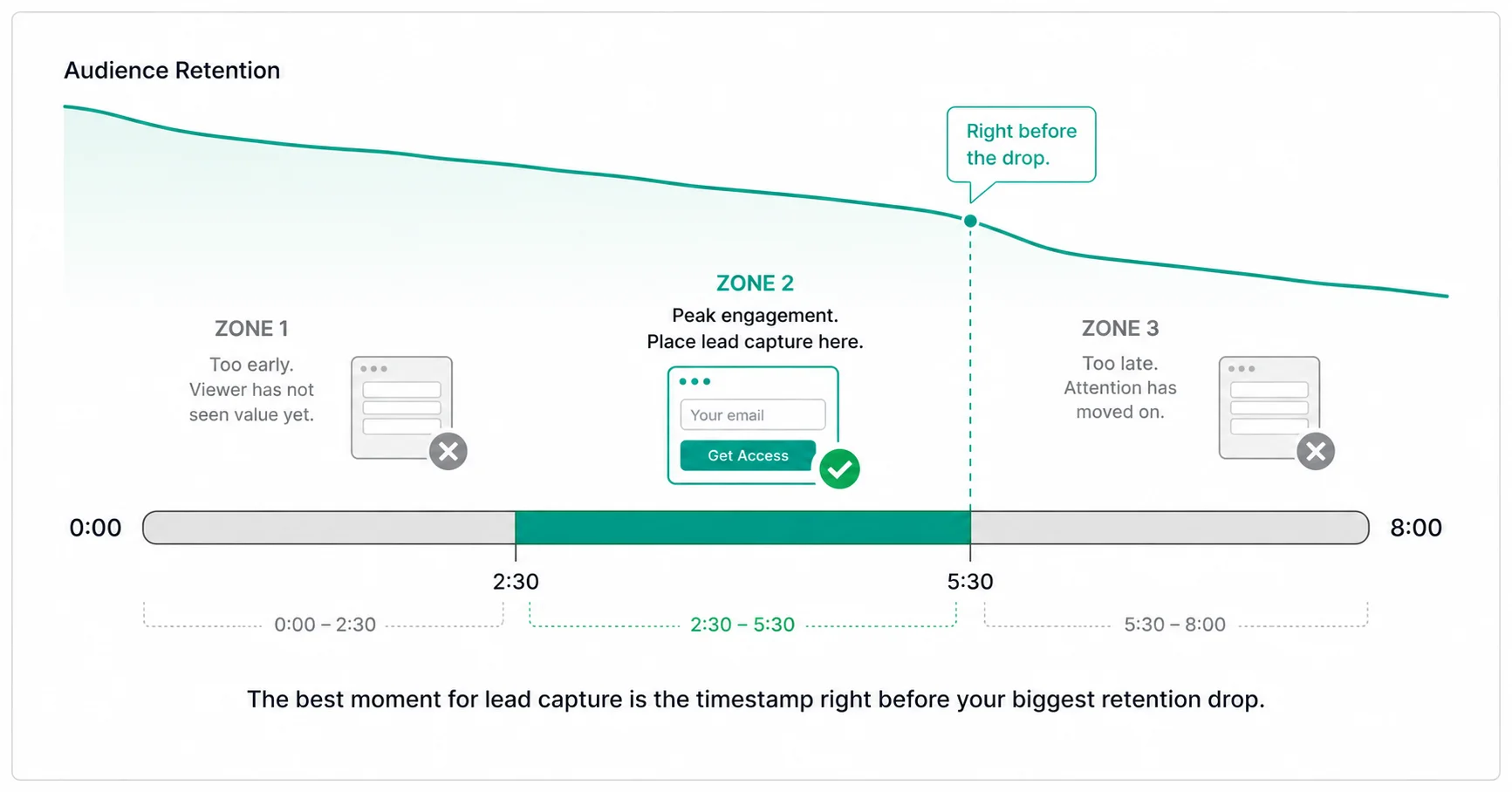
The moment a viewer is most ready to act is somewhere in the middle of the video, right after a specific point lands. Not before the video starts (they have not seen value yet). Not after it ends (attention has already moved on).
FluentPlayer lets you place an email capture form inside the video at any timestamp. The viewer does not leave the player to act. The form appears at the exact moment you choose, timed to the point where engagement is highest.
How do you find that point? Check your audience retention curve (Step 6). The timestamp right before the biggest retention drop is your highest-engagement moment. Place the form there.
Step 5: Match Each Video to a Stage in the Buyer’s Path
Not every video does the same job. An awareness-stage video and a decision-stage video need different player behavior around them.
Awareness videos (explainers, how-tos, thought leadership) need chapters for easy navigation and a soft email capture midway through. The goal is to help and collect contacts. Nothing more.
Consideration videos (product demos, case studies, comparison breakdowns) need contextual CTAs. A viewer watching a demo of a specific feature should see a CTA related to that feature, not a generic “Get Started” button. FluentPlayer lets you place different CTAs at different timestamps.
Decision videos (pricing walkthroughs, onboarding previews, free trial demos) need a direct conversion path. A payment form or registration form embedded inside the video at the moment the viewer is most ready to commit. FluentPlayer’s integration with Fluent Forms makes this work without a redirect.
Here is how this looks in practice for a WordPress cooking class membership site:
- Awareness: A 5-minute pasta tutorial with chapters and an email capture at 3:20, right after the sauce technique
- Consideration: A 3-minute course library walkthrough with a CTA at 1:45, timed to the most popular module
- Decision: A 90-second course preview with a Fluent Forms payment form at the 60-second mark
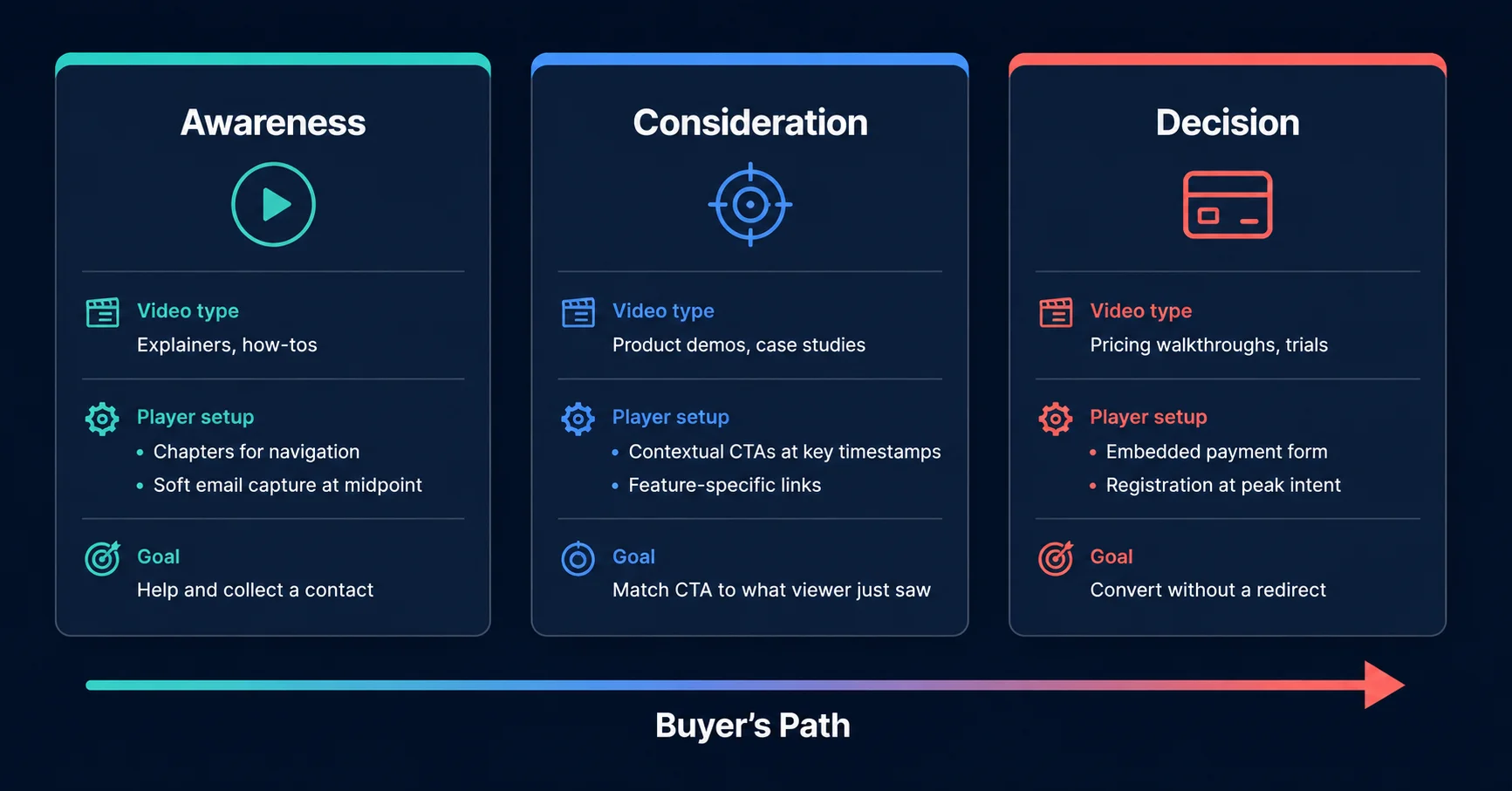
The most common mistake is treating every video like an awareness video. If your product demo page has a “subscribe for updates” form instead of a purchase option, you are asking a decision-stage viewer to take an awareness-stage action. Match the action to the intent.
Learn how to grow your business with a WordPress video player
Step 6: Set Up Measurement That Connects Video to Revenue
Views are not a KPI. They tell you someone pressed play. They do not tell you whether that person stayed, learned anything, or took action afterward.
Wyzowl’s 2026 data makes this gap visible. 67% of video marketers measure ROI by counting views. Only 32% track bottom-line sales. The marketers in that 32% are the ones building an actual strategy. The rest are reporting activities.
The problem is not a lack of data. It is the default tools that give you the wrong data. YouTube Studio shows impressions, click-through rate, and watch time. None of those tells you whether a viewer took action on your WordPress site after watching.
The metrics that matter vs. the metrics that look good
Completion rate tells you whether the content holds attention. If 80% of viewers drop off in the first 30 seconds, the video is not the problem. The thumbnail, title, or placement is.
Post-video action rate tells you whether the player setup is working. How many viewers who finished the video (or reached the CTA timestamp) actually clicked, signed up, or purchased? If completion is high but action is low, your CTA placement or offer needs work.
Audience retention curve tells you where viewers lose interest. This is not a vanity metric. It is a content editing tool. A retention drop at the 2-minute mark of a 10-minute video tells you exactly where to tighten the next version.
FluentPlayer’s built-in analytics track all three: average watch time, completion rate, audience retention, and viewer location data. You do not need a separate analytics plugin. The data lives inside WordPress, tied to the same dashboard where you manage the rest of your content.
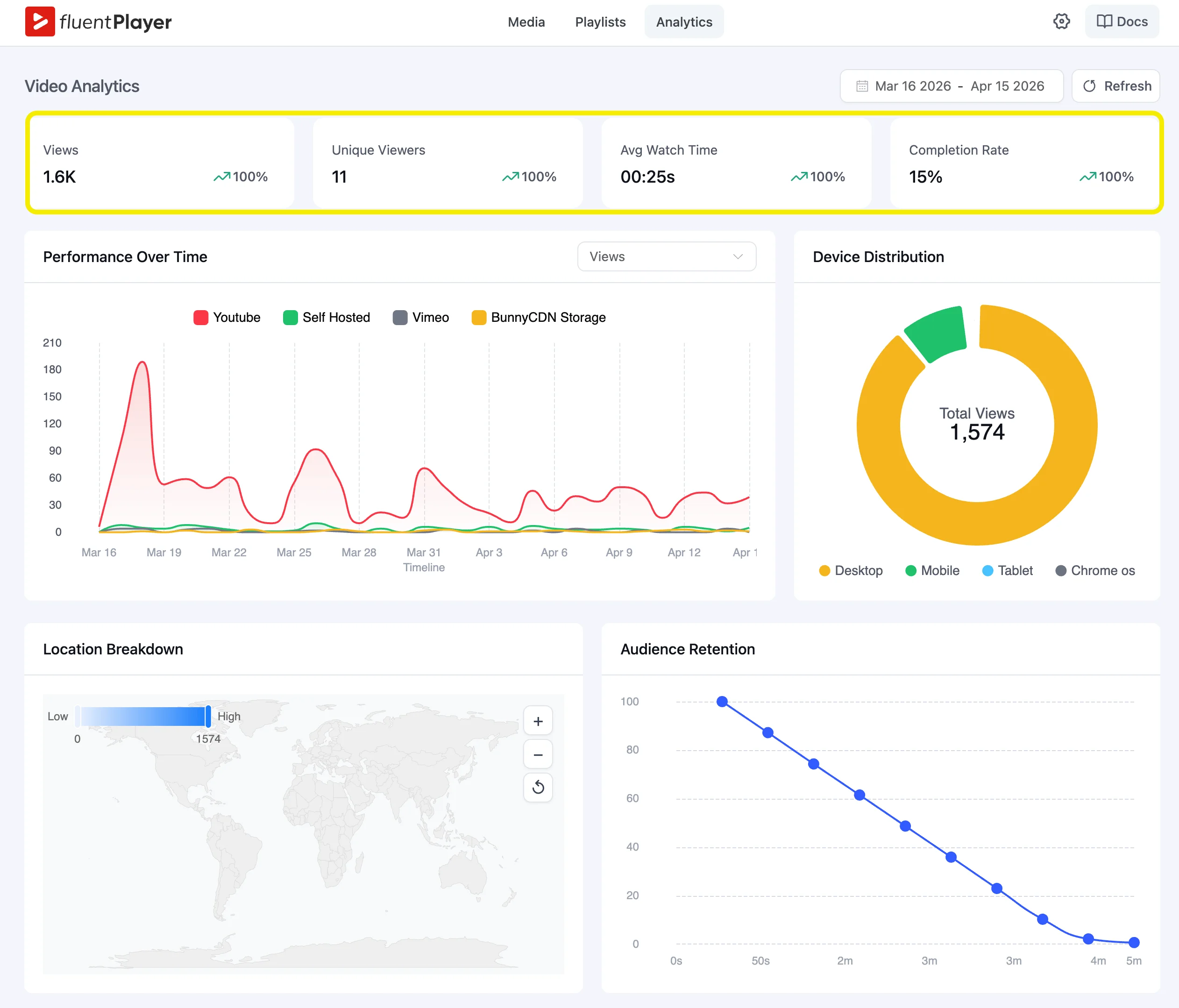
The dashboard also splits new and returning viewers. This matters for course creators. A high return rate with low completion tells you people want to finish but something is blocking them. A low return rate tells you the first impression did not land.
Step 7: Build a 90-Day Video Calendar You Can Actually Execute
A video marketing strategy without a calendar is a list of intentions. The calendar turns intent into output.
Keep it simple. For 90 days, you need three things per video: the business goal (from Step 1), the buyer stage (from Step 5), and the player setup (from Step 4). One row per video. One page.
We built a free 90-day video calendar template you can download and start filling in today.
Month 1: Fix what you have. Take the videos from your audit (Step 2), add chapters, CTAs, and lead capture using your player. No new videos yet. Measure baseline performance.
Month 2: Fill the gaps. Check your buyer stage map. If you have five awareness videos and zero decision-stage videos, make one. If your consideration-stage videos have no contextual CTAs, add them.
Month 3: Produce and optimize. Create one or two new videos based on what the data from months 1 and 2 tells you. A high-completion video with low email capture? Test a different form placement. A decision video with no conversions? Revisit the offer.
The Strategy Starts Before You Hit Record
Most WordPress sites treat video as a content type. Add it to the page, press publish, and check the box. The sites that grow from video treat it as a system: goal, audit, hosting, player experience, buyer stage, measurement, and calendar.
Start this week. Pick one video on your site that should be generating leads but is not. Write down the goal, choose a CTA timestamp, and set up tracking. That single change shows the difference between a video that plays and a video that works. FluentPlayer is built for that work. Timestamp-level lead capture, contextual CTAs, chapter-based navigation, built-in analytics, and full control over the viewer experience on your WordPress site.
FluentPlayer: Better control over videos

This is Sumit. He’s a physics major who’s trying to understand both the physical as well as the WordPress worlds. Whenever he’s not busy, plays fifa or spends time with his family.
Leave a Reply