
10 Ways FluentPlayer Helps You Grow Your Business

Video is already one of the most effective things you can put on a website. People watch, they stay longer, they trust more. You probably already know this because you are already publishing videos.
What most marketers do not realise is that the player around the video determines how much of that trust actually converts. The same video, in a better player, captures leads, closes sales, and keeps learners coming back.
FluentPlayer is built for that. This guide covers ten ways it turns the videos you are already publishing into tools that actually grow your business.
TL;DR
- A passive video player lets leads, sales, and learners slip away while the video plays just fine
- FluentPlayer captures leads and accepts payments inside the video at the moment viewers are most engaged
- CTAs appear at the right moment, not after the video ends when attention has already moved on
- YouTube’s recommendations and exit buttons are replaced with whatever you decide comes next
- Chapters, resume playback, and analytics give course creators real control over the learning experience
- One player handles every video source with consistent branding and analytics across all of them
- Lazy loading is on by default so your page speed and Core Web Vitals are never at risk
What your current player is costing you
You will not find this cost on any invoice. It does not show up as an error. The video plays fine. That is why most people never notice it.
Think about the last video you published. Someone watched it, got value from it, and then nothing. No email captured. No CTA clicked. No next step taken. The video did its job. The player did not do yours.
Here is what that looks like in practice:
- A product demo runs perfectly and the viewer has no way to act without leaving the page to find a contact form.
- A webinar replay sits on your site collecting views that tell you nothing about who watched, how much they watched, or whether any of them were ready to buy.
The video played. The business outcome did not happen.
This is not a content problem. Your videos are doing their job. It is a player problem. And it is quiet enough that most people never go looking for it.
Let’s find out how not to get hurt by your video player plugin and see actual growth. Here are the 10 ways:
1. Capture leads at the moment viewers are most engaged
Most lead capture happens around the video, not inside it. Below the player, before it starts, after it ends. I get why these placements feel logical. They are easy to set up and they do not interrupt the viewing experience.
The problem is timing. By the time someone reaches the end of a video they have already moved on mentally. A form below the player competes with everything else on the page.
The moment you actually had them was somewhere in the middle, when a specific insight landed and they were most ready to act. That is the moment most setups miss entirely.
How FluentPlayer handles it:
FluentPlayer lets you place an email capture prompt inside the video at any timestamp. Not over the page. Not below the player. Inside it. The viewer does not leave the experience to give you their email. The capture happens at the exact moment you choose, timed to the point of highest engagement.
When FluentPlayer launches, this is one of the first things worth configuring on any video where lead generation is the goal.
Stay updated on free vs. pro, pricing & beta.
2. Accept payments and registrations without leaving the video
Email capture is one use case. But some of the most valuable actions a viewer can take require more than a single field. Paying for a course. Registering for a webinar. Filling out a qualification form before a sales call.
The standard approach sends the viewer somewhere else to complete these. A separate page, a popup, a redirect. Each handoff adds friction and each friction point loses people.
What FluentPlayer does differently:
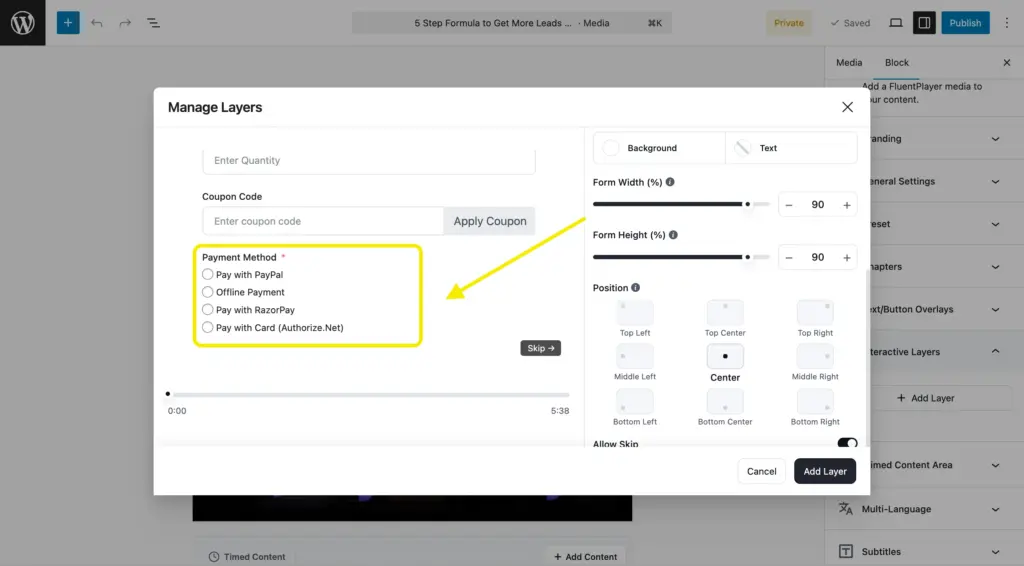
FluentPlayer’s integration with Fluent Forms lets you embed a full form directly inside the video at any timestamp. The form itself, inside the player, appears at the moment you choose. Because this uses Fluent Forms specifically, the forms carry everything Fluent Forms supports, including its payment feature.
Here is what that looks like in practice:
- A viewer watching a course preview can pay for full access without leaving the video
- A webinar registration form can appear at the moment the speaker mentions the next session
- A product demo can end with a purchase form inside the player
- A service page video can trigger a qualification form at the moment the viewer signals interest
A popup interrupts. An embedded form is part of the experience. The viewer does not feel redirected. They act from inside the video, at the moment they are most ready to.
3. Add CTAs that actually match what the viewer just watched
Most CTAs on video pages are generic. A button below the player that says “Get Started” or “Book a Demo” regardless of what the video was about or where the viewer is in their decision.
The problem is not that the CTA is there. It is that it does not connect to the moment. Someone watching a tutorial on setting up a feature is not in the same headspace as someone watching a pricing breakdown. A single static CTA treats them the same way.
What FluentPlayer does differently:
FluentPlayer lets you place different CTAs at different points inside the video, matched to what the viewer just saw. A tutorial can prompt a documentation link at the moment a specific step is shown.
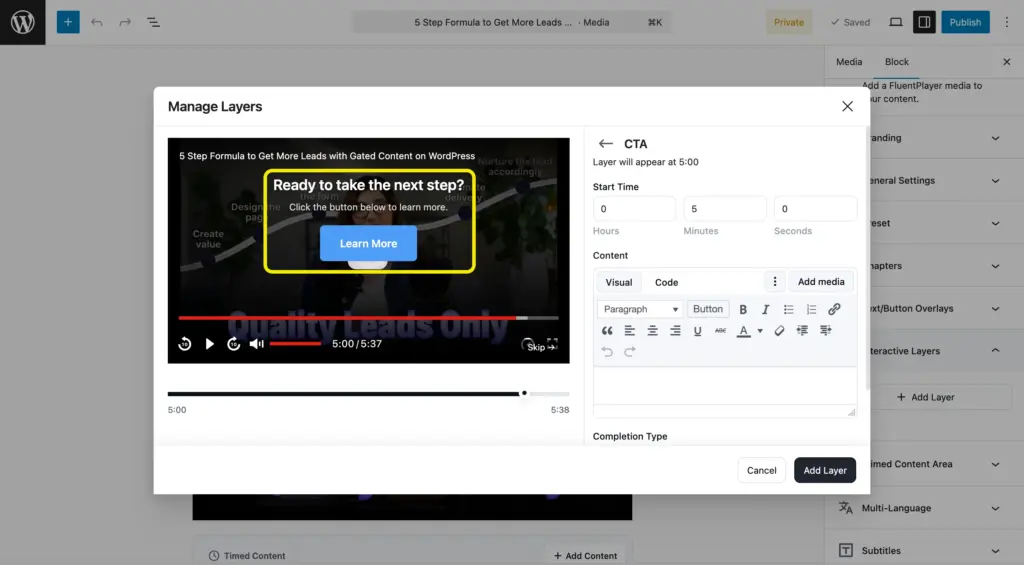
The CTA responds to the content. That is what makes it relevant. And relevant CTAs convert better than well-placed ones.
4. Remove the exit doors YouTube builds into your page
Every YouTube embed ends the same way. Your video finishes and YouTube fills the screen with a grid of recommended videos. Most of them are not yours.
This is not a bug. It is how YouTube is designed. The platform’s goal is to keep viewers on YouTube. Your goal is to keep them on your site. These two goals are directly opposed, and the default YouTube embed serves YouTube’s goal every time.
Beyond the recommendation grid, it also puts a Watch on YouTube button directly on your page, a button whose only job is to send your viewer somewhere else.
I have seen this play out on product demo pages repeatedly. Someone watches the video, gets interested, and then clicks away to a recommended video before ever reaching the CTA. The video did its job. The player undid it.
What FluentPlayer changes:
FluentPlayer replaces the YouTube player UI entirely. When your video ends, your viewer sees what you decide: a CTA, a form, another video, or nothing at all. The recommendations are gone. The exit doors are closed.
You did the work of making the video. The player should work for you, not for YouTube.
5. Structure courses and lessons the way you teach
YouTube chapters are built for YouTube viewers. They are indexed and labeled in a way that makes sense for someone browsing the platform. When you embed that video on your WordPress site, those chapters disappear entirely. Your student gets a flat, unmarked timeline and has to scrub to find the section they need.
I noticed this on a course site where every lesson was a long-form YouTube embed. Students kept asking where specific concepts were covered. The chapters were there on YouTube. On the site, they were gone.
How FluentPlayer solves it:
FluentPlayer’s chapter support is independent of YouTube. You build chapters inside WordPress, for your students, structured around how you teach, not how YouTube has indexed the video.
- Label each chapter with the lesson name your students recognize
- Match the structure of your course outline exactly
- Update chapters at any time without touching YouTube
A student who needs to rewatch one concept in a 40-minute lesson finds it in three seconds. That is the difference between a course experience that supports learning and one that frustrates it.
6. Let learners pick up where they left off
A learner closes a lesson tab halfway through. Life happens. They come back the next day with every intention of finishing.
Without resume playback, they are back at the beginning. Most do not scrub to find where they stopped. They restart, lose momentum somewhere in the middle, and are more likely to abandon the course entirely. The friction is small at the page level. The impact on course completion is not.
What resume playback does:
FluentPlayer remembers where each viewer stopped. A returning learner lands at the exact frame they left. No hunting. No repetition. No reason to give up.
It is a small feature with an outsized effect. Course completion rates are notoriously hard to move. Resume playback removes one specific, recurring friction point that quietly costs completions across every platform that does not have it.
7. See exactly where your audience drops off
You publish a video. It gets views. Views tell you almost nothing about whether the video is actually working.
I have been in this position. A video gets solid view numbers and you assume it is performing well. Then you look closer and realise most viewers left in the first two minutes. The view count looked fine. The actual engagement was not.
Without proper analytics, the only response is to guess. Rewrite the description. Cut the intro. Change the thumbnail. Try again. You have no idea which change made a difference or whether the real problem is deeper in the video.
What FluentPlayer shows you:
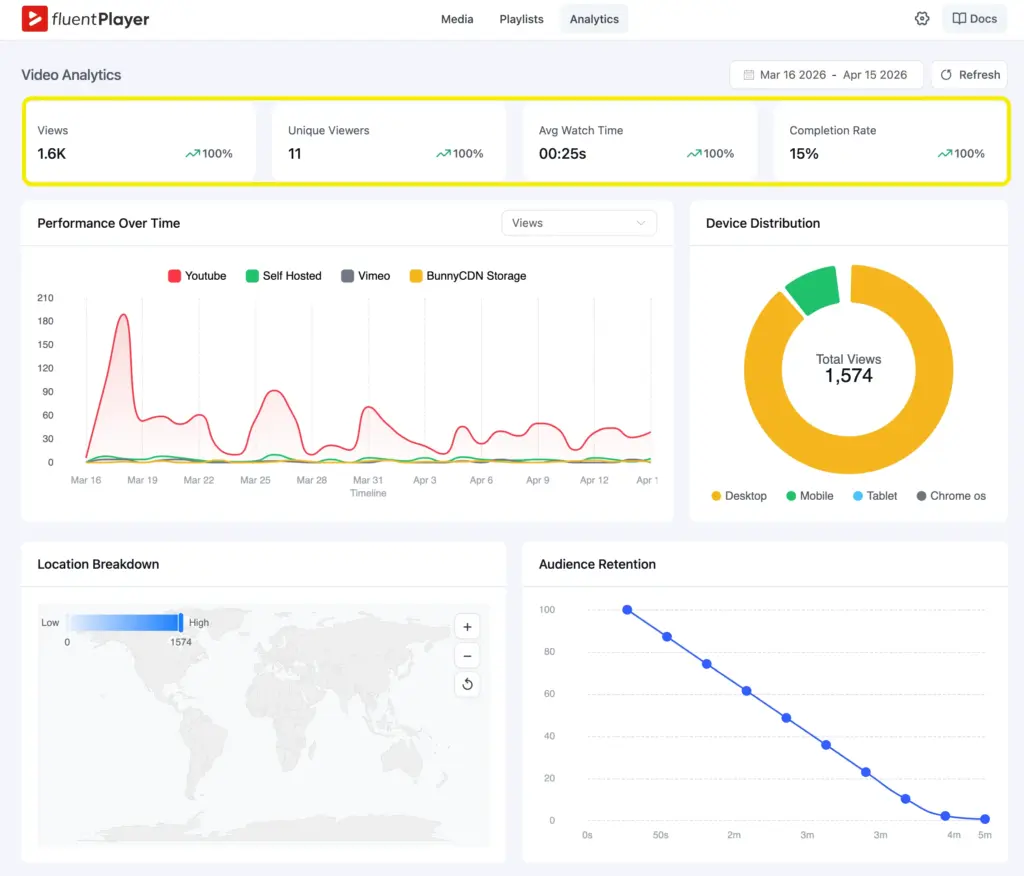
FluentPlayer brings detailed video analytics inside WordPress, not in a separate platform you have to log into separately.
- Play rate: what percentage of visitors actually press play
- Unique viewers: who is watching, not just how many times
- Average watch time: how long viewers actually stay
- Audience retention: where exactly viewers drop off
- Top videos: which content is doing the real work
A product demo where nobody reaches the pricing section is telling you something specific. FluentPlayer tells you what it is so you can fix it.
8. Keep your brand on screen from first frame to last
Every video embedded through the default YouTube player carries YouTube’s branding throughout. The controls are YouTube’s. The interface is YouTube’s. The viewer moves from your carefully designed page into an interface that belongs to someone else.
For most blog posts this does not matter much. But for a course platform, a membership site, or a sales page where the brand experience is part of the value, that inconsistency has a real cost. The professional experience you built breaks the moment the video starts.
What FluentPlayer gives you:
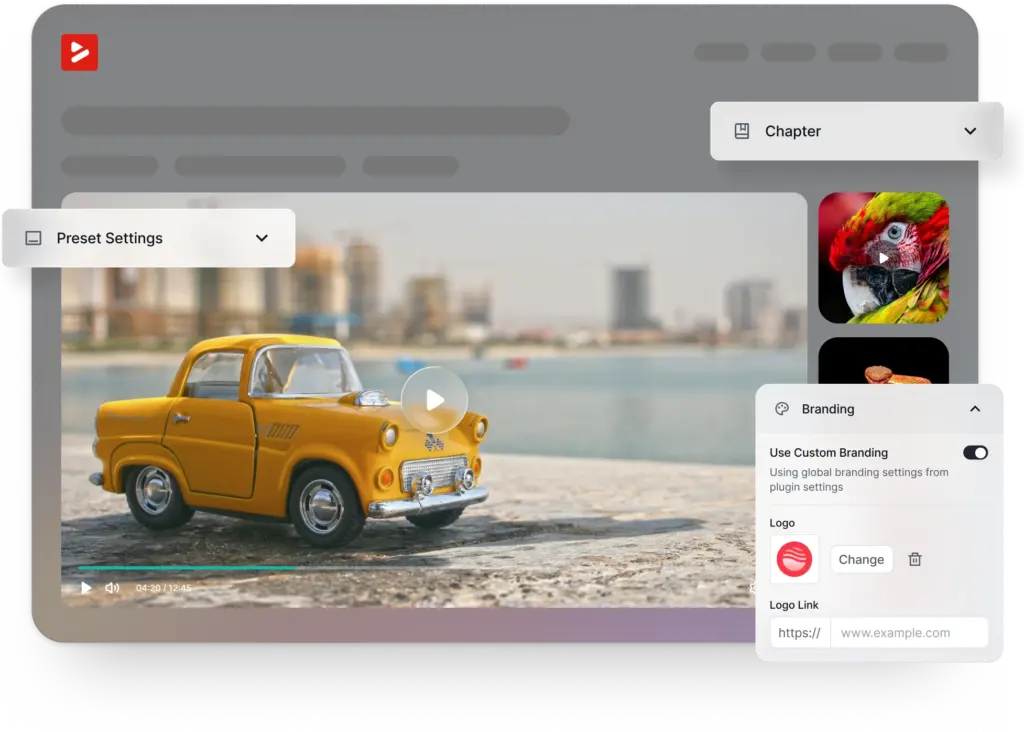
FluentPlayer gives you a fully branded player: your logo, your colors, your controls. Every video on your site plays inside an experience that never stops feeling like yours.
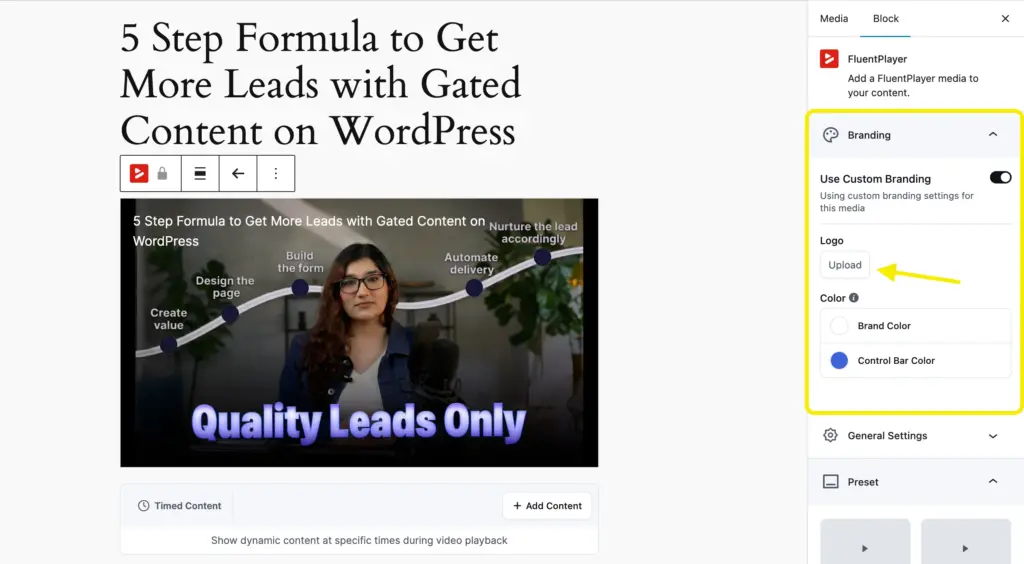
When FluentPlayer launches, branding is one of the first presets worth configuring so every video on your site reflects the experience you have built.
9. Use one player for every video source
Most sites I have seen end up with a mix of video sources over time. YouTube for public content. A private host for course videos. A CDN for high-traffic pages. Self-hosted files for internal use. It happens gradually and then suddenly you are managing three different embed styles and logging into three different dashboards to understand how your videos are performing.
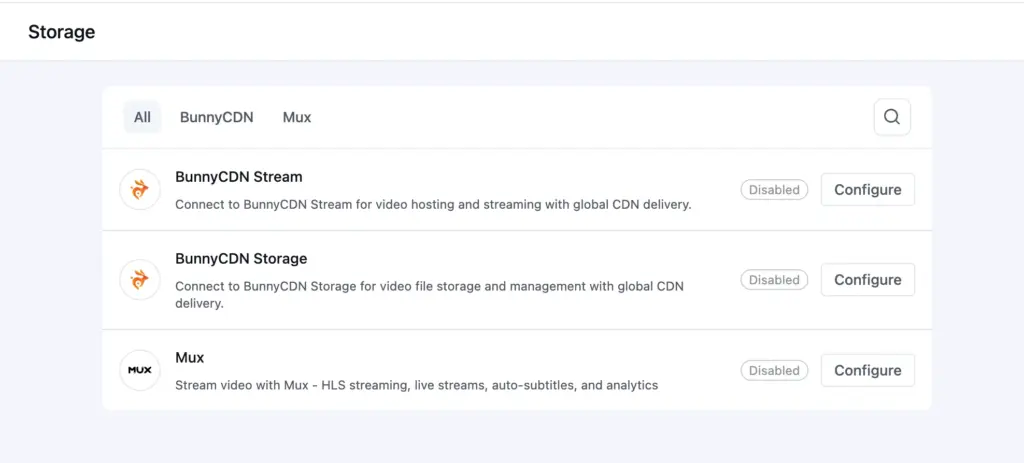
What FluentPlayer unifies:
FluentPlayer supports YouTube, Vimeo, Bunny Stream, Mux, and self-hosted files through one consistent player interface.
- The same analytics layer regardless of where the video is hosted
- The same presets and branding applied across all sources
- The same viewer experience whether the video is on YouTube or Bunny Stream
The practical benefit:
When you move content between platforms, switching a course from YouTube to Bunny Stream for privacy for example, you update the source and the player stays the same. Your embeds do not need rebuilding.
10. Protect your page speed while using video
A standard YouTube embed loads roughly 500KB of scripts on every page visit, whether the visitor ever presses play or not. For a single video page, that is significant. For a course page with multiple lessons, it compounds fast.
Page speed is a confirmed Google ranking factor. Heavy video embeds are one of the most common reasons pages fail Core Web Vitals, quietly, with no obvious error telling you why. The specific metric at risk is Largest Contentful Paint, the time it takes for the main content of your page to load.
Most people do not connect a slow page to their video embeds. They look at images, scripts, and fonts. The video player is sitting there loading 500KB every single visit and nobody notices.
How FluentPlayer handles it:
FluentPlayer lazy loads by default:
- A lightweight thumbnail loads with the page
- The full player only loads when someone clicks play
- Visitors who scroll past the video never pay the loading cost
- Core Web Vitals scores stay clean
- Page rankings stay protected
No separate lazy load plugin needed. No manual configuration. It works this way out of the box.
What a better video player actually does for your business
You already did the hard part. The videos are there. People are watching.
The player is either working for you or it is not. Capturing the lead or missing it. Keeping the viewer on your page or handing them to YouTube. Showing you where people dropped off or leaving you to guess.
Ten things in this guide. None of them require a new video.
FluentPlayer is on the waitlist. If any of this matches what you have been running into with your current setup, we would love to hear about it in the comments.
FluentPlayer: Better control over videos

This is Sumit. He’s a physics major who’s trying to understand both the physical as well as the WordPress worlds. Whenever he’s not busy, plays fifa or spends time with his family.
Leave a Reply