
WordPress Video Hosting Comparison: Bunny Stream vs Vimeo vs YouTube vs Self-Hosted
You are picking a video hosting option for your WordPress site. The four options that keep coming up are Bunny Stream, Vimeo, YouTube, and hosting the video yourself.
I work on FluentPlayer, a WordPress video player that supports all four of these as video sources. Building that meant researching each option seriously: how they price at scale, how they perform under real traffic, what they do to your content ownership over time, and where each one breaks down for WordPress use cases specifically.
You have probably read the surface-level breakdowns. Free vs paid. Storage limits. Embed quality. None of that tells you which one is actually right for what you are building.
This comparison goes deeper. Cost math at real usage levels. Delivery performance under load. What each platform does to your content ownership over time. And a clear verdict on which option fits which type of site, with the reasoning attached.
No hedging. Pick the one that fits. Move on.
TL;DR
- Bunny Stream is the cost-efficient choice for paid courses, memberships, and gated content — usage-based pricing, DRM included, no platform interference.
- Vimeo delivers a clean, professional player out of the box with no configuration overhead, best for portfolios, brand video, and sales pages.
- YouTube is the right tool for content meant to be discovered — free at any scale, ranks in search, and reaches audiences you have not built yet.
- Self-hosting is acceptable only for short, low-traffic videos on non-critical pages — the moment scale enters the picture, it breaks.
- Most serious WordPress video setups use more than one source. A plugin like FluentPlayer lets you run all four through a single consistent player.
Before the comparison: what this is actually about
Most people frame this as a features list fight. Which one has the best player. Which one costs less. Which one is the most popular.
That framing misses the point.
Video hosting is an infrastructure decision. You are not picking a favorite. You are picking something that will sit between your content and your audience for the next several years, and that choice has cost, performance, privacy, and control implications that compound over time.
The four options in this comparison solve fundamentally different problems:
- Bunny Stream: purpose-built CDN delivery with pay-as-you-go pricing
- Vimeo: managed hosting with a clean professional player out of the box
- YouTube: free distribution platform with a built-in audience engine
- Self-hosted: full control on your own server, with full responsibility for what breaks
None of them is universally correct. The right answer depends on what your videos are doing, who is watching them, and what happens if something goes wrong at scale.
This comparison gives you the evaluation framework to make that decision. Not just the pros and cons, but the reasoning behind when each option makes sense and when it does not.
The evaluation framework
Every video hosting option in this comparison gets evaluated across six criteria. These are the metrics that actually determine whether a hosting choice was correct six months after you make it.
|
# |
Criterion |
What it measures |
|---|---|---|
|
01 |
Cost Math |
What you pay per GB of storage and delivery, how cost scales with audience, hidden minimums or caps |
|
02 |
Playback Performance |
Edge location count and latency, adaptive bitrate (HLS/MPEG-DASH), behaviour under traffic spikes, mobile and slow-connection handling |
|
03 |
Privacy and Ownership |
Can you restrict embed location, does the platform show ads, can your account be suspended, who has access to viewer data |
|
04 |
Player and Branding |
Custom colours, logo, CSS, CTA overlays and email capture, playlist and chapter support, requires third-party plugin or not |
|
05 |
Analytics |
Play rate and watch-time data, engagement heatmaps, conversion event tracking, WP-native or siloed dashboard |
|
06 |
Risk Over Time |
Pricing change exposure, content policy risk, migration difficulty, infrastructure continuity |
Overview of the video hostings
If you need a quick answer before reading the full breakdown: scan the table below. Each column is a video hosting option. Each row is a criterion that will cost you time or money if you get it wrong.
Find your priority – cost, privacy, reach, or simplicity; and follow it across the row. That column is probably your answer.
Bunny Stream
Best for: Online courses, membership sites, and anyone who wants high-performance delivery at a predictable, usage-based cost.
What it is
Bunny Stream is the video hosting and streaming layer of Bunny.net, operates a global CDN network with 100+ edge locations worldwide. It is not a video platform with a community or discovery engine. It is infrastructure. You upload video, it transcodes, it delivers through a global CDN, and you embed it where you want.
That narrow focus is its strength. It does one thing and prices it at a level that makes every other option look expensive by comparison.
Cost math
Bunny Stream uses pay-as-you-go pricing with a $1/month minimum.
- Storage: $0.01 per GB per month per replication region
- CDN delivery: from $0.005 per GB (varies by region)
- Transcoding: free
- DRM and token authentication: included
What this looks like in practice: a site with 50 GB of video and 500 GB of monthly delivery bandwidth pays roughly $3 to $4 per month (typically under $10 at this scale). A course platform with 200 GB of content and 2 TB of monthly delivery runs around $12 to $15.
Compare that to Vimeo Standard at $25 per month with a 5 TB storage cap, or Vimeo Advanced at $75 per month. At realistic course platform usage, Bunny Stream costs 60 to 80 percent less for the delivery layer alone.
The catch: you are paying separately for a WordPress player plugin. Bunny Stream does not come with a native WordPress experience. You need something like FluentPlayer or any other WordPress Player to embed and control the playback experience on your site.
That player typically costs $0 to $100 per year depending on which option you choose, which still keeps total cost well below Vimeo.
Playback performance
This is where Bunny competes directly with platforms that charge five to ten times more. The 119-edge-location network delivers average latency around 25ms globally. Adaptive bitrate streaming is automatic. Transcoding to HLS and MPEG-DASH happens on upload, not at request time.
For most small to mid-sized sites, delivery performance is comparable in practice.
Privacy and ownership
Your content lives on your Bunny account. Bunny does not show ads. Bunny does not have a viewer-facing platform that can recommend competing content. Token authentication and DRM are available on all plans, which means you can restrict who can view content without paying enterprise-tier pricing.
For gated content, paid courses, and membership video, this is a significant advantage over YouTube and a cost advantage over Vimeo.
Player and analytics
Bunny Stream has its own basic embedded player. It is functional but minimal. For any meaningful customization, interactive layers, or analytics that connect to your WordPress marketing stack, you need a player plugin on top.
Analytics from Bunny cover views and bandwidth consumption. They do not cover watch time heatmaps, engagement scoring, or conversion events inside WordPress. That data layer lives in whatever player plugin you use.
Risk profile
Bunny.net is an independent infrastructure, not a social platform. Pricing changes on CDN providers happen, but they are gradual and competitive, not sudden policy decisions tied to a platform business model. Migration risk is low: your video files live in your Bunny account and can be moved.
The main operational risk is setup complexity. Connecting Bunny Stream to WordPress requires configuration. It is not plug-and-play for someone who has never used a CDN before.
| Bunny Stream is the right choice when: You are building content behind a paywall, running a course platform, or managing a membership site. Your primary concern is delivery cost over time, not setup simplicity. You have or are willing to use a WordPress player plugin for the front-end experience. |
Vimeo
Best for: Professional portfolios, brand video, and sales-focused pages where a clean, controlled viewing experience justifies a higher monthly cost.
What it is
Vimeo is a managed video hosting platform. Upload a video, get a polished player, embed it anywhere. No ads, no algorithm recommending a competitor’s content mid-roll. The platform has been the default choice for agencies, creative professionals, and marketing teams for over a decade.
Its value proposition is simplicity and quality: the out-of-the-box experience requires zero configuration and looks professional immediately.
Cost math
Vimeo has three paid tiers relevant to business use:
- Starter: $12 per month – 1 seat, 2 TB storage, basic analytics
- Standard: $25 per month – 5 seats, 4 TB storage, added collaboration tools, advanced privacy
- Advanced: $75 per month – 10 seats, 7 TB storage, multiple streaming, marketing automation integrations, enhanced analytics
The pricing looks reasonable until you model it against what you actually need. Starter gives you 2 TB of storage and basic analytics for $12, which is fine if you are just hosting videos. But the moment you want domain-level privacy or any conversion tooling, you are on Standard at $25.
Advanced at $75 unlocks marketing automation integrations and the analytics depth that makes video useful as a business asset. That is a real jump for features that should not be premium.
The flat-rate structure is the real issue. A course platform with 200 GB of content and 2 TB of monthly delivery pays the same $25 whether they are at 10 percent utilization or 90 percent. There is no smaller tier to drop to when you need less. You pay for the ceiling, not the floor.
Playback performance
Vimeo’s CDN is reliable and global. 4K support is available across all paid plans. Adaptive bitrate streaming is handled automatically. Buffering incidents on Vimeo are rare in practice.
Performance is not a differentiator here. Vimeo and Bunny Stream, both provide strong global delivery infrastructure suitable for professional use. The gap is cost and control, not reliability.
Privacy and ownership
Vimeo is the strongest option in this comparison for content privacy controls. Domain-level embed restrictions, password protection, and private links are available. You can prevent a video from being played anywhere except your specific domain.
One important note: Vimeo owns the hosting relationship. If Vimeo changes its pricing, restricts a feature, or decides to discontinue a plan tier, your content and your workflow are affected. This has happened before. The platform has restructured pricing and removed features from lower-tier plans over the years. That is a dependency risk worth pricing into your decision.
Player and analytics
Vimeo’s player is the cleanest default experience in this comparison. Custom colors, logo, and CSS are available. CTAs and email capture are in the Advanced plan. For basic professional embedding, Vimeo requires no additional tools.
Analytics include play rate, watch time, engagement graphs, and geographic breakdowns. These live in Vimeo’s dashboard, not inside WordPress. If your conversion tracking stack is WordPress-native, that data stays siloed unless you build a connection manually.
FluentPlayer vs Vimeo: Which One Is Right for Your WordPress Site?
Risk profile
Vimeo is a profitable, established platform. Short-term continuity risk is low. The longer-term risk is pricing trajectory: as Vimeo has matured, the ratio of features to price has shifted in ways that favour their enterprise segment, not their mid-market users. If you are on Starter or Standard, you are renting infrastructure that can be repriced at renewal.
Migration off Vimeo is possible but involves re-uploading all content to a new platform and updating embeds across your site. The friction is real.
| Vimeo is the right choice when: You need a professional, ad-free player with no configuration overhead. Your video library is small to medium and stable. You do not need tight cost control per GB. The content justifies a premium monthly line item and the audience expects a polished, distraction-free viewing experience. |
Cost comparison (Bunny Stream vs Vimeo)
|
Usage Level |
Bunny Stream |
Vimeo |
Annual saving with Bunny |
|---|---|---|---|
|
Small Creator (50 GB storage, 500 GB/mo delivery) |
$3–4/mo |
$12/mo (Starter) |
~$96/yr |
|
Course Platform (200 GB storage, 2 TB/mo delivery) |
$12–15/mo |
$25/mo (Standard) |
~$138/yr |
|
Brand / Agency Site (500 GB storage, 5 TB/mo delivery) |
$30–35/mo |
$75/mo (Advanced) |
~$510/yr |
YouTube
Best for: Marketing content, tutorials, and any video designed to be found and shared widely. The free tier is genuinely free, and the discoverability engine is unmatched.
What it is
YouTube is a distribution platform that also functions as a search engine. The second most visited site on the internet. Effectively free hosting with generous upload limits. Global delivery infrastructure. A recommendation algorithm that can put your video in front of people who have never heard of you.
For video that is meant to attract audiences, YouTube is not a compromise. It is the correct tool. The problems start when you try to use it as a controlled hosting layer for content that is not meant to be discovered.
Cost math
Zero. YouTube is free to host and deliver video at any scale. This is the most important fact in its favor for any site where the budget is constrained and the content strategy depends on traffic acquisition rather than access control.
The cost is indirect: you give up control of the viewing environment in exchange for free infrastructure. Whether that tradeoff is acceptable depends entirely on what the video is doing on your site.
Playback performance
YouTube’s delivery infrastructure is the most battle-tested on this list. It handles billions of plays per day. Adaptive bitrate streaming, global CDN, mobile optimization, and codec handling are all automatic and flawless at scale.
The performance argument for using a paid platform over YouTube is nearly impossible to make. If anything, YouTube’s delivery is more reliable than anything you would build or pay for at small-to-medium scale.
Privacy and ownership
This is where YouTube falls apart for any professional use case beyond marketing content.
YouTube owns the viewing experience. When you embed a YouTube video on your site, you are renting their player. That player can show ads before or during your content. The suggested videos sidebar recommends your competitors. A viewer who clicks away from your site is now on YouTube, not on your next CTA.
You cannot restrict playback to specific domains the way Vimeo allows. You can limit related videos, but can not fully remove YouTube’s ecosystem from the player.
More critically: your YouTube channel can be demonetized, age-restricted, or suspended by an automated system with limited recourse. Your hosting dependency is on a platform whose content policies are not written for your business use case.
Player and analytics
The YouTube player has limited customization. You can hide related videos at the end of a video using a URL parameter, but the broader control surface is narrow. No custom branding. No CTA overlays. No email capture. No watch time data that connects to your WordPress stack.
YouTube Studio analytics are detailed for public content: views, watch time, subscriber growth, audience retention. For embedded video on your site, you get impression data but not the behavioral analytics that connect to conversion outcomes.
Risk profile
YouTube’s risk is not technical. It is strategic. You are building your content infrastructure on a platform whose incentive is to keep viewers on YouTube, not to send them to your site. Every embedded YouTube video is a small bet that your content is compelling enough to survive the algorithm recommending something else.
For marketing content, that risk is acceptable and the tradeoff is worth it. For sales pages, course content, or anything where the viewer leaving is a failure, it is not.
| YouTube is the right choice when: The goal is discovery and distribution. You want your videos to be found via search. The content is marketing material, tutorials, or educational content designed for a broad audience. You are comfortable with ads and recommended content in exchange for free hosting at unlimited scale. |
Self-hosted
Best for: Nothing at scale. Short, infrequent, low-traffic videos where zero budget and maximum control are the only requirements.
What it is
Self-hosting means uploading video files directly to your WordPress media library or server and serving them from there. No CDN. No transcoding. Without additional streaming infrastructure, self-hosted video does not support adaptive bitrate streaming. The file sits on your server and plays when someone requests it.
The appeal is total control and zero ongoing cost. The reality is that this setup trades those benefits for a set of infrastructure risks that scale directly with your audience size.
Cost math
The upfront cost is zero. The downstream costs are not.
Shared hosting plans typically include 10 to 50 GB of storage and cap bandwidth at levels that a single viral video can breach in hours. Overage fees on shared hosting can be significant. On managed WordPress hosts, video files in the media library inflate storage costs quickly.
A 1 GB video file watched 1,000 times per month generates 1 TB of bandwidth. Most shared hosting plans do not support that without overage charges or throttling. A dedicated server capable of delivering that volume starts at $40 to $80 per month, which is more expensive than every other option in this comparison.
Playback performance
Self-hosted video does not transcode. The file you upload is the file that plays. No adaptive bitrate means the player cannot drop quality when a viewer’s connection is slow. No CDN means every request routes to your server’s geographic location. A viewer in Singapore watching a video served from a US server experiences that latency on every buffering event.
On mobile, the problem is worse. Without HLS or MPEG-DASH, smooth adaptive playback is not possible. On slow connections, the video buffers and may not recover.
Privacy and ownership
Self-hosted video has the highest privacy and ownership score on paper. No third party has access to your files. No platform can remove or restrict your content. No algorithm touches it.
In practice, this ownership advantage only matters if your server can deliver the content reliably. If your server goes down, or bandwidth is throttled during a traffic spike, the content is inaccessible. Ownership without reliable delivery is not a functional advantage.
Player and analytics
WordPress’s default video block is functional for playback but has no analytics, no adaptive streaming, no interactive layers, and no branding controls beyond basic CSS. You can get some of these features with a player plugin, but the delivery infrastructure gap remains.
Risk profile
The risk of self-hosted video is not that the platform changes its policy. The risk is that your own infrastructure cannot support the load. A single blog post that goes viral, a product launch with unexpected traffic, or a course that sells faster than expected can bring down a self-hosted video setup. The recovery time is measured in hours, not minutes.
| Self-hosted is acceptable only when: The video is short (under 2 minutes), the audience is small and predictable (under 500 plays per month), and the content is not on a critical page. For anything with commercial importance or scale ambition, use one of the other three options. |
Side-by-side comparison
| Criterion | Bunny Stream | Vimeo | YouTube | Self-Hosted |
|---|---|---|---|---|
| Cost at scale | Very low (usage-based, ~$0.005/GB delivery) | Medium-high ($25-$75/mo flat) | Free | Unpredictable (server + bandwidth overage) |
| Delivery performance | Excellent (119 PoPs, 25ms avg latency) | Excellent (global CDN, 4K) | Excellent (billions of plays/day) | Poor (no CDN, no adaptive bitrate) |
| Adaptive bitrate (HLS/DASH) | Yes (auto on upload) | Yes | Yes | No |
| Privacy controls | Strong (token auth, DRM) | Strong (domain restrictions) | Weak (no embed restriction) | Total (but delivery dependent) |
| Platform ads on your video | None | None | Possible | None |
| Content ownership risk | Low (independent CDN) | Medium (platform dependency) | High (policy/algorithm risk) | None |
| Player customization | Minimal native, full with plugin | Good (colors, logo, CSS) | Limited | Minimal |
| WordPress-native analytics | Via player plugin | Vimeo dashboard only | YouTube Studio only | None by default |
| Interactive layers (CTAs, forms) | Via player plugin | Advanced plan only | No | Via player plugin |
| Setup complexity | Medium (needs plugin + config) | Low (embed and done) | Very low (paste URL) | Very low (upload and done) |
| Migration risk | Low (own your files) | Medium (re-upload required) | Medium (content tied to channel) | Low (files on your server) |
| Best for | Courses, memberships, gated content | Portfolios, brand video, sales pages | Marketing, tutorials, discovery | Tiny internal videos only |
Who should use what
The comparison table gives you the data. This section gives you the decision.
|
User Type |
Recommended |
Why |
Avoid |
|---|---|---|---|
|
Course creators and membership sites |
Bunny Stream |
Cost scales with usage, DRM protects paid content, no algorithm sends viewers away |
YouTube (exposes content), Vimeo (expensive at scale) |
|
Portfolios, agencies, brand sites |
Vimeo |
Clean player with zero config, domain-level restrictions, stable predictable cost |
Self-hosted (no CDN), Bunny (setup friction for small libraries) |
|
Marketers, educators, content creators |
YouTube |
Ranks in YouTube and Google search, free at any scale, built-in discovery engine |
Self-hosted (no CDN), Bunny or Vimeo for sales pages |
|
Small business, low-traffic sites |
Self-hosted |
Zero cost for rare short videos, no third-party account needed, under 500 plays/month |
Any commercial page, course content, or growing site |
|
Sites with mixed video strategy |
All four sources via FluentPlayer |
YouTube for discovery, Bunny for gated content, Vimeo for brand pages, one player for all |
Rebuilding the player UI for each source separately |
You are building an online course or membership site
Use Bunny Stream with a player plugin.
Your video is your product. It needs to be fast, protected, and delivered reliably to paying users worldwide. Bunny Stream handles all three at a cost that does not scale into your margin as your library and audience grow. The DRM and token authentication prevent content scraping. A player plugin like FluentPlayer adds the WordPress-native analytics and interactive layers you need to run the product side of the experience.
YouTube exposes your paid content to the open web. Vimeo works but charges more without meaningful performance benefit. Self-hosted breaks at scale. Bunny Stream is the correct answer here.
You are running a portfolio, agency, or corporate brand site
Use Vimeo.
Your video library is probably small and stable. The content changes infrequently. The audience is professional and the viewing environment needs to look clean without any configuration overhead. Vimeo’s out-of-the-box quality justifies its cost when the alternative is spending engineering time configuring a CDN and player stack.
If your video volume grows significantly or you add interactive lead generation to your video strategy, revisit this decision. At that point, Bunny Stream with FluentPlayer likely becomes more cost-effective.
You are creating marketing content, tutorials, or educational videos for broad reach
Use YouTube, and embed it on your site.
The discoverability engine is the product. A tutorial video on YouTube can rank in both YouTube search and Google search simultaneously. A video hosted on Bunny Stream or Vimeo can only rank through your own SEO. For content where audience acquisition is the goal, YouTube’s infrastructure advantage is also a distribution advantage.
If you embed through FluentPlayer, you get privacy-enhanced mode, CTA overlays, and watch-time analytics on top of YouTube’s delivery, without leaving the platform.
The tradeoff: accept the ads and the recommended content sidebar. If those elements are unacceptable on specific pages (sales pages, checkout flow, high-intent landing pages), host those specific videos on Bunny Stream or Vimeo and keep YouTube for the discovery layer.
You are running a portfolio or small business site with very few videos
Self-hosting is acceptable at this scale, with one condition: the videos must be short and the traffic must be predictable.
A 30-second product demo on a low-traffic local business site does not need a CDN. Uploading it directly to WordPress and serving it from your host is fine. The moment that site starts growing, or the video starts getting shared, move it.
You are using a mix of video types on the same site
Most WordPress sites with a real video strategy end up using more than one option. This is the correct approach.
- Marketing and blog content on YouTube for discovery
- Course and membership content on Bunny Stream for cost-efficient gated delivery
- Brand and sales page video on Vimeo for clean professional presentation
Using FluentPlayer with your video hosting
FluentPlayer supports all four hosting options as video sources: Bunny Stream, Vimeo, YouTube, and self-hosted files.
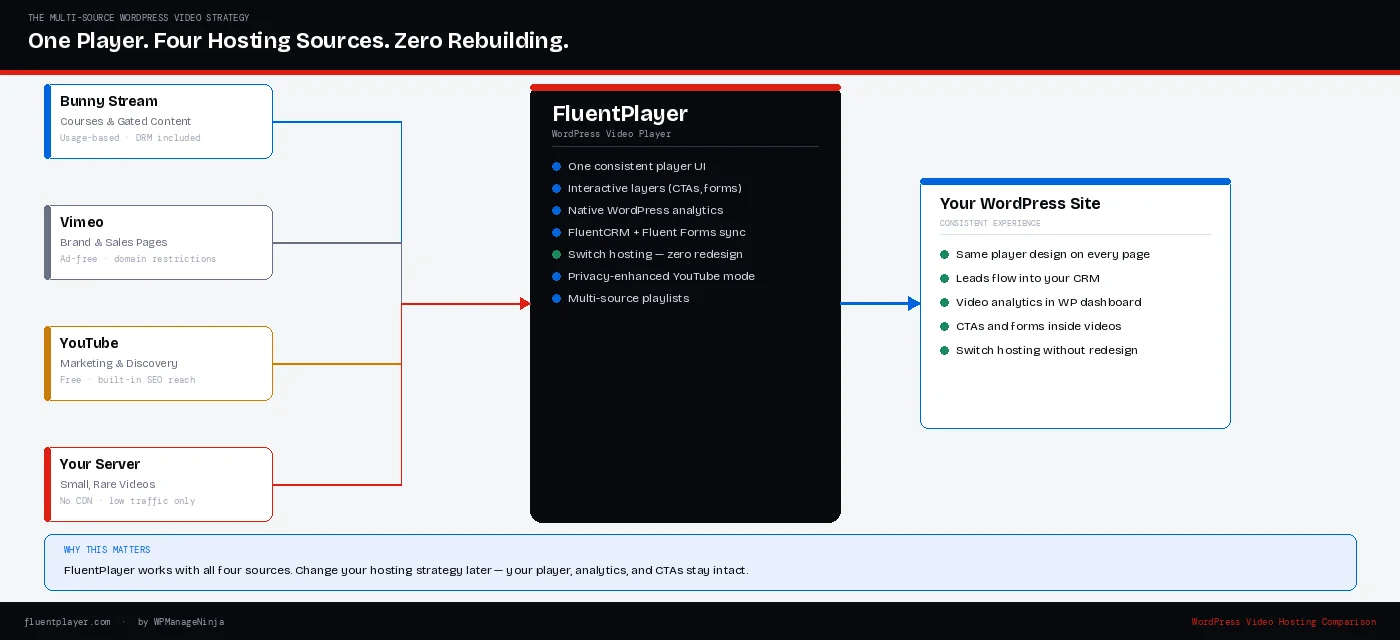
One consistent player experience across your entire video library, with interactive layers, native WordPress analytics, and integrations with FluentCRM and Fluent Forms.
The decision
Four options for WordPress video hosting. None of them is wrong in the right context. All of them are wrong in the wrong context.
Bunny Stream is the infrastructure layer that makes everything else cheaper – use it when every dollar needs to do work.
Vimeo is the reasonable default when you need clean and professional with no setup overhead.
YouTube is not a compromise for discovery-focused content; it is the correct tool.
And self-hosting is fine for a low-traffic page that rarely changes; do not over-engineer it. The mistake most WordPress site owners make is defaulting to one platform for everything without modeling how that decision performs at the scale they are building toward. Pick the hosting layer that fits your use case today and can absorb the growth you are planning for tomorrow.
Or, use WordPress media player like FluentPlayer that supports all four hosting in one settings. That is the decision.
FluentPlayer: Better control over videos

This is Sumit. He’s a physics major who’s trying to understand both the physical as well as the WordPress worlds. Whenever he’s not busy, plays fifa or spends time with his family.
Leave a Reply