
FluentPlayer vs Easy Video Player: Simplified Solutions for WordPress Video Embedding
Most WordPress video plugins answer one question: Does it play? If you’re running a course, a funnel, or a product site, that stopped being enough long ago. Now the real question is: Does this video actually do something for my business?
That’s where the comparison between FluentPlayer and Easy Video Player gets interesting. These two plugins come from very different schools of thought about what a WordPress video player is for. Easy Video Player has been around for years and does exactly what it says on the tin. FluentPlayer is a newer plugin built around the idea that video is an asset, not just a media file.
In this article, I walk through both plugins to show you an honest comparison. By the end, you’ll have a clear sense of which one best fits your exact needs.
Two plugins, two philosophies: a quick overview
Before getting into the details, here’s a quick side-by-side comparison:
| Feature | FluentPlayer | Easy Video Player |
| Lead Capture | Yes (in-video forms via Interactive Layer) | No |
| Analytics | Built-in viewer analytics | No |
| FluentCRM Integration | Yes (native) | No |
| Chapters | Yes | No |
| Setup Complexity | Simple | Simple |
| Hosting Support | YouTube, Vimeo, Bunny Stream, self-hosted, and more | Self-hosted MP4 and direct links |
| Free Plan | Yes | Yes |
Both plugins handle video on WordPress. What separates them is how much they handle and why.
Why use a video player plugin: practical benefits
Before comparing features, it’s worth stepping back to consider why you’re adding a video player plugin to WordPress in the first place. The answer shapes which plugin you actually need.
WordPress’s native video block works for basic use cases. But once you care about any of the following, you’re in plugin territory:
Your player, your brand
Your videos live on your website. A video player plugin lets you control how they’re presented, which logo or watermark shows up, and what the player looks like. Easy Video Player keeps it clean and neutral. FluentPlayer is designed to let you brand the experience fully and make the player feel like part of your site, not an embedded foreign object.
Video play control
The moment you start exploring video chapters, resume playback, subtitle tracks, or playlist support, a basic embed just doesn’t cut it. Sites with structured content, multiple languages, or returning viewers need a player with real options. The more specific your playback requirements, the more a plugin with genuine controls becomes necessary rather than optional.
Turning views into business results
If your video content is connected to a business goal, you need to know if it’s working. Email captures, click-through rates, drop-off points, conversion tracking. Easy Video Player doesn’t offer any of this. FluentPlayer is built around this exact gap.
Speed vs. features: Knowing the trade-off
Lightweight players load faster and add less to your page weight. Feature-rich players give you more tools but require thoughtful configuration. Neither is universally better. It depends on what you’re building.
Playback: what each plugin actually delivers
Let’s look at how each plugin handles the core playback experience.
Easy Video Player covers the basics well:
- Embeds MP4 videos from self-hosted sources or direct external links
- Responsive player that adapts to mobile screens
- HTML5 video for broad browser compatibility
- Supports poster images (thumbnail before play)
- Autoplay, loop, and muted options via shortcode parameters
- Shortcode-based embedding that works in classic and block editors
- Optional MediaElement skin for a different player UI
What you get is a clean, reliable player. No surprises, no complexity. If a video needs to be on a page, Easy Video Player puts it there.
FluentPlayer is designed around a broader definition of “playback features”:
- Resume playback so viewers pick up where they left off
- Chapter markers for structured long-form content
- Subtitles and captions (important for accessibility and international audiences)
- Adaptive quality handling depending on the viewer’s connection
- Playlist and multi-video support
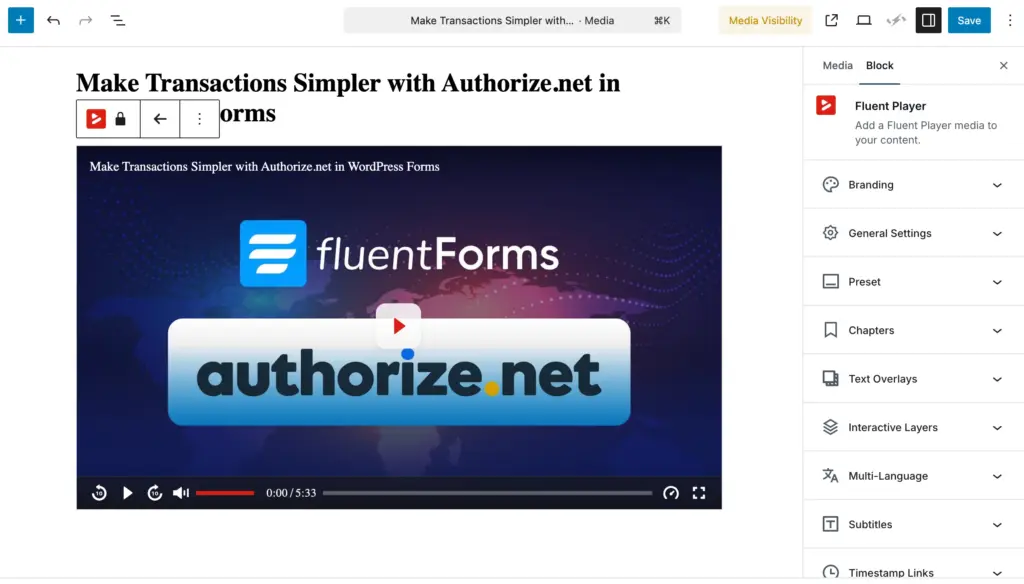
- Interactive Layers: the ability to overlay interactive elements (forms, CTAs, hotspots) at specific timestamps in a video
FluentPlayer’s approach treats each playback feature as a potential engagement touchpoint. Chapters aren’t just navigation aids; they’re signals of where viewers are paying attention. A resume isn’t just convenient; it’s a retention mechanism.
For pure playback reliability with no extras, Easy Video Player delivers. For playback that doubles as a conversion and retention tool, FluentPlayer is built specifically for that.
The obvious gap: Fluent Ecosystem
This is one of the clearest differences between the two plugins.
Easy Video Player is intentionally standalone. It plays video. It doesn’t connect to your CRM, your forms plugin, your email marketing tool, or your analytics dashboard. Add-ons exist for things like User Only Videos and Video Schema, but these are narrow extensions rather than deep integrations with the broader marketing stack.
FluentPlayer is designed as part of the WPManageNinja ecosystem from day one:
- FluentCRM: Video-collected leads go straight into your CRM. Tag, segment, and automate follow-up without exporting or using a third-party connector.
- Fluent Forms: Display any Fluent Forms form inside a video at a timestamp you choose. Capture leads in context, at the moment of closest attention. Sell access to paid content right within the video experience using Fluent Forms payments.
- FluentBooking: Embed a booking calendar directly inside the player. A viewer watching a service demo can book a call without leaving the video.
If you’re already using WPManageNinja tools, FluentPlayer fits into what you’ve built rather than asking you to bolt something new on. If you’re not using those tools, the integration value is lower, but the core playback and analytics features still stand on their own.
Set up and day-to-day experience
Getting it running
Easy Video Player wins on setup simplicity. Install, enable jQuery in the settings, and drop a shortcode. That’s genuinely it. The learning curve is flat. You don’t need to configure anything, read documentation, or make decisions about presets. For a developer spinning up a quick embed or a blogger who just needs a video on a page, this is a real advantage.
FluentPlayer offers a wider range of options, giving you greater control over how your videos appear and perform. Features like preset configuration, player branding, Interactive Layer setup, and CRM connections allow you to tailor the player to your exact needs. This provides you with consistency, ensuring better visual and conversion performance.
What visitors actually see
Easy Video Player delivers a clean, distraction-free player. No ads, no YouTube branding, no unexpected UI elements. The player is unobtrusive, responsive, and consistent. For content where you simply want the viewer to watch without interruption, this is a strong point.
FluentPlayer is designed to be visually polished and customizable, letting you match the player to your site’s design language. The interactive elements (forms, CTAs, chapters) are intended to feel native rather than intrusive. That said, interactive elements, when used without care, can disrupt the viewing experience. The quality of the viewer experience in FluentPlayer will depend heavily on how thoughtfully you set it up.
Matching the right plugin to the right project
FluentPlayer is the right fit if:
FluentPlayer is built for people where video is actively part of a funnel, a course, or a community.
- Online educators and course creators who need chapters, resume playback, content protection, and progress tracking
- Affiliate marketers and bloggers running review content who want to capture emails at the peak engagement moment of a video
- eCommerce site owners using product demos and wanting to drop a booking or purchase action right inside the player
- Community leaders on FluentCommunity who want video experiences that feed directly into CRM automations
- Small and medium businesses where every visitor interaction should be measurable and actionable
- Web developers and agencies building client sites that need more than just playback, particularly clients already in the WPManageNinja ecosystem
If you want to know how many people watched past the halfway mark on your explainer video, or if you want an email form to appear at the 60-second mark when attention is highest, FluentPlayer is built for exactly that.
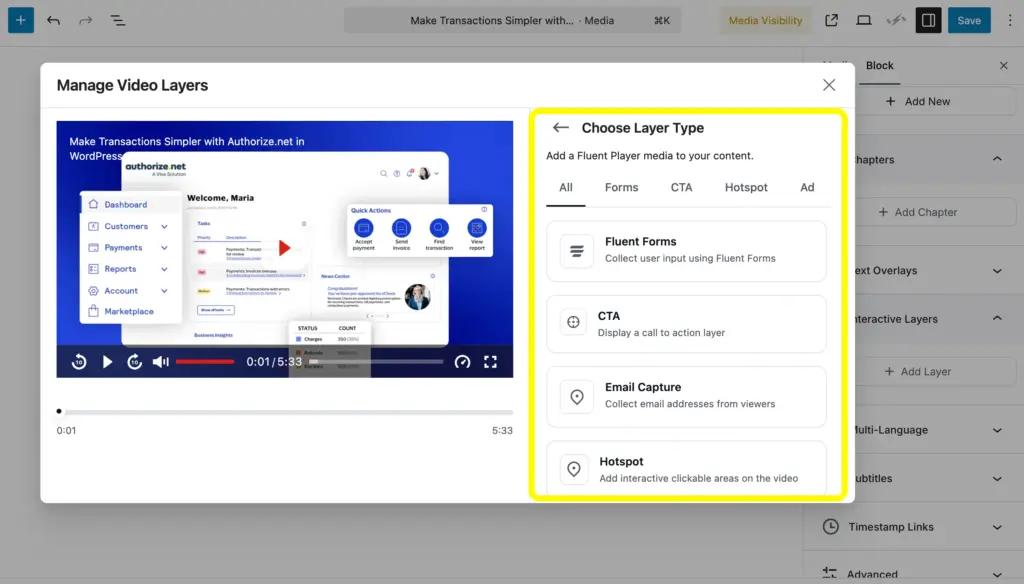
For instance, you can check the interactive layers feature of FluenPlayer. You will get multiple options inside that.
Easy Video Player is the right fit if:
Easy Video Player is a strong choice when simplicity genuinely serves your needs:
- Developers and agencies who need a lightweight, zero-fuss player for client sites where video is supplementary, not central
- Bloggers and content writers who embed the occasional video post and don’t need analytics or lead capture around it
- WordPress enthusiasts experimenting or building simple sites who don’t want to deal with configuration overhead
- Anyone with a straightforward self-hosted video who just needs an HTML5 player that works cleanly across devices
Not every project needs more. For those who don’t, Easy Video Player is exactly enough.
Where both FluentPlayer and Easy Video Player fit
There’s a real middle ground where both plugins could work, depending on your priorities:
- Motion graphics designers and video editors publishing portfolio content who care about clean presentation but may not need lead capture features yet
- Influencers and content creators in the early stages who want reliable embedding now and may want to upgrade to a feature-rich tool as their audience grows
- WordPress developers are evaluating options for a client who has basic needs today, but may evolve
In these cases, Easy Video Player does the basic video embedding task, while FluentPlayer becomes the logical next step as your needs grow.
| Scenario | Recommended plugin |
| Quick embed, no extras needed | Easy Video Player |
| Course or membership site with protected content | FluentPlayer |
| Email capture or lead gen from video | FluentPlayer |
| Portfolio or personal blog | both |
| WPManageNinja ecosystem user | FluentPlayer |
| Lightweight client site | Easy Video Player |
| eCommerce with product video strategy | FluentPlayer |
| Agency project with complex video needs | FluentPlayer |
The bottom line
There’s no universal answer here, and any comparison article that pretends there is one isn’t being straight with you.
If you’re managing video as part of a marketing, education, or lead-gen workflow, FluentPlayer is built with your use case at the center. Both a free and a pro version will be available soon, so you can start without a budget commitment and upgrade when you need the full toolkit.
If you need a reliable, no-overhead video embed right now, Easy Video Player is a genuinely solid choice. It’s been around for years, it’s actively maintained, it’s free, and it does what it promises without asking much of you.
{Wait list}

Hi, this is Aparup. I am a Literature postgraduate, mixing my creative thoughts with my experience in the tech industry to surpass AI. Professionally, I am a content marketer seeking solutions to users’ problems regarding WordPress.
Leave a Reply