
FluentPlayer vs Vimeo: Which One Is Right for Your WordPress Site?
If you run a WordPress site and you want video to do more than just play, you have probably run into the limits of Vimeo at some point.
Vimeo is a solid platform. Clean delivery, polished player, reliable infrastructure. I am not going to pretend otherwise. But if your videos are supposed to support a funnel – capture leads, push a CTA, trigger a booking, feed your CRM – Vimeo was not built for that. And no amount of workarounds fully closes that gap.
That is where FluentPlayer enters the picture. It is a WordPress-native video player plugin, not a hosting platform. It does not compete with Vimeo on hosting. It competes with the experience your viewers have after the video starts playing.
In this comparison, I break down where the two overlap, where they diverge, and which one actually fits what you are trying to do.
TL;DR
- Vimeo is a hosted video platform – great for clean delivery, reliable infrastructure, and a polished default player, but pricing scales with your library and deeper marketing tools sit on higher tiers.
- It handles hosting and playback well, but advanced in-video interactivity and WordPress-native funnel integration are limited on standard plans.
- FluentPlayer is a WordPress-native video player plugin, not a hosting service. It connects to Vimeo, YouTube, Bunny Stream, HLS, or self-hosted videos and adds interactive layers, in-player lead capture, CRM sync, and native WordPress analytics.
- Vimeo suits teams that want fully managed hosting with minimal setup and do not need deep on-site conversion behavior.
- FluentPlayer suits as a great alternative to Vimeo for WordPress teams who want video to act as a conversion tool, integrate directly with their CRM and forms, and avoid long-term lock-in to a single hosting vendor.
Why WordPress users start looking beyond Vimeo
Vimeo is popular for good reasons. But in practice, WordPress site owners run into a consistent set of friction points:
Recurring costs that scale with your library. Vimeo charges by plan tier, and as your video library grows, so does the cost. If you are managing dozens of videos across multiple campaigns, the subscription adds up faster than you expect.
Player control is locked behind plan tiers. On standard plans, your ability to customize the player experience is limited. More branding control, more advanced settings – those unlock at higher price points.
No native WordPress integration. Vimeo embeds via iframe. Your video analytics stay in Vimeo’s dashboard, not WordPress. Connecting viewer behavior to your CRM or form tool requires third-party connectors or manual exports. Nothing about it feels native to the platform you are building on.
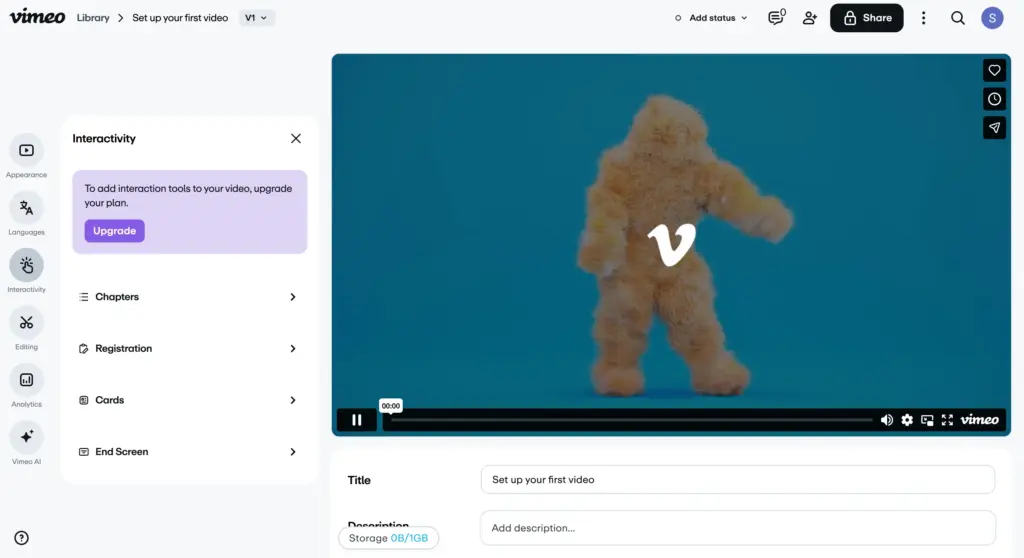
Marketing tools are enterprise-only. In-player CTAs, lead capture, timestamp-triggered interactions – these exist in Vimeo, but not on the plans most creators and small teams actually use.
None of these are dealbreakers on their own. But if you are building a video-driven funnel on WordPress, they add up.
What keeps Vimeo popular
To be fair, there is a reason Vimeo has a loyal user base. I found several things genuinely worth acknowledging.
Strengths:
- Clean, ad-free player with a polished default experience
- Strong delivery infrastructure with adaptive streaming and global CDN
- Privacy controls that give you real control over who can embed and view
- Reliable hosting with no bandwidth surprises if you are on the right plan
- Well-known brand that clients and stakeholders recognize and trust
Pricing (billed monthly, annual plans available):
- Starter: $12 per month
- Standard: $25 per month
- Advanced: $75 per month
Every plan includes hosting and playback. Higher tiers unlock more storage, analytics depth, and player customization. If you want Vimeo’s marketing tools, you are looking at the enterprise tier – that conversation starts well above the standard plan range.
If your primary need is reliable video hosting with a clean player and you do not need WordPress-native conversion behavior, Vimeo is a genuinely reasonable choice. It does that job well.
FluentPlayer: A WordPress-native alternative
FluentPlayer is not a video hosting platform. It does not store your videos. What it does is control how video behaves inside your WordPress environment.
You bring the video source. That can be Vimeo, YouTube, Bunny Stream, a self-hosted file, or an HLS stream. FluentPlayer wraps that source with a customizable player, adds interactive layers, and connects the whole experience to your WordPress stack.
I have worked with it across different setups, and the clearest thing I can say is this: FluentPlayer is built for WordPress teams who want video to participate in their funnel, not just sit on a page.
What makes FluentPlayer stand out:
- Supports Vimeo, YouTube, Bunny Stream, self-hosted, and HLS sources under one player
- Six interactive layer types: Forms, CTA, Hotspot, Ad, Email Capture, and Shortcode
- Native integrations with FluentCRM, FluentCommunity, Fluent Forms, and FluentBooking
- Lead capture inside the player with CSV/JSON export and CRM sync
- Video analytics tracked inside WordPress, not a separate dashboard
- Playlist layouts with sidebar and grid options, full typography control
- YouTube Privacy-Enhanced Mode supported
- Custom JavaScript support
Pricing: FluentPlayer is currently in development with a freemium model planned at launch. A free tier will be available, with a paid tier for advanced features including interactive layers and integrations. Exact pricing is not confirmed yet.
The structural difference worth noting- Vimeo bundles hosting and player into one recurring cost. FluentPlayer separates them. If you pair FluentPlayer with Bunny Stream for hosting, your total cost typically comes in below a mid-tier Vimeo plan, with more control over what you are paying for.
Stay updated on free vs. pro, pricing & beta.
Feature overview
|
Feature |
Vimeo |
FluentPlayer |
|---|---|---|
|
Video hosting |
Yes (cloud-hosted platform) |
No – player layer only; connects to your chosen source |
|
Supported video sources |
Vimeo-hosted library |
Vimeo, YouTube, Bunny Stream, HLS, self-hosted |
|
Interactive layers |
Basic interactivity (CTAs, end screens); advanced tools on higher-tier plans |
6 types: Forms, CTA, Hotspot, Ad, Email Capture, Shortcode |
|
In-player lead capture |
Available on Advanced plans |
Yes – CSV/JSON export + CRM sync |
|
Native WordPress analytics |
No – analytics available in Vimeo dashboard |
Yes – engagement tracked inside WordPress |
|
FluentCRM integration |
No native integration (requires third-party automation) |
Yes – native integration |
|
Fluent Forms integration |
No native integration |
Yes – mid-video form overlays + payment support |
|
FluentBooking integration |
No |
Yes – booking calendar inside video via short code layer |
|
Custom JavaScript control |
Limited via Player SDK/API (no direct UI script injection) |
Yes – custom JavaScript support |
|
Playlist layouts |
Available via Showcase/collections (limited embed layout control) |
Sidebar and Grid layouts with typography control |
|
YouTube Privacy-Enhanced Mode |
Not applicable (Vimeo does not embed YouTube) |
Yes |
|
Branding (logo, colors, styling) |
Customization varies by plan |
Yes – plus logo URL and custom positioning |
|
WordPress-native plugin |
No – embed-based workflow |
Yes – full WordPress plugin integration |
Where the features diverge
Both Vimeo and FluentPlayer offer branded players, video controls, and analytics. The gap shows up in three areas: interactivity, ecosystem integration, and hosting flexibility.
Interactivity
Vimeo’s player is clean and passive. On non-enterprise plans, in-player marketing tools are limited. You watch. That is the end of it.
FluentPlayer offers six interactive layer types: Forms, CTA, Hotspot, Ad, Email Capture, and Shortcode. Each triggers at a specific timestamp, can be styled independently, and is configured to drive an action. Your video becomes a conversion surface, not just a media file.
Ecosystem integration
Vimeo is a standalone platform. Connecting it to your WordPress CRM or form tool requires third-party connectors or manual exports. Nothing is native. Everything needs stitching.
FluentPlayer is built by WPManageNinja – the same team behind FluentCRM, Fluent Forms, FluentBooking, and FluentCommunity. These integrations are native. An email captured inside a video goes directly to your CRM. A form shown mid-video can process payments. A booking calendar can appear inside a video and accept appointments without the viewer leaving the page.
Hosting flexibility
With Vimeo, hosting and player are bundled under a single recurring plan. Usage grows, costs grow. You do not really get to separate those two things.
FluentPlayer separates them by design. You choose your hosting source. If your strategy changes – if Bunny Stream makes more cost sense than Vimeo for new content – your player setup does not have to change with it.
Feature-by-feature breakdown
Video playback and quality
Vimeo’s delivery infrastructure is genuinely strong. Adaptive streaming, global CDN, reliable uptime. If raw delivery quality is the main requirement, Vimeo holds up well. This is where it earns its reputation.
FluentPlayer’s playback quality depends entirely on the source you connect. That is an honest tradeoff. Pair it with Bunny Stream and you get competitive global CDN delivery.
Connect it to Vimeo and you keep Vimeo’s delivery quality while gaining FluentPlayer’s interaction and branding layer on top. The quality ceiling is set by your hosting choice, not by the player itself.
Player customization and branding
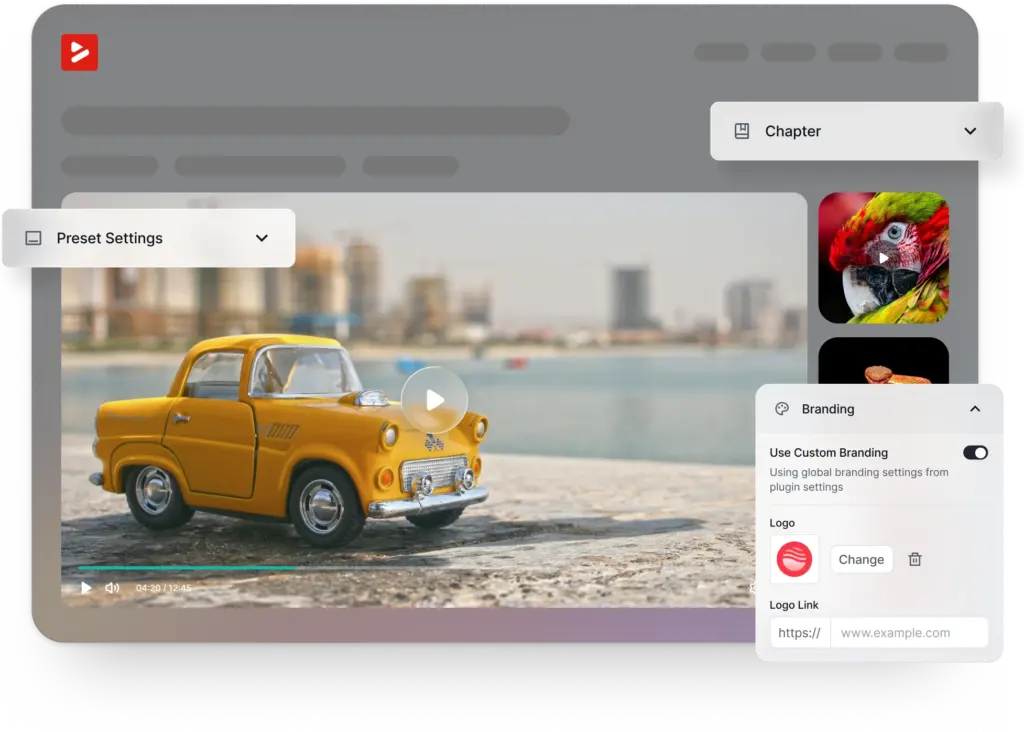
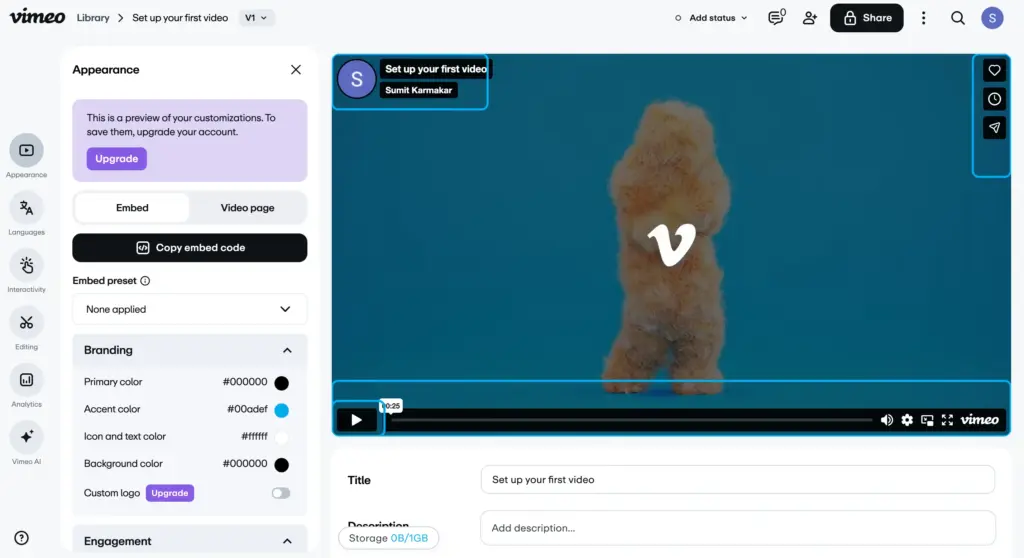
Both products let you brand the player. Vimeo’s depth here depends on your plan. Basic controls are available at lower tiers, more options open up at higher ones. It is functional, but the upgrade path for design control feels like it should not require a plan jump.
FluentPlayer gives you multiple skins, full color and logo control, logo URL positioning, and custom CSS support.
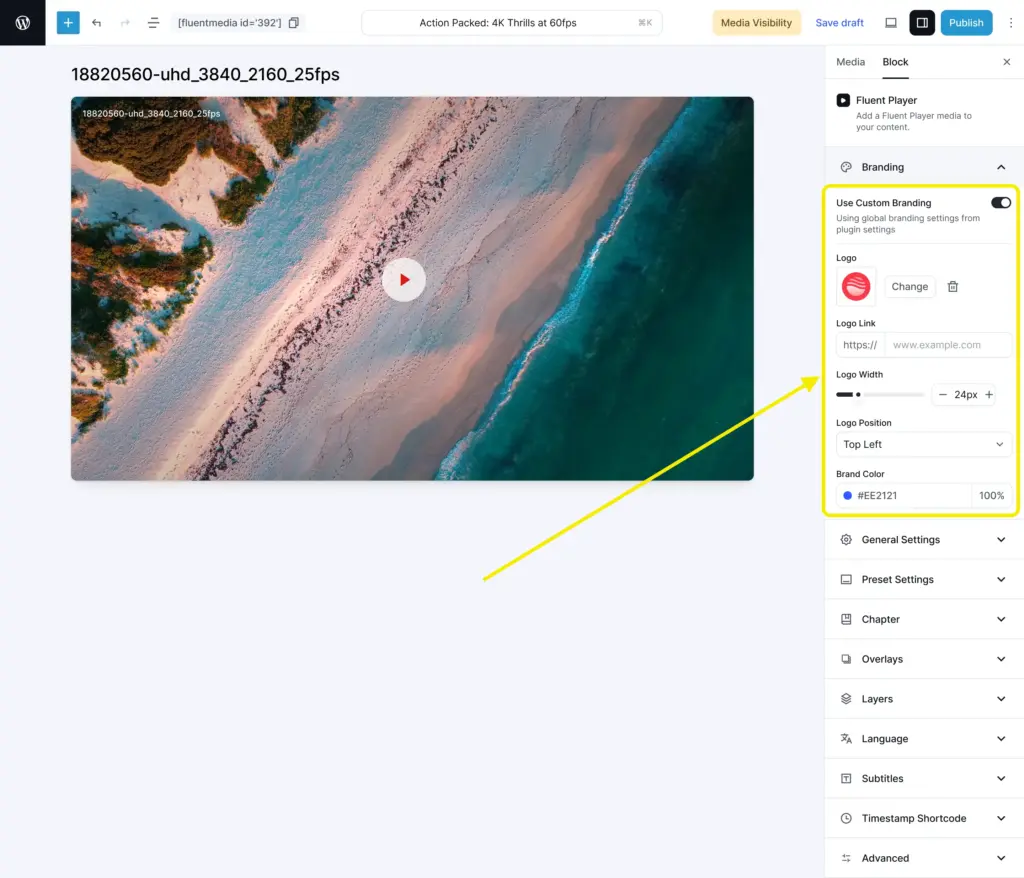
You can match the player to a sales page, a course lesson, or a product demo without being locked to a single visual style or waiting for a plan upgrade.
In-video interactivity
This is the largest functional gap in the comparison, and it is worth being direct about it.
Vimeo’s standard player plays video. Timestamp-triggered overlays, CTA layers, and form embeds are not part of the standard product. They exist in Vimeo’s enterprise tier, but that is a different budget conversation.
FluentPlayer was built specifically for this. Interactive Layers let you place a form at a specific timestamp, show a CTA button after a key feature is explained, trigger a shortcode, or run an ad overlay mid-video.
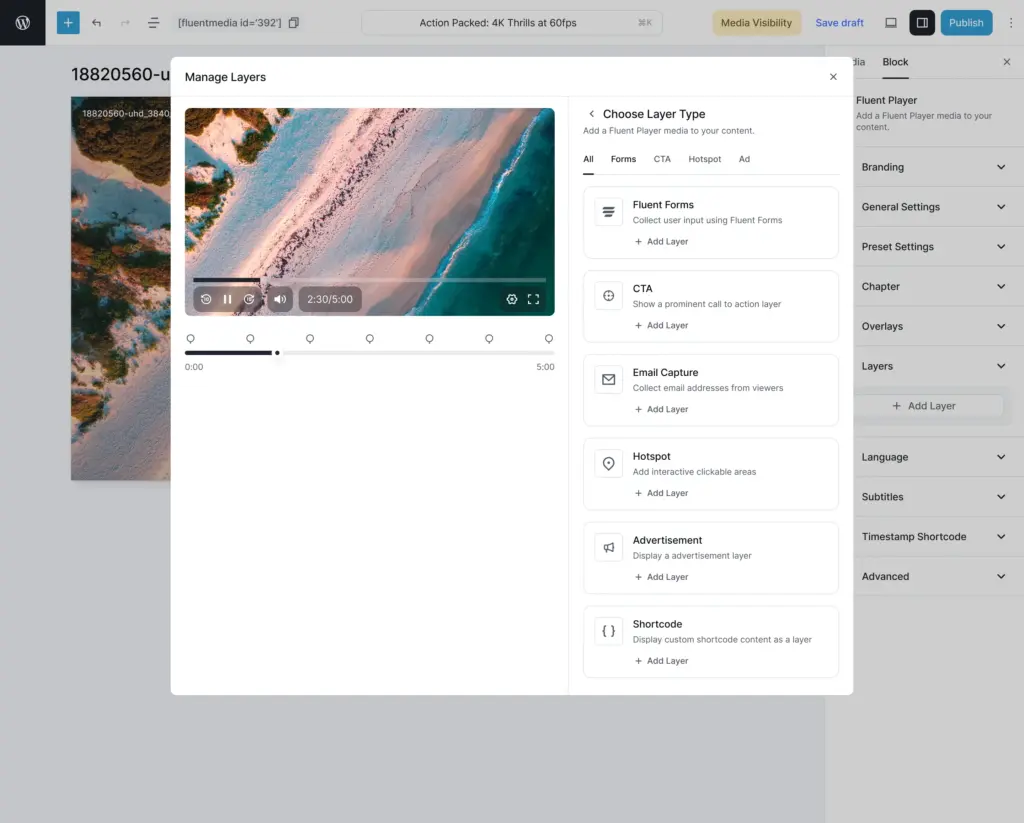
The behavior can be styled independently for each layer. This turns your video from passive content into part of your marketing flow.
Lead capture
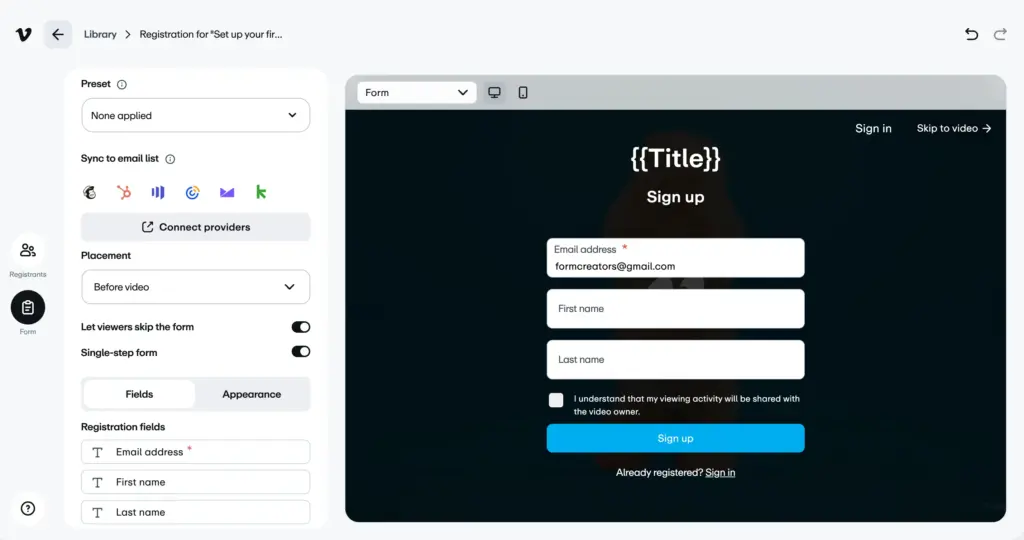
Vimeo does not include in-player email capture on standard plans. If you want a viewer’s email, you are adding a separate form somewhere on the page and hoping they fill it out after watching. That is friction you are adding back manually.
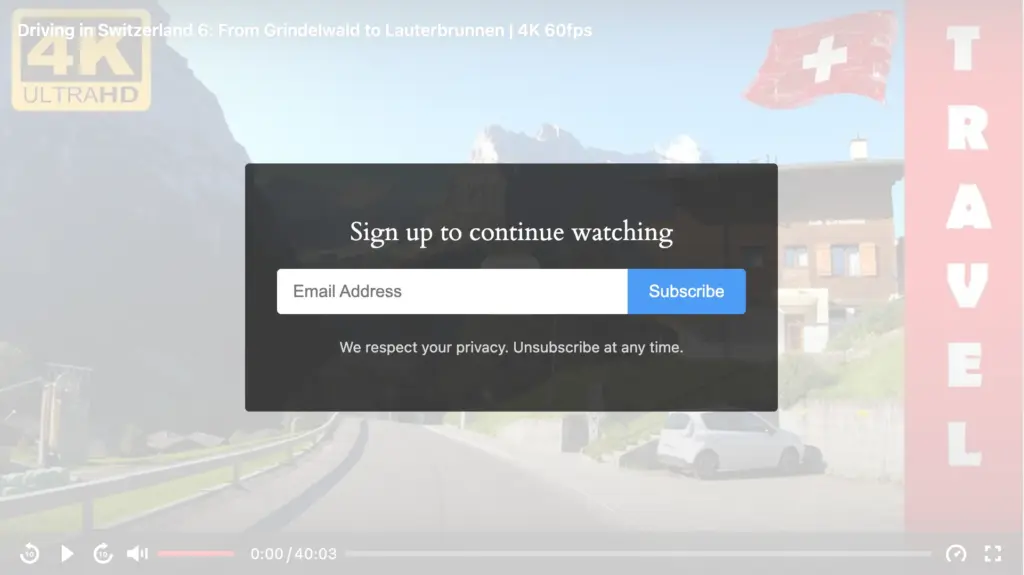
FluentPlayer has lead capture built into the player. You can trigger an email capture overlay at a specific timestamp, export captured leads via CSV or JSON, and sync them directly to FluentCRM. No third-party connectors required.
Analytics
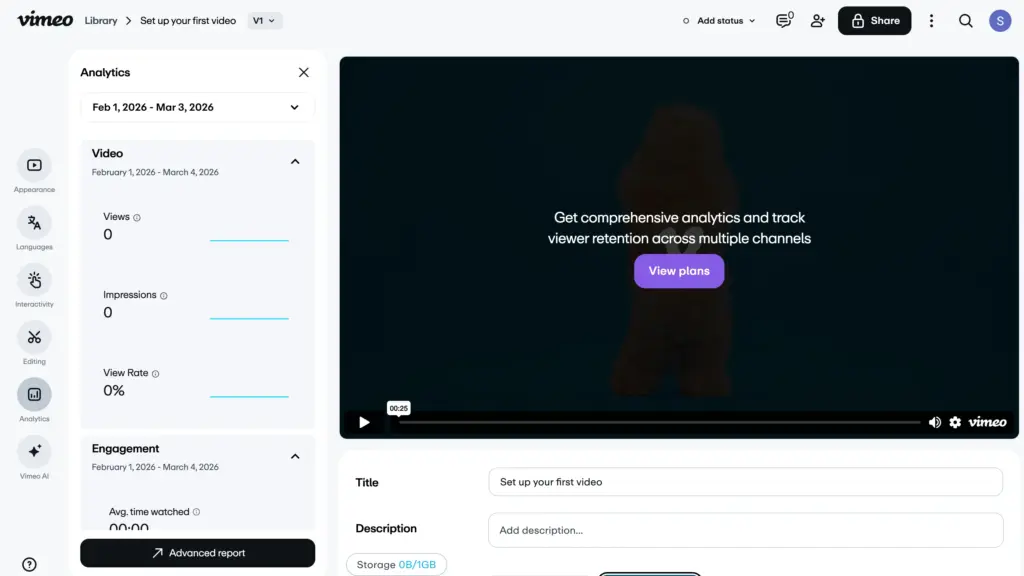
Vimeo’s analytics are solid. Views, plays, engagement data, heatmaps on higher tiers. The information is there. The issue is that it lives in Vimeo’s dashboard, separate from everything else you are tracking.
FluentPlayer tracks video performance inside your WordPress dashboard. You see viewer behavior alongside the rest of your on-site data.
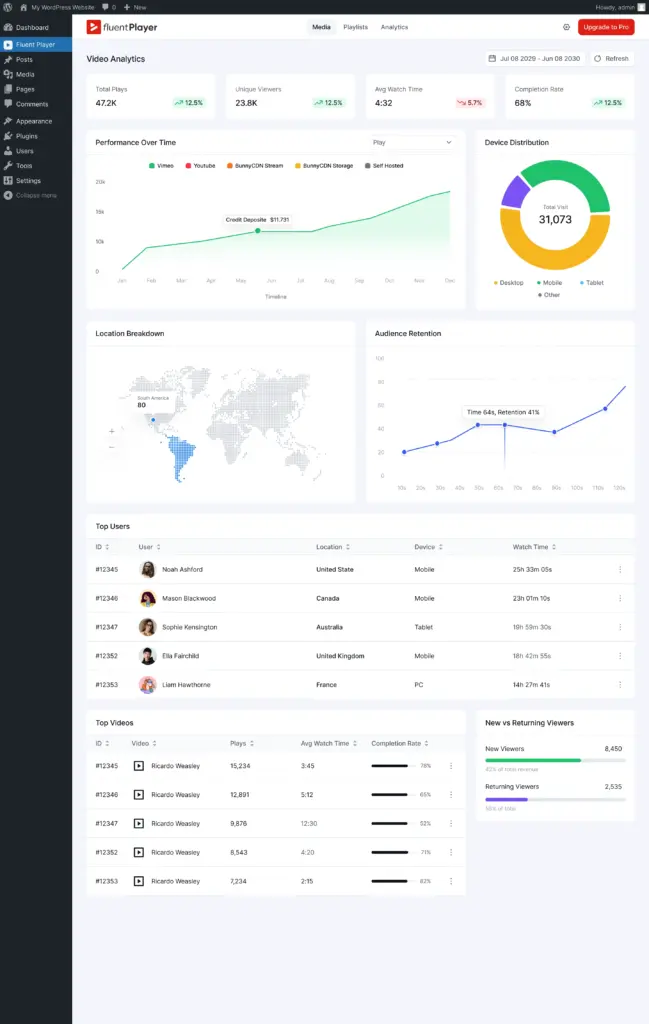
If you are already using WordPress analytics or FluentCRM, keeping everything in one place is a genuine workflow improvement.
Integrations
A video player works best when it connects to the tools you already use. Here is where the difference becomes significant.
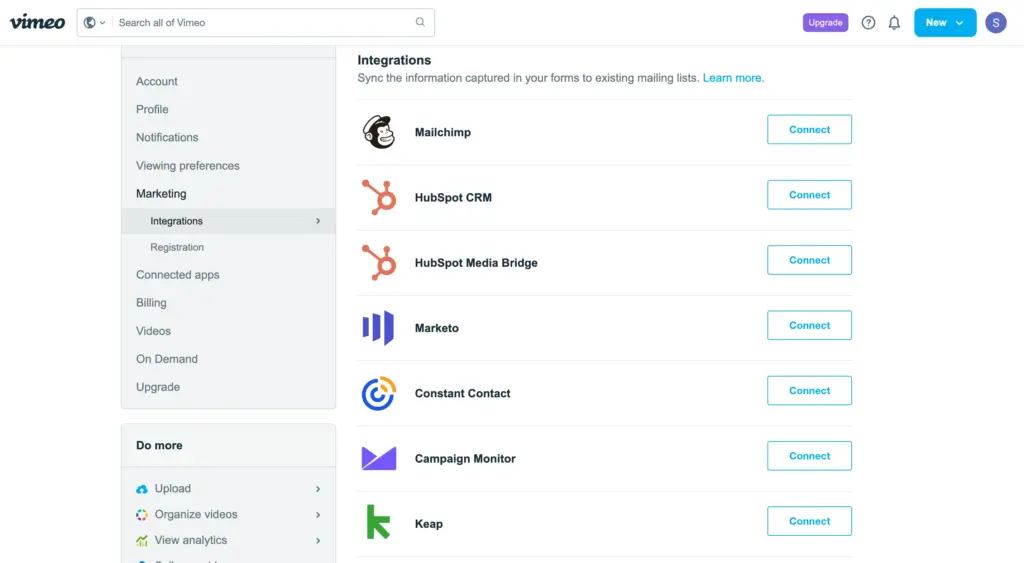
Vimeo integrates with several third-party tools, but the connections are not WordPress-native. Common integrations like Zapier, Mailchimp, and HubSpot are available, but they require external setup and do not sit inside your WordPress workflow.
FluentPlayer takes a different route. It connects directly with the WPManageNinja ecosystem. Because these tools are built and maintained by the same team, the integrations are native and frictionless. No glue code. No patchwork connectors.
FluentCRM integration: Emails collected inside a video are instantly added to your CRM. From there, you can segment, automate, and nurture leads with personalized campaigns.
Fluent Forms integration: You can display a form at any moment in the video timeline. Capture lead data, process payments, or even sell premium content without redirecting users away from the player.
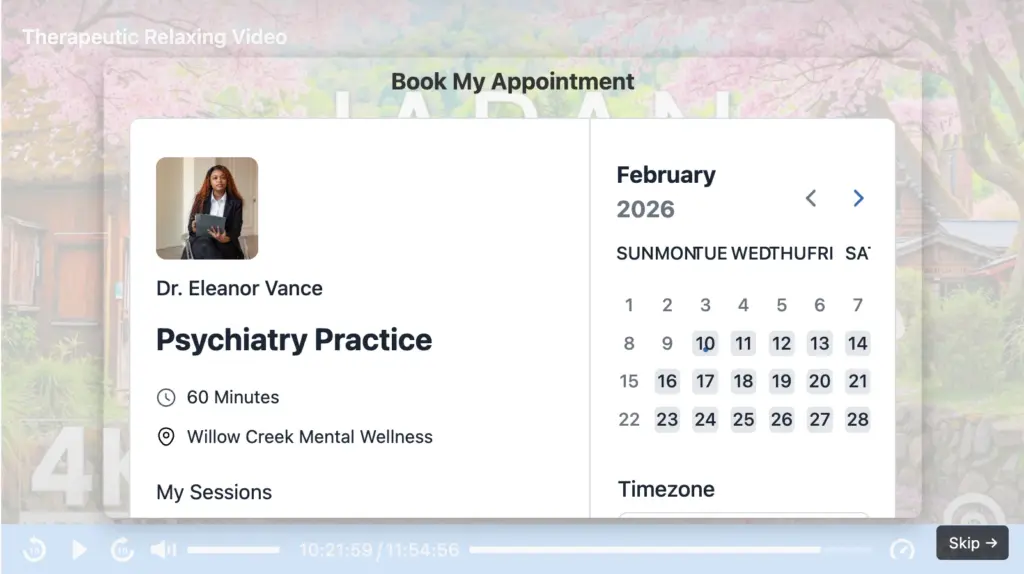
FluentBooking integration: Embed your booking calendar directly inside the video so viewers can schedule a one-on-one or group session while engagement is at its peak.
FluentCommunity integration: Add a call to action that invites viewers into your community space. They can discuss, ask questions, and continue the conversation. You can also embed FluentPlayer media inside your course lessons to keep everything connected.
It is also compatible with Mailchimp, BunnyCDN Stream & Storage.
The bigger idea is automation. Once your flows are configured, video becomes part of your nurturing system. Leads move through forms, bookings, emails, and communities without manual handling. You set it up once, and the system keeps working in the background.
Exclusive features of FluentPlayer
A few capabilities FluentPlayer offers that are not available in this form on standard Vimeo plans.
|
Feature |
Available In |
What It Does |
|---|---|---|
|
In-Player Lead Capture |
Free+Pro |
WordPress-native email capture with CRM sync |
|
FluentBooking Integration |
Pro |
Booking calendar appears inside the video |
|
Playlist Layouts |
Pro |
WordPress-controlled sidebar and grid layouts with typography control |
|
Custom JavaScript |
Pro |
Inject custom scripts within the player environment |
|
Multi-Source Support |
Free + Pro |
One player for Vimeo, YouTube, Bunny Stream, self-hosted, and HLS |
Interactive Layers are the core differentiator. The ability to trigger a form, CTA, or hotspot at a specific timestamp – with independent styling for each – is not something Vimeo offers to standard-plan users. This is what turns a video into a conversion tool.
Multi-Source Support matters more than it sounds. If you ever want to move content off Vimeo, add a YouTube video to the same layout, or test Bunny Stream for cost reasons, you can do all of that without changing your player setup. Your on-site experience stays consistent regardless of where the video actually lives.
Pricing: which one is worth it
Vimeo’s pricing is tied to their hosting infrastructure. The more you use, the more you pay. That is a reasonable model for a hosting platform, but it means your costs scale with your content volume regardless of whether you need the full feature set.
|
Vimeo Plan |
Monthly Cost |
Annual Cost |
|---|
| Starter | $12/mo | ~$144/yr |
| Standard | $25/mo | ~$300/yr |
| Advanced | $75/mo | ~$900/yr |
FluentPlayer is in development with a freemium model at launch. Exact pricing is not confirmed yet, but the model separates player cost from hosting cost. If you pair it with Bunny Stream for hosting, the combined cost typically lands below a mid-tier Vimeo plan.
The structural advantage is this: with Vimeo, your hosting and player costs are permanently linked. With FluentPlayer, you can optimize each layer independently. As your content volume grows, that flexibility tends to pay off.
When Vimeo still makes sense
Vimeo is the right call if:
- You want a fully managed hosting platform with clean delivery and no server setup
- Your videos do not need to capture leads, trigger CTAs, or integrate with WordPress
- You are comfortable with subscription costs scaling as your library grows
- You need a trusted brand for client work or enterprise environments
- Analytics in a dedicated dashboard is fine for your workflow
If those conditions describe your situation, Vimeo will serve you well. I do not think you need to complicate it.
When FluentPlayer is the better fit
FluentPlayer makes more sense if:
- Your videos are part of a sales or lead generation workflow on WordPress
- You need in-video forms, CTAs, or interactive layers without enterprise pricing
- You already use FluentCRM, Fluent Forms, or other WPManageNinja plugins
- You want one consistent player across Vimeo, YouTube, Bunny Stream, and self-hosted content
- You want video analytics inside WordPress, not a separate platform
- You want to reduce long-term dependence on a single hosted video subscription
The smartest stack: Using both together
You do not have to pick one and abandon the other.
Keep your existing Vimeo library as the source. Install FluentPlayer as the player layer on your WordPress pages. Your Vimeo videos stay on Vimeo. FluentPlayer adds the interaction, branding, and native integrations on top.
This gives you an immediate upgrade without touching your hosting setup. You add Interactive Layers, connect video behavior to your funnel, and improve the on-page experience without moving a single file.
From there, you can decide whether future content belongs on Bunny Stream or stays on Vimeo – based on cost and performance, not because you were forced to migrate.
How to make the switch without disrupting your setup
If you are currently on Vimeo and want more control, you do not need to start over.
- Keep your Vimeo hosting exactly as it is
- Install FluentPlayer and pick your 3 to 5 highest-traffic video pages
- Swap in FluentPlayer as the player on those pages with Vimeo as the source
- Add an Interactive Layer CTA or form at a relevant timestamp on each
- Run it for 30 days and compare engagement and lead capture
- If Bunny Stream’s cost makes sense for new content, move forward there while leaving legacy Vimeo links untouched
You improve outcomes first. You optimize hosting economics second. Nothing breaks in the process.
Final verdict
Both Vimeo and FluentPlayer do their jobs well. But they do different jobs, and that is the whole point.
Vimeo is a strong video hosting platform. If your goal is reliable delivery with a clean player and you do not need deep WordPress integration, it is a reasonable long-term choice.
FluentPlayer is the right tool when your WordPress site is part of a real funnel and you want video to participate in it – not just sit on a page and play. It does not replace Vimeo. It adds the conversion layer that Vimeo does not provide.
For most WordPress teams, the move is not to choose one and abandon the other. Keep Vimeo where it works. Use FluentPlayer to take ownership of the on-site experience. You get native integrations, six interactive layer types, and a player that is not tied to any single hosting vendor.
That is a more resilient setup, and it starts without moving a single video file.
Have you tried combining Vimeo with a WordPress-native player layer? Drop your setup in the comments – your experience might help someone else figure out what works for them.
FluentPlayer: Better control over videos

This is Sumit. He’s a physics major who’s trying to understand both the physical as well as the WordPress worlds. Whenever he’s not busy, plays fifa or spends time with his family.
Leave a Reply