
FluentPlayer vs. Presto Player: Which WordPress Video Player Is Right for You
If you’re searching for a WordPress video player plugin, you’ve likely come across Presto Player. It’s quite popular among course creators and content marketers.
But today, I want to introduce you to FluentPlayer. It does everything that Presto Player does, and a few things even better. Built by WPManageNinja, the team behind FluentCRM, Fluent Forms, and FluentSMTP, FluentPlayer is designed to be lightweight, powerful, and flexible.
Here’s the difference in a sentence: Presto Player is built to make video play well. FluentPlayer is built to make video work – capture leads, track engagement, and trigger automations, all without leaving WordPress.
I’ve used both plugins (Presto Player & the beta version of FluentPlayer), comparing everything from video hosting options and customization features to analytics and playlist capabilities. While Presto Player has established itself as a solid solution, FluentPlayer offers fresh approaches worth your attention, especially if you’re looking for a modern, comprehensive alternative.
This comparison covers the subtle differences between Presto Player and FluentPlayer across video sources, branding, interactivity, integrations, and more. Whether you’re building an online course, podcasts, or a membership site, or simply want more control over how videos appear on your WordPress site, this guide will help you make an informed choice.
TL;DR
- FluentPlayer stands out with 6 interactive layer types (Forms, CTA, Hotspot, Ad, Email Capture, Shortcode) compared to Presto Player’s 3 (Email Capture, CTA, Action Bar), making it a stronger lead-generation tool.
- Built by WPManageNinja, FluentPlayer integrates seamlessly with FluentCRM, Fluent Forms, FluentBooking, and FluentCommunity, turning your videos into automated marketing funnels.
- Both Presto Player & FluentPlayer offer native analytics and GA4 integration, plus browser-based progress tracking.
- Both support YouTube, Vimeo, Bunny.net, self-hosted videos, and HLS streaming. However, FluentPlayer adds Privacy-Enhanced Mode for YouTube to prevent tracking until viewers click play.
- FluentPlayer offers more branding flexibility, including logo positioning, clickable logo URLs, and custom JavaScript. Presto Player doesn’t support custom JS.
- Both plugins include player skins, chapters, subtitles, & behavioral controls, but FluentPlayer provides additional load strategies (immediate, after page load) and more granular caption styling.
- FluentPlayer provides advanced playlist customization (grid layout, sidebar, typography, box shadow) that Presto Player lacks. Both plugins let you customize background color, border color & radius, and support “auto-advance to next video.”
Presto Player vs FluentPlayer: at a glance
Before we go into the details, here’s a quick view of how the two plugins compare on the features that matter most. This should give you a general sense of where each plugin stands.
| Feature | Presto Player | FluentPlayer |
|---|---|---|
| Branding | Yes | Yes |
| Presets | Yes | Yes |
| Analytics | Native & GA4 | Native & GA4 |
| Chapters | Yes | Yes |
| Overlays | Yes | Yes |
| Poster image | Yes | Yes |
| Play inline (Mobile) | Yes | Yes |
| Layer | 3 Options | 6 Options |
| Subtitle | Yes | Yes |
| Autoplay | Yes | Yes |
| Playlist | Yes | Yes |
| Appearance Customization | Yes | Yes |
As you can see, both plugins cover the essentials. The differences become clearer when you look at how each feature is implemented and how much flexibility you get. Let’s break it down section by section.
Stay updated on free vs. pro, pricing & beta.
Layers & marketing tools
This is where video players move beyond simple playback and become tools for engagement and conversion.
Overlays
Overlays are elements that appear on top of your video at specific times. Both plugins support video overlays. You can control overlay appearance and behavior, including when they appear, how long they stay visible, and where they’re positioned on the video. You can also add custom texts and URLs. Moreover, FluentPlayer includes an option to display the video title as an overlay, useful for branding or embedding videos without surrounding context.
Interactive layers
Video shouldn’t be passive. If someone’s watching your content, they’re engaged. That’s your moment to collect leads or convert your viewers. And FluentPlayer’s interactive layers make that unbelievably simple.
- Forms (you can collect leads via your Fluent Forms’ forms)
- CTA (let users complete an action, like signing up/visiting a page, etc.)
- Hotspot (an interactive circle with an animated pulse effect that encourages users to click it)
- Ad (you can upload ads at desired points in your video and decide how long users have to wait before clicking “skip”)
- Email Capture (collect users’ email addresses during the video). You can download them (CSV, JSON, ODS) and automatically import them to your CRM contacts.
- Shortcode (display other elements/interactive items via a shortcode)
- Action Bar (a customizable bar that encourages users to take an action)
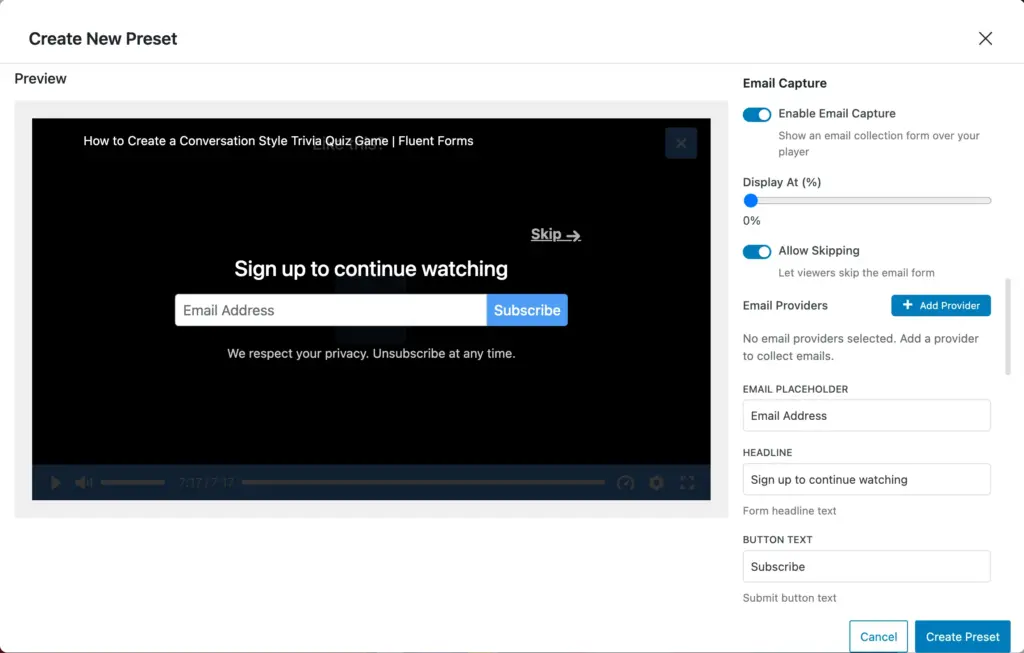
You can determine when the layers appear, how long they stay, style, color, border radius & shadow, redirection URL, position, skip button, background opacity, and more, making your videos the perfect lead-generation tool.
FluentPlayer is nothing if not detail-oriented. It allows you to customize whether CTA links open in a new tab, so you can offer your users a delightful viewing experience.
Presto Player only offers email capture, CTA, and an action bar. They offer customization flexibility as well. These might be enough to collect leads, but the more the merrier, right?
Ecosystem advantage
Integrations help you automate your workflow. It saves you time and effort by removing manual sorting. Presto Player offers integrations with LMS and membership plugins, page builders, CRM tools, and so on.
FluentPlayer comes with the powerful WPManageNinja ecosystem. Since the plugins are created and managed by the same developers, they integrate seamlessly. Let’s see how:
FluentCRM integration: The emails you collect from your videos directly get sent to your CRM contacts, and you can segment and nurture your leads with personalized emails.
Fluent Forms integration: You can display a form at any point during a video and collect lead information. As Fluent Forms has payment features, you can also sell paid courses or premium content via Fluent Forms right in the middle of a video.
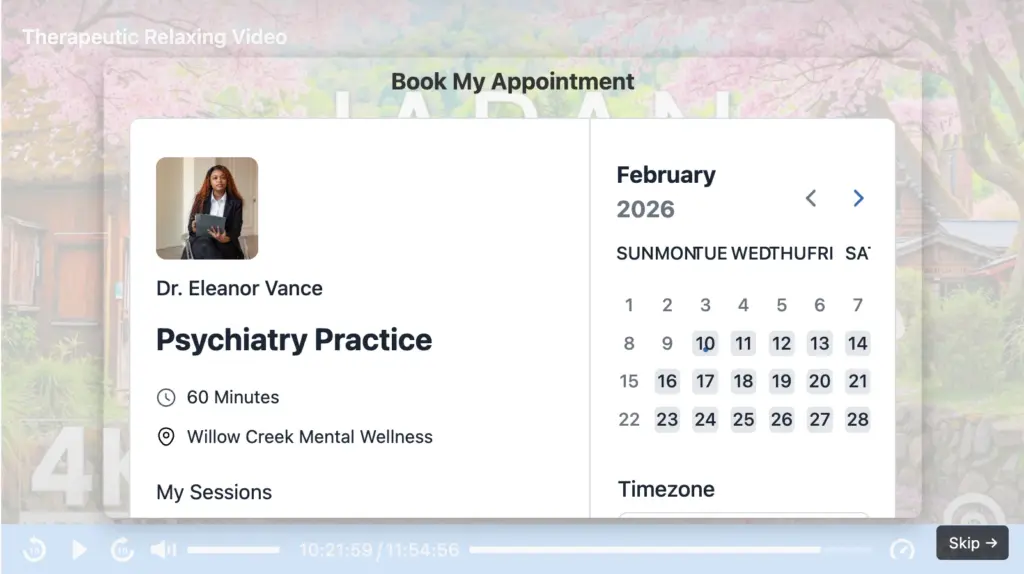
FluentBooking integration: You can show your custom calendar during a video so viewers can book a one-on-one/group session with you.
FluentCommunity integration: Use a call to action to allow viewers to join your community, where they can have discussions, ask questions, chat, and more. You can also add your FluentPlayer media to your course lessons.
These are only a few. With FluentPlayer, you get endless opportunities to nurture & convert leads, all without requiring any manual processing. All you have to do is set it up once, and your sales will multiply automatically.
Video hosting, branding & player features
So far, we’ve focused on what makes FluentPlayer stand out – the ecosystem integration & interactive layers. But what about the basics? Video hosting compatibility, branding options, player controls – the features you expect any solid video player to handle. Well, both players handle them well & we’ll cover those in this section.
Video sources: Both plugins support YouTube, Vimeo, Bunny.net, self-hosted videos, and HLS streaming. FluentPlayer adds Privacy-Enhanced Mode for YouTube (no tracking until the viewer clicks play) and integrates with both BunnyCDN Stream and Storage.
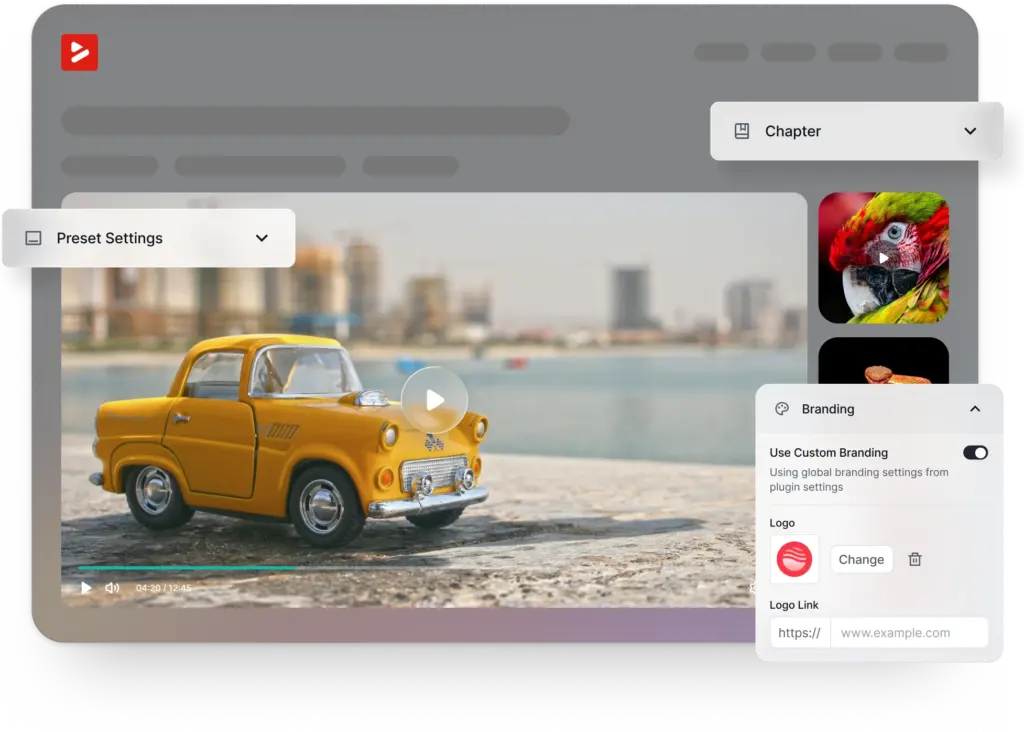
Branding: Both offer logo upload, brand colors, and custom CSS. FluentPlayer adds logo positioning, clickable logo URLs, and custom JavaScript support.
Player controls: Both cover the essentials – progress bar, play/pause, volume, speed, fullscreen, picture-in-picture, captions. FluentPlayer includes a settings menu and additional load strategies (immediate, after page load, lazy load).
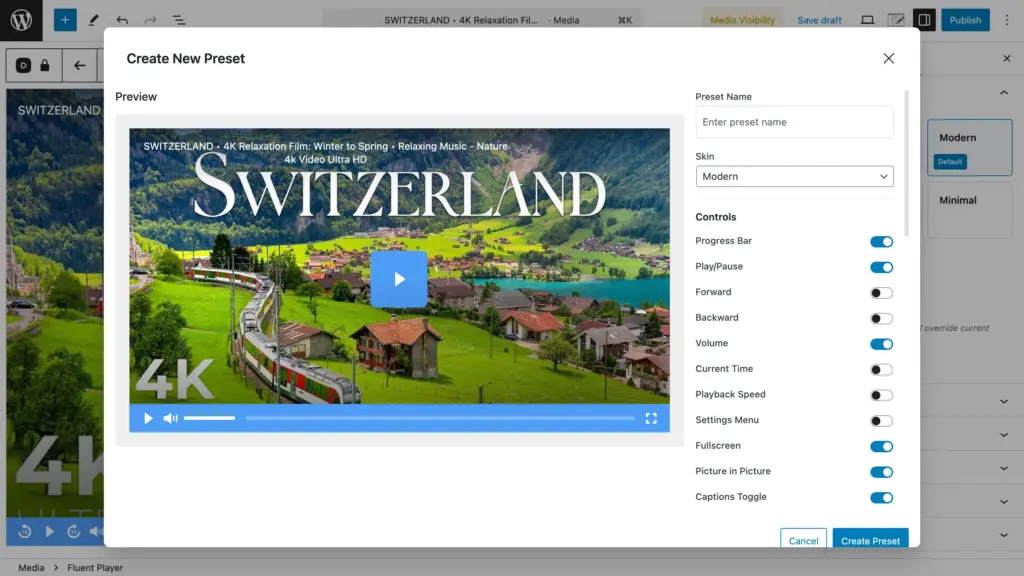
Chapters & subtitles: Both support chapters for navigation and multi-language subtitles. FluentPlayer offers more granular caption styling (font size, colors, background).
You won’t be disappointed by either plugin when it comes to these fundamentals. Both handle the core video player responsibilities competently, with subtle differences. If your priority is a clean, customizable player that works with your preferred video host, either will do the job.
Analytics & tracking
Understanding how viewers interact with your videos helps you improve content and optimize for engagement. Both Presto Player & FluentPlayer offer Google Analytics integration.
More importantly, they come with native analytics, meaning video plays and progress are tracked within WordPress itself, without the need for external tools. You see the number of total plays and viewers, average watch time, completion rate, and more.
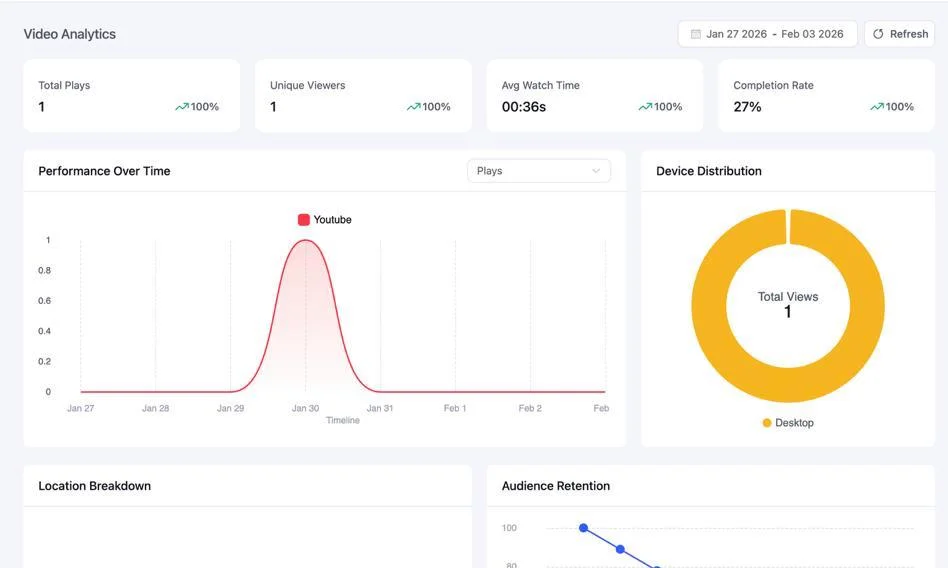
FluentPlayer also features browser progress tracking, which remembers viewer progress across sessions (useful for non-logged-in visitors).
Playlist features
If you’re displaying multiple videos together (like a course curriculum or video series), playlist features matter. With a playlist, users can easily watch related videos sequentially, which makes learning simple.
The FluentPlayer playlist offers multiple Layout Options:
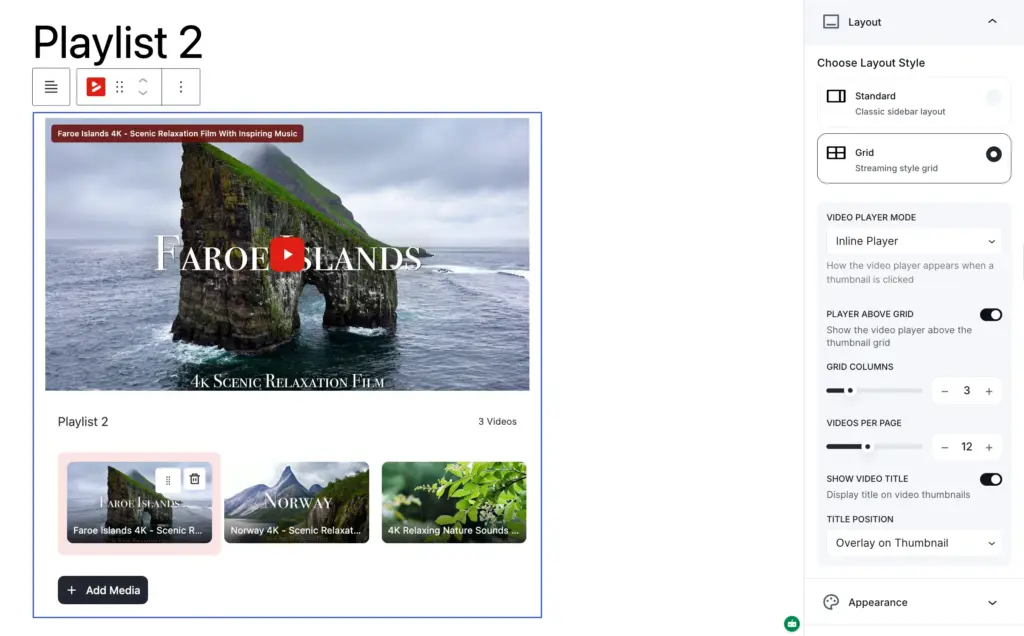
- Standard/Sidebar: Classic vertical list (Playlist displayed beside the video)
- Grid: Videos arranged in columns (you control the number of columns and items per page)
Moreover, FluentPlayer lets you create playlists that match your site’s design perfectly. You can customize various appearance elements, including:
- Playlist title
- Background color
- Border color, width, and radius
- Brand color
- Text color
- Typography settings
- Box shadow
Presto Player only has the sidebar layout, and you can’t display the preview (thumbnail) for the videos next in the queue. However, you can customize the playlist title, playlist items, text, background, highlight, and border color, and set a custom border radius.
Both players offer the “auto-advance to next video” feature, which is great for creating an effortless user experience. While FluentPlayer offers a comfortable transition time (preset) between the videos, Presto Player lets you customize the transition duration.
FluentPlayer vs. Presto Player: who is right for you
Both plugins are capable video players, but they’re built with different priorities in mind. Your choice depends on what you need most from your video experience.
Choose Presto Player if:
- You need a video player right now (FluentPlayer is launching soon)
- Dynamic watermarks for content protection are a must-have
- Searchable captions are critical for your educational content
- You’re already using Presto, and it’s working fine
Choose FluentPlayer if:
- You want videos that can automate your workflow, without manual exports or third-party connectors.
- You want interactive layers (forms, hotspots, CTAs, ads) to turn viewers into leads
- Native analytics matter more than relying on external tools
- You’re already using FluentCRM, Fluent Forms, or other WPManageNinja products
- Playlist customization and layout options are important to you
- You prefer privacy-first YouTube embeds
- You want the flexibility of custom JavaScript for advanced use cases
At the end of the day, the best plugin is the one that fits your workflow. If you just need clean video playback, either will do the job. But if you want your videos to actively contribute to your marketing and lead generation, FluentPlayer gives you more tools to make that happen.
Make user experience smooth with the right player
Presto Player is a solid video player that’s served WordPress users well, and if it’s already working for you, there’s no urgent reason to switch.
But if you’re exploring options for the first time, or you’ve been wishing your video player could do more than just play files, FluentPlayer takes the right approach: video as a business asset, not just a media embed.
With interactive layers, native analytics, and seamless integration with the WPManageNinja ecosystem, you can capture leads, track engagement, and automate follow-ups effortlessly with simple one-time set-ups.
Are you intrigued? Because FluentPlayer is launching soon. So, join the waitlist to stay updated on the free vs pro features, pricing, and beta release before anyone else.
FluentPlayer: Better control over videos

Sarika writes for FluentPlayer and loves to offer marketing insights to online businesses. She’s curious and enjoys discussing ideas, interests, & perspectives. In her free time, she’s exploring art & culture or relishing comfort food.
Leave a Reply